How to Build an Agentic OS for Claude Code Efficiency
TL;DR
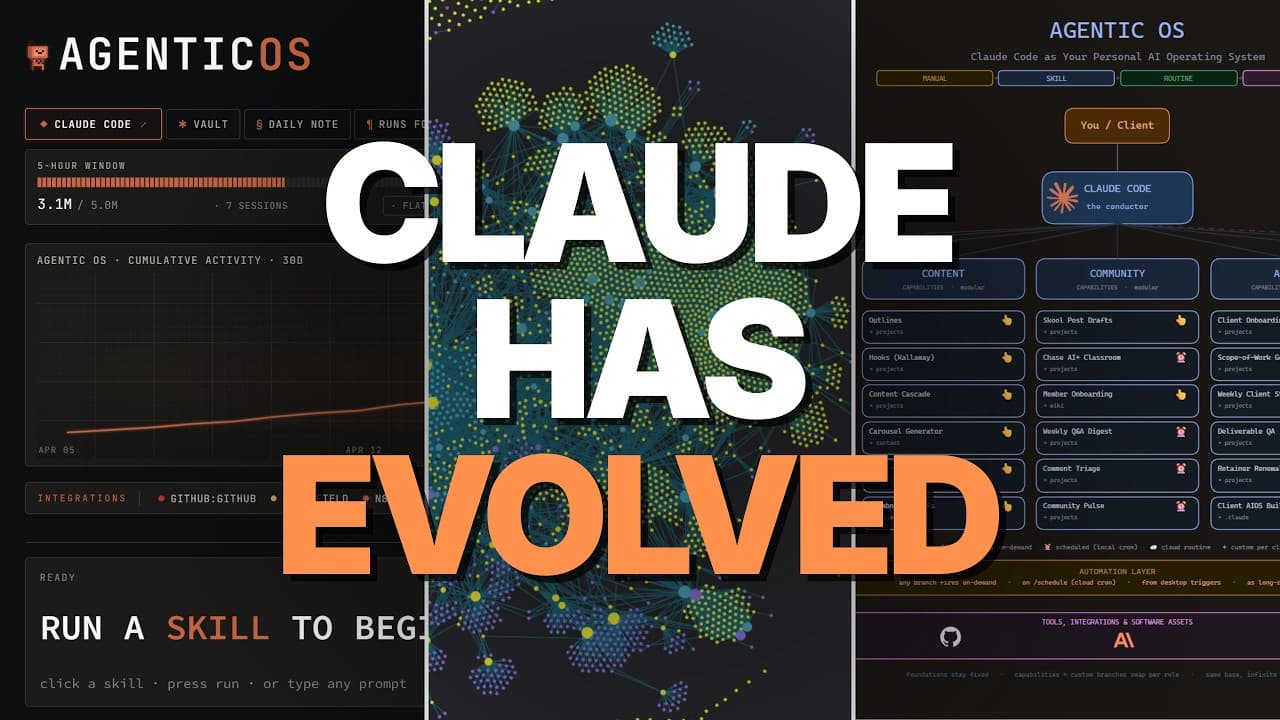
Using an agentic OS with Claude Code transforms random prompts into structured, optimized workflows. By converting tasks into skills and automations, and wrapping them in a memory and observability layer, users can enhance productivity and share systems with team members or clients. This approach provides a systematic way to codify daily activities, enabling efficient tracking and optimization.
Transcript
Most people use cloud code like a slot machine. They're just using random prompts on random tasks and ultimately getting random results. But if we instead use an agentic OS, we can create a system that we can optimize, track, and ultimately hand off to members of our team or clients. with a clawed code agentic OS. We turn your daily workflows into ... Read More
Key Insights
- An agentic OS optimizes Claude Code usage by structuring workflows into skills and automations.
- The observability layer offers a dashboard to interact with the OS outside the terminal.
- The memory layer uses Obsidian for organizing and storing workflow data efficiently.
- Tasks are categorized into domains, which are further broken down into skills for automation.
- Automations can be local or remote, enhancing task efficiency.
- A proper Claude.md file is essential for defining OS memory structure and functionality.
- The OS dashboard allows for executing skills and automations with a single click.
- Customization of the OS system enables client and team member empowerment without terminal use.
Install to Summarize YouTube Videos and Get Transcripts
Explore YouTube Video Summarizer or Get YouTube Transcript Extractor
Questions & Answers
Q: How to optimize Claude Code usage with an agentic OS?
Optimizing Claude Code usage involves creating an agentic OS that structures workflows into skills and automations. This system uses a memory layer with Obsidian to organize data and an observability layer for dashboard interaction. By categorizing tasks into domains and converting them into skills, users can automate processes and enhance productivity. This approach also allows for efficient tracking and optimization.
Q: What is the role of the memory layer in an agentic OS?
The memory layer in an agentic OS uses Obsidian to organize and store workflow data efficiently. It involves setting up a structured file system, such as the Carpathy rag system, to manage the flow of data. This layer helps in tracking tasks, optimizing processes, and ensuring that both Claude Code and the user have a clear understanding of data organization and retrieval.
Q: How are tasks converted into skills and automations?
Tasks are first categorized into specific domains, which are then broken down into individual skills. These skills can be automated to improve efficiency. Automations are classified as either local or remote, and the system uses Claude Code to determine the best type of automation. This structured approach allows for consistent task execution and enhanced productivity.
Q: Why is a Claude.md file important in an agentic OS?
A Claude.md file is crucial as it defines the memory structure and functionality of the agentic OS. It informs Claude Code about the system's purpose, operational guidelines, and data organization. This file is appended to every prompt, ensuring that Claude Code adheres to the defined structure, leading to more efficient and cost-effective operations.
Q: What benefits does the OS dashboard provide?
The OS dashboard allows users to execute skills and automations with a single click, making it accessible to team members and clients without terminal knowledge. It also offers observability features, such as usage tracking and recent changes, providing insights that are not available in the terminal. This visual interface enhances user experience and productivity.
Q: How can an agentic OS be customized for different users?
An agentic OS is highly customizable, allowing users to tailor the system to their specific needs. Users can define domains, tasks, and skills relevant to their workflows. The Claude.md file can be adjusted to reflect personal or business requirements. This flexibility ensures that the OS meets individual or organizational goals, enhancing its utility and effectiveness.
Q: What is the significance of automations in an agentic OS?
Automations in an agentic OS streamline repetitive tasks, improving efficiency and productivity. By converting skills into automated processes, users can minimize manual intervention. Automations can be local or remote, and Claude Code helps determine the appropriate type. This reduces errors, saves time, and allows users to focus on more strategic activities.
Q: How does the observability layer enhance the agentic OS?
The observability layer enhances the agentic OS by providing a dashboard that offers insights into system usage and performance. It tracks metrics like usage limits and recent changes, enabling users to monitor and optimize their workflows. This layer also allows for the execution of skills and automations with ease, making the system more user-friendly and efficient.
Summary & Key Takeaways
-
The agentic OS for Claude Code turns random prompts into optimized workflows by structuring tasks into skills and automations. It includes a memory layer using Obsidian and an observability layer for dashboard interaction. This system allows for efficient tracking and optimization, providing significant value to both individual users and teams.
-
Tasks are organized into domains and converted into skills, which can then be automated. Automations can be either local or remote, and the system is customized through a Claude.md file. The OS dashboard simplifies task execution, making it accessible to team members and clients without terminal knowledge.
-
The agentic OS is highly customizable, allowing users to tailor the system to their specific needs. It empowers users by codifying daily activities and enabling efficient tracking and optimization. This approach enhances productivity and facilitates sharing systems with team members or clients.
-
(Content reviewed on 2026-08-27.)
Read in Other Languages (beta)
Share This Summary 📚
Summarize YouTube Videos and Get Video Transcripts with 1-Click
Try YouTube Summary with ChatGPT & Claude or YouTube Transcript Generator
Explore More Summaries from Chase AI 📚

Summarize YouTube Videos and Get Video Transcripts with 1-Click
Try YouTube Summary with ChatGPT & Claude or YouTube Transcript Generator