How to Use Claude Code to Build n8n Workflows
TL;DR
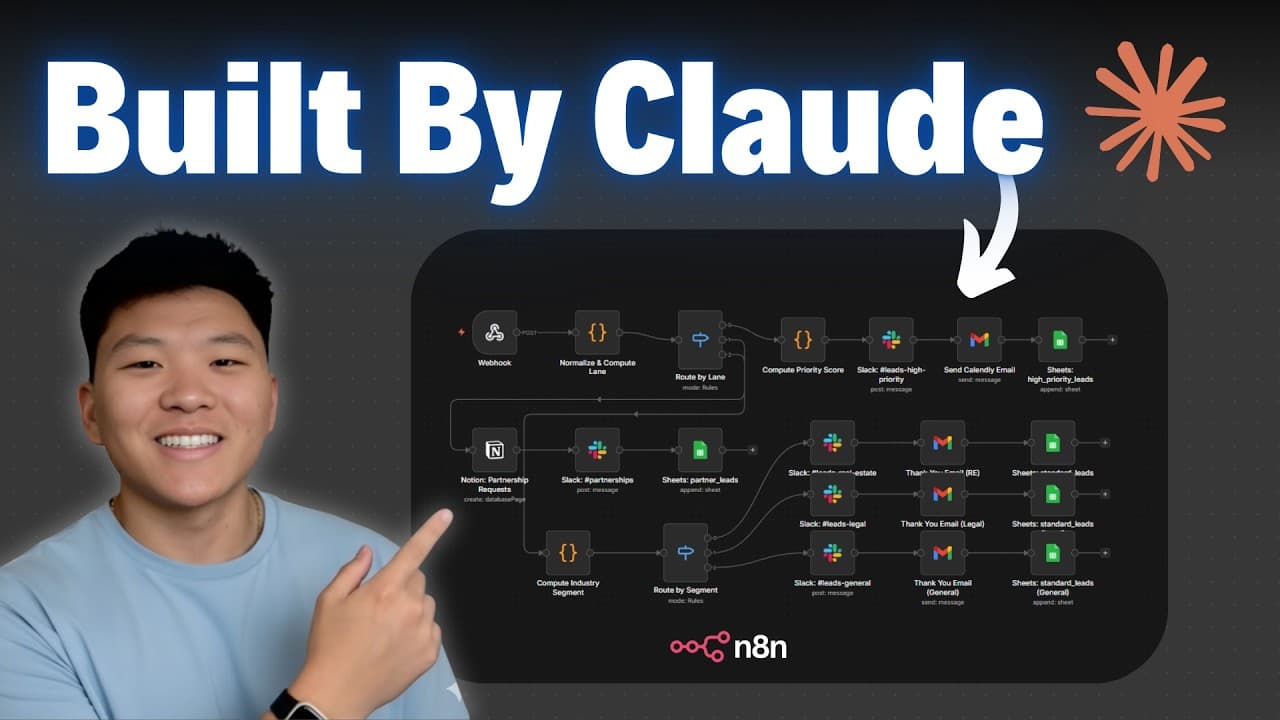
Claude Code can build n8n workflows from a plain-language brain dump in about three minutes, then self-correct when it hits errors. Set it up inside Visual Studio Code through the Claude Code extension, create a claude.md system prompt for the project, and connect the n8n MCP server plus n8n skills so Claude understands nodes, syntax, and configuration.
Transcript
All right, so I just brain dumped a manual process into chatbt and it spit this out for me. And now I'm going to come into Claude code and just say, "Hey Claude, build me this end workflow. Then I'm just going to paste in that information and shoot that off and I'll check in with you guys when we get that workflow back." Okay, so that took about 3 ... Read More
Key Insights
- Claude Code can turn a manual-process brain dump into a working n8n workflow in about three minutes, after which the user only needs to connect their credentials to run it.
- Claude Code self-corrects when it hits problems: it identified issues with code node parameters and Slack node configuration, then fixed them on its own across several passes without user intervention.
- The setup runs inside Visual Studio Code because it is the cleanest interface and looks the least like code, though Claude Code can also run through Cursor or directly in the terminal.
- A claude.md markdown file acts as the system prompt for a project, telling Claude the environment and goal; the creator used Claude itself to help write this file.
- Plan mode is used before executing so Claude drafts an approach first, while bypass permissions mode lets Claude take action without asking, useful once instructions are set.
- Bypass permissions mode requires enabling 'allow dangerously skip permissions' in the Claude Code settings before the mode becomes selectable.
- The n8n MCP server gives Claude the ability to search nodes, configurations, and workflow templates, because Claude knows JSON but does not natively understand n8n nodes and expression syntax.
- The key skill for using Claude Code is clear communication of the end goal rather than reading code, since Claude asks clarifying questions and can explain its reasoning on request.
Install to Summarize YouTube Videos and Get Transcripts
Explore YouTube Video Summarizer or Get YouTube Transcript Extractor
Questions & Answers
Q: How do you use Claude Code to build an n8n workflow?
Brain dump the manual process you want automated, paste that description into Claude Code, and ask it to build the end-to-end workflow. Claude creates a to-do list, works through each task and checks them off, and searches documentation to figure out which nodes to use and how to configure them. In the example it finished in about three minutes, after which the user only needed to connect credentials to run the workflow.
Q: Why do you need Visual Studio Code to run Claude Code?
Visual Studio Code is an interface that lets you connect and use Claude Code through an extension. The creator chose it because it is the cleanest option and looks the least like code, which suits beginners who do not want to stare at a terminal. You can also access Claude Code through Cursor or directly in the terminal, but VS Code keeps the experience simpler and less intimidating.
Q: What is a claude.md file and why does it matter?
A claude.md file is a markdown file that acts as the system prompt for a specific project. It tells Claude Code about the environment it is in and what you plan to do together, such as building high-quality workflows in your n8n instance using the n8n MCP server and n8n skills. The creator used Claude itself to help write this file so future requests work better and more consistently.
Q: What is the difference between plan mode and bypass permissions mode in Claude Code?
Plan mode has Claude draft an approach before it takes any action, which the creator uses almost every time before saying go ahead. Bypass permissions mode means Claude does not have to ask before executing, letting it act and run things directly, which is useful later once instructions and prompts are set. There are also intermediate options like ask before edits and edit automatically.
Q: How do you enable bypass permissions mode in Claude Code?
If you cycle through the modes and do not see bypass permissions, you need to enable it in settings. Open the Claude Code settings, type in Claude Code, and find the option labeled allow dangerously skip permissions, then turn it on. After that, bypass permissions mode becomes available. The creator notes it seems dangerous but you remain in control and can watch what Claude does within its configured environment.
Q: Why does Claude Code need the n8n MCP server to build workflows?
Claude Code is smart and knows JSON, but by itself it does not yet understand n8n nodes, expression syntax, configuration, and parameters. The n8n MCP server gives Claude access to search nodes, configurations, and existing workflow templates so it can figure out which nodes to use and how to set them up correctly. This tool is what lets Claude translate a request into a properly built n8n workflow.
Q: What happens when Claude Code runs into errors while building a workflow?
Claude Code figures out why something went wrong and fixes it on its own. In the example it noticed issues with the code node parameters and Slack node configuration and updated the workflow to correct them. This self-correction happened two more times, with Claude identifying the Slack node configuration and code node problems and fixing each one, all without the user having to step in.
Q: Do you need to know how to read code to use Claude Code?
No. The creator stresses that the key skill is not reading or understanding code but clearly communicating what you want. If you can talk to a developer or a brainstorming partner, you can use Claude Code. Because the Opus and Sonnet models are strong, Claude asks clarifying questions like whether you meant one thing or another, and you can ask it to explain anything that does not make sense.
Summary & Key Takeaways
-
The creator brain dumps a manual process into a chatbot, pastes the result into Claude Code, and asks it to build an end-to-end n8n workflow. In roughly three minutes Claude produces a working workflow, creating a to-do list, checking off tasks, and searching documentation to pick the right nodes.
-
Setup starts by downloading Visual Studio Code, installing the Claude Code extension, and signing into an Anthropic Claude account. The user opens a fresh project folder called n8n builder, then creates a claude.md file that serves as the system prompt describing the environment and the workflow-building goal.
-
To make Claude capable in n8n, it is connected to the n8n MCP server so it can search nodes, configurations, and templates, plus n8n skills so it understands how nodes work together. Because Claude self-corrects errors, the result is a supercharged setup that builds workflows much faster.
Read in Other Languages (beta)
Share This Summary 📚
Summarize YouTube Videos and Get Video Transcripts with 1-Click
Try YouTube Summary with ChatGPT & Claude or YouTube Transcript Generator
Explore More Summaries from Nate Herk | AI Automation 📚



Summarize YouTube Videos and Get Video Transcripts with 1-Click
Try YouTube Summary with ChatGPT & Claude or YouTube Transcript Generator