How to Run ChatGPT Through Open WebUI Locally
TL;DR
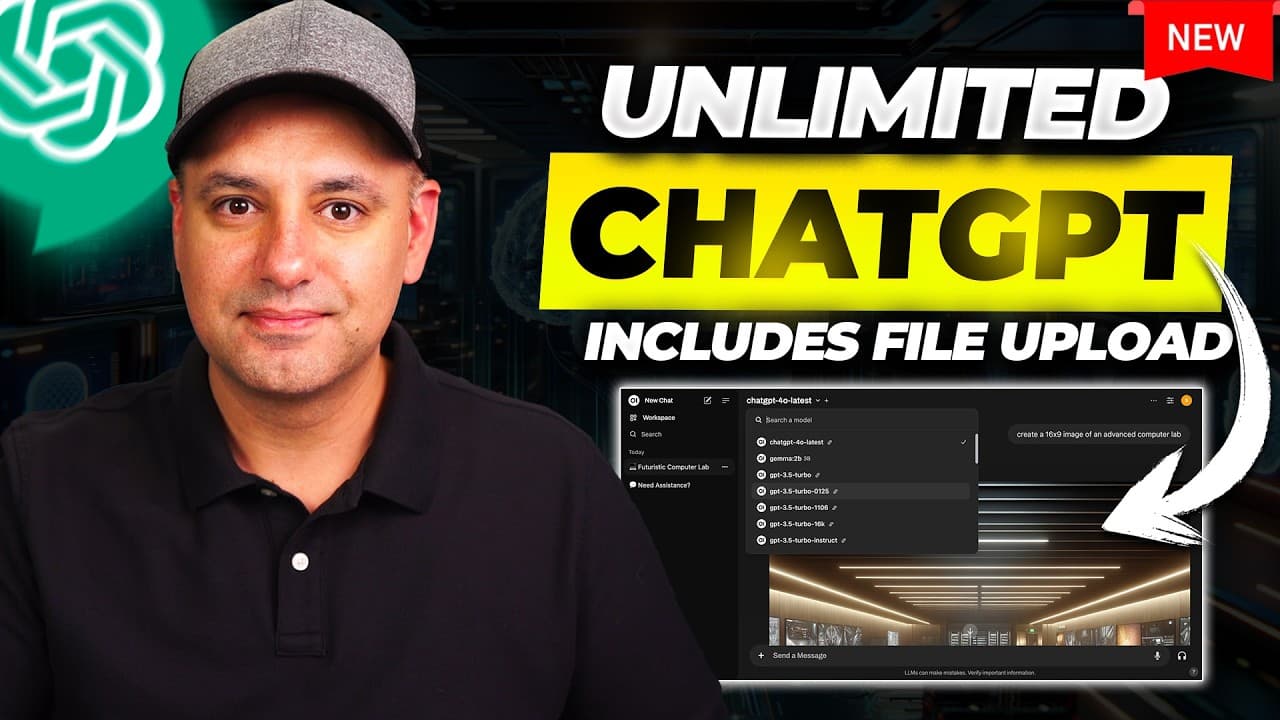
Install Ollama, download Llama 3.1 through Terminal, install and open Docker, then deploy Open WebUI and add an OpenAI API key. The setup removes fixed chat caps by charging for API usage instead, often a fraction of a penny for chat and about three or four cents for a DALL-E 3 image, while locally installed models can run privately without Wi-Fi.
Transcript
when I use chat GPT even with the paid version of chat GPT I often run out of credit so they limit you even with the plus version of chat GPT that's $20 a month the team version those all have a cap on how often you could use chat GPT how often you could make images with Dolly but this option that I want to show you today you get unlimited usage of... Read More
Key Insights
- Open WebUI is a locally hosted, ChatGPT-style interface that can connect to OpenAI through an API key. It avoids fixed chat caps because API activity is billed according to actual usage, although this does not mean that OpenAI services are free.
- OpenAI API usage is separate from the $20 ChatGPT Plus plan and the team plan described in the source. Chat requests usually cost a fraction of a penny, while each DALL-E 3 image can cost approximately three or four cents.
- Ollama is the first required installation and works on macOS, Windows, and Linux. After installing it, the user runs the provided Ollama command in Terminal to download Llama 3.1, a model file shown as 4.7 gigabytes in the demonstration.
- Local Llama 3.1 operation is private because the downloaded model can run on the computer after Wi-Fi is turned off. ChatGPT accessed through an OpenAI API key is different because prompts and responses travel between the computer and OpenAI.
- Additional local models are optional and can be installed with Ollama commands. Gemma 2 and Mistral are cited as examples, but users should inspect model sizes because one model may occupy about five gigabytes while others can require 27 gigabytes.
- Docker is required to operate the Open WebUI container. The application only needs to be installed, opened, and left running in the background during setup, after which the container appears inside Docker and can be started or stopped there.
- Open WebUI is installed by copying its specified command from the getting-started documentation into Terminal. When the download finishes, the running Docker container exposes a numbered port that opens the Open WebUI sign-up or sign-in page on localhost 3000.
- Open WebUI combines local and OpenAI-connected tools in one interface. The demonstrated features include model selection, DALL-E 2 and DALL-E 3 image generation, searching previous chats, uploading documents, analyzing documents, and interacting with their contents.
Install to Summarize YouTube Videos and Get Transcripts
Explore YouTube Video Summarizer or Get YouTube Transcript Extractor
Questions & Answers
Q: How do you install Open WebUI for ChatGPT access?
Install Ollama for macOS, Windows, or Linux, then use Terminal to run the provided command for downloading Llama 3.1. Install Docker, open it, and leave it running. Next, copy the appropriate Open WebUI installation command from its getting-started documentation into Terminal. When the container appears in Docker, open its port, create an Open WebUI account, and add an OpenAI API key.
Q: Is ChatGPT usage through Open WebUI actually free?
ChatGPT usage through Open WebUI is not presented as free. It replaces a fixed subscription and its usage caps with OpenAI API billing based on actual activity. Chat interactions usually cost a fraction of a penny, while generating a DALL-E 3 image may cost about three or four cents. Monthly spending can fall below $20 when usage is light, but heavy use costs more as activity increases.
Q: Why does Open WebUI avoid fixed ChatGPT usage caps?
Open WebUI connects to OpenAI through an API key rather than relying on the capped access provided by the ChatGPT Plus or team plan described in the source. Requests are billed individually, so the interface does not display the same type of fixed usage-limit message. The user can continue making requests while paying for the API activity generated by chats and images.
Q: How can you run Llama 3.1 locally with Ollama?
Download and install Ollama, then copy the displayed Llama 3.1 run command and paste it into Terminal. Press Enter while connected to the internet so Ollama can retrieve the model, which is shown as a 4.7-gigabyte download. When Terminal reports success, the model is installed and can be used directly there or selected later through the Open WebUI interface.
Q: Can Open WebUI use both local models and ChatGPT?
Open WebUI can place locally installed models and OpenAI-connected models in the same interface. The demonstrated setup installs Llama 3.1 through Ollama and then connects ChatGPT by adding an OpenAI API key. Other Ollama models, including Gemma 2 and Mistral, may also be installed. Users can then select among these options and run them side by side inside Open WebUI.
Q: Is using ChatGPT through Open WebUI private?
Privacy depends on which model is selected. A downloaded local model such as Llama 3.1 can operate on the computer after Wi-Fi is turned off, so its activity remains local according to the source. ChatGPT does not work that way in this setup. When an OpenAI API key is used, data is sent back and forth between Open WebUI and OpenAI.
Q: Why is Docker required for Open WebUI?
Docker runs the container that hosts Open WebUI on the computer. After Docker is installed and opened, it can remain minimized while the Terminal command downloads and creates the Open WebUI container. The running container exposes a port that opens localhost 3000 in a browser. Docker also provides a stop control for pausing the container when Open WebUI is not needed.
Q: What features does Open WebUI provide beyond chatting?
Open WebUI provides access to multiple locally installed and OpenAI-connected models from one ChatGPT-like interface. The demonstrated options include DALL-E 2 and DALL-E 3 image generation, searching earlier chats, uploading documents, analyzing documents, and interacting with document contents. It also makes optional Ollama models easier to add or remove after the initial installation process is complete.
Summary & Key Takeaways
-
Open WebUI provides a ChatGPT-like interface that runs through Docker on a local computer. After connecting an OpenAI API key, it can access available ChatGPT models and DALL-E tools without a fixed usage cap. Charges accumulate according to actual API activity instead of a flat monthly subscription with capped access.
-
The installation begins with Ollama, followed by downloading Llama 3.1 through a Terminal command. Users may optionally install additional models such as Gemma 2 or Mistral, but they should check download sizes because individual models can require about five gigabytes or considerably more storage space on the computer.
-
Docker must be installed, opened, and kept running before the Open WebUI container is installed through Terminal. Its port opens a localhost page where the user creates an Open WebUI account. The interface supports model selection, document interaction, previous-chat searches, local models, OpenAI models, and DALL-E image generation.
Read in Other Languages (beta)
Share This Summary 📚
Summarize YouTube Videos and Get Video Transcripts with 1-Click
Try YouTube Summary with ChatGPT & Claude or YouTube Transcript Generator
Explore More Summaries from Skill Leap AI 📚




Summarize YouTube Videos and Get Video Transcripts with 1-Click
Try YouTube Summary with ChatGPT & Claude or YouTube Transcript Generator