How to automate support with AI to cut manual work
TL;DR
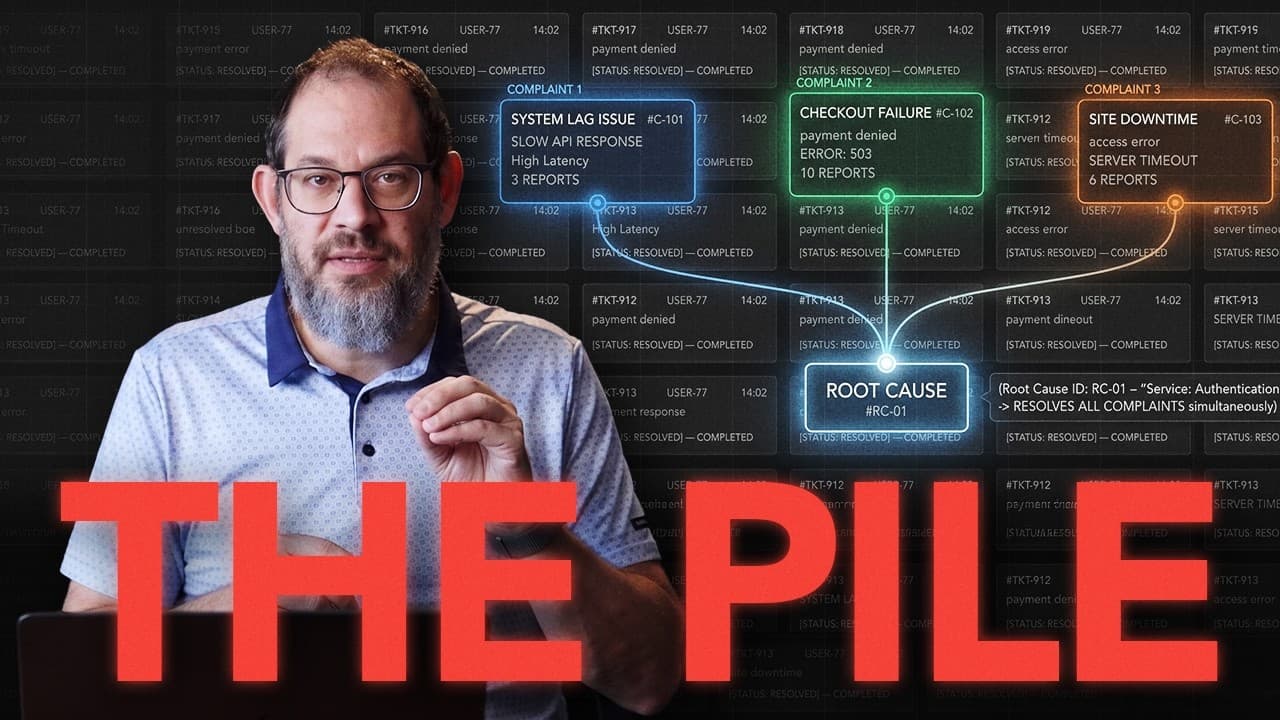
AI can cut heavy support load by identifying root causes, grouping cases by those causes, and automating repetitive steps while preserving human oversight for money or access. The result was a drop from 52 to 19 issues in a week and eliminating Slack access work through a redesigned access path and self service invites.
Transcript
In the last couple of weeks, we fixed 51 out of 52 customer support issues at my company using AI. And in this video, I'm going to show you how to do that. And yeah, on paper that was a 98% week, and I thought we were doing well, but I spent enough years at Amazon to know that this customer obsession thing is never going to leave me alone. And AI i... Read More
Key Insights
- AI reduced the weekly support issue count dramatically by solving the root cause rather than the symptom.
- Root cause based grouping is more effective than solving by ticket subject or label.
- Automation is kept to non critical decisions while preserving human approval for access and money related steps.
- The first step is to map and time every part of the support process to identify hidden work.
- Creating tickets for each pain point helps attach context and enable AI to act.
- Rebuilding the access path with self service and domain allowlists reduces repetitive questions.
- The approach extends beyond support to other areas like sales, finance, and IT, showing cross department potential.
- 2026 AI strategy focuses on end to end processes and reducing the total mental workload.
- More videos from this channel:
- More from this channel: AI News & Strategy Daily | Nate B Jones
Install to Summarize YouTube Videos and Get Transcripts
Explore YouTube Video Summarizer or Get YouTube Transcript Extractor
Questions & Answers
Q: How can AI help reduce repetitive support work beyond speeding up tickets
AI helps by first identifying all steps involved in a support issue, then grouping cases by root cause rather than just subject matter. It automates research across systems, attaches relevant data to a ticket, and guides the assistant through the required actions. This reduces mental load, speeds up responses, and minimizes the need for human intervention on routine steps.
Q: What was the key change made to the Slack access process
The key change was rebuilding the access path so that the question stops recurring. They created approved email domains for self service access and a non expiring community invite, which dramatically reduced the back and forth. This allowed most users to join without repeated approvals, cutting repetitive tasks substantially.
Q: How did the team determine what could be automated
They started with a full process map, listing every step and measuring how long each took and what required judgment. By identifying non automated steps and how often they occurred, they could decide which tasks could be automated with AI while keeping decisions around access or money under human control.
Q: Why is root cause analysis important in this approach
Root cause analysis is essential because simply answering tickets faster doesn’t prevent the same issues from arising. By identifying the underlying pain points and their causes, the team can design automation that addresses the real problem and prevents the issue from reoccurring, leading to long term improvements rather than short term gains.
Q: What role do tickets play in the automation strategy
Tickets act as scaffolds to store all relevant information needed to resolve an issue. Each pain point gets its own ticket with context such as prior investigations, related accounts, and billing research. This structure makes it easier for AI to access the necessary information and for humans to review decisions.
Q: How is human judgment preserved in the automated workflow
Human judgment remains in decisions involving access or money. While AI handles research, triage, and routine steps, final approvals for account access and financial actions ensure quality and safety. This balance prevents automation from compromising critical customer outcomes.
Q: Can this AI approach be applied to other departments
Yes, the video suggests applying the same approach to sales, finance, IT, and product. The principle is to map the entire process, identify hidden work, group by root cause, and design AI assisted workflows that automate repetitive tasks while keeping essential human oversight. This can scale to multiple domains.
Q: What is meant by 2026 AI problem versus 2024 or 2025
The 2026 AI problem refers to solving the whole process end to end, including hidden work across multiple tools and channels. It emphasizes eliminating the need for unnecessary back and forth by redesigning workflows, not just speeding up individual tickets. This shifts focus from micro-automation to macro process improvements.
Summary & Key Takeaways
-
The video explains turning a recurring support problem into an AI driven process and shows how to map pain points, define tickets, and automate steps while keeping critical decisions under human control.
-
It emphasizes shifting from just speeding up tickets to removing the need for tickets by redesigning workflows and access paths to reduce friction.
-
The case study demonstrates end to end changes across the support process, including how to scale the approach to other departments like sales and IT.
Read in Other Languages (beta)
Share This Summary 📚
Summarize YouTube Videos and Get Video Transcripts with 1-Click
Try YouTube Summary with ChatGPT & Claude or YouTube Transcript Generator
Explore More Summaries from AI News & Strategy Daily | Nate B Jones 📚





Summarize YouTube Videos and Get Video Transcripts with 1-Click
Try YouTube Summary with ChatGPT & Claude or YouTube Transcript Generator