How to use Python input to read user input data
TL;DR
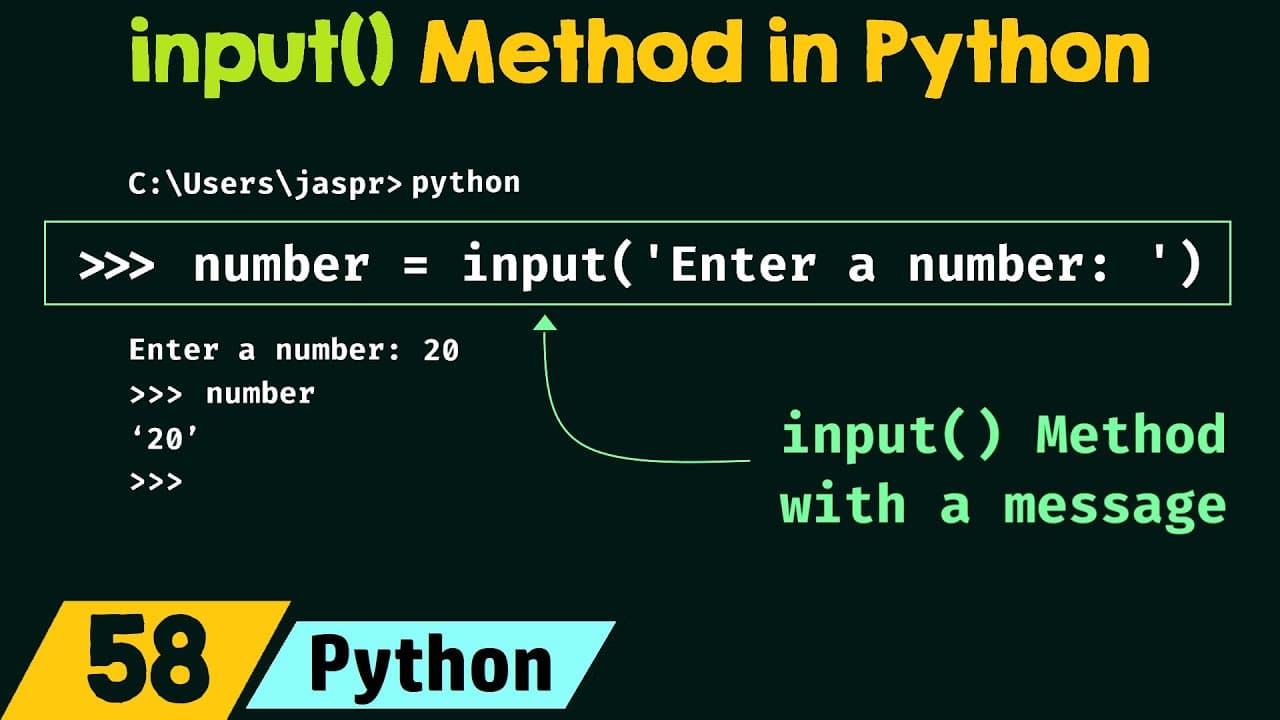
The input() function reads what the user types and returns it as a string. To perform numeric operations, convert the string with int(), or use int() on a variable containing the input. Providing a prompt message is done by passing a string to input, which displays it before waiting for input.
Transcript
foreign we will understand input method in Python so without any further delay let's get started following are the topics which we need to understand in this presentation the first topic is input method the second topic is input method with a message and the third topic is typecasting the user input let's first understand input method in details so... Read More
Key Insights
- input() always returns a string, regardless of the user’s actual data type.
- A message can be shown to the user by passing a string to input as a prompt.
- User input is stored in a variable and can be checked or manipulated later.
- To perform numeric operations, you must convert the input string to an integer using int().
- You can either pass input directly to int() or convert after assigning to a variable.
- Converting this way helps prevent errors when attempting arithmetic on non numeric data.
- The transcript demonstrates both immediate and post input typecasting approaches.
- Understanding input and typecasting is foundational for handling user data in Python.
Install to Summarize YouTube Videos and Get Transcripts
Explore YouTube Video Summarizer or Get YouTube Transcript Extractor
Questions & Answers
Q: How to read user input in Python using input()
input() reads a line from the user through the keyboard and returns it as a string. This means any data entered by the user, whether letters or numbers, is captured as text unless converted. You store this value in a variable to use later in your program, and you can display a prompt by passing a string to input.
Q: What happens to numeric input without type conversion
Without type conversion, numbers entered by the user are stored as strings. This can cause errors if you attempt arithmetic operations directly, such as adding or subtracting numbers. To perform calculations, you must convert the string to an integer or float using appropriate conversion functions.
Q: How to prompt the user with a message using input()
To guide the user, include a prompt string inside the input() call, for example input('Enter a number: '). This displays the message and then waits for the user to type a value. The prompt helps clarify the expected input type and reduces input errors in subsequent processing.
Q: How to convert input to an integer in Python
Convert the input to an integer by wrapping the input() call in int(), for example number = int(input('Enter a number: ')). This approach reads the user input as a string and then converts it to an integer so arithmetic operations can be performed safely.
Q: What is an alternative to converting immediately
An alternative is to assign the raw input to a variable first and then convert, for example number = input('Enter a number: '); number = int(number). This two step method mirrors the flow of receiving input first and applying typecasting later, which can be useful for validation and errors handling.
Q: Can input be converted using the variable before conversion
Yes, you can pass the already stored input variable to int(), as in number = int(number). This method is useful if you need to reuse the raw input for other checks or if you want to separate input collection from type conversion for clearer code structure.
Q: Why is input considered a string in Python
Python treats all data received from input() as strings because the function reads a line of text from the user and returns it without assuming a numeric type. This behavior requires explicit type conversion if numeric operations are intended, ensuring programs handle data correctly and avoid type errors during calculations.
Q: What topics are covered in the video besides input()
Besides the basic input() method, the video covers input() with a message prompt and typecasting the user input to integers. These topics build a practical understanding of collecting user data, guiding users with prompts, and ensuring numeric input can be used in arithmetic operations without errors.
Summary & Key Takeaways
-
The video explains the input() method in Python, including how it captures user input and stores it in a variable as a string.
-
It shows how to provide a prompt using input for clearer user guidance and why conversion to integers may be necessary.
-
It covers typecasting the input to integers and demonstrates two common approaches to ensure numeric data is usable in calculations.
Read in Other Languages (beta)
Share This Summary 📚
Summarize YouTube Videos and Get Video Transcripts with 1-Click
Try YouTube Summary with ChatGPT & Claude or YouTube Transcript Generator
Explore More Summaries from Neso Academy 📚
Summarize YouTube Videos and Get Video Transcripts with 1-Click
Try YouTube Summary with ChatGPT & Claude or YouTube Transcript Generator