How to Build Your First n8n Workflow
TL;DR
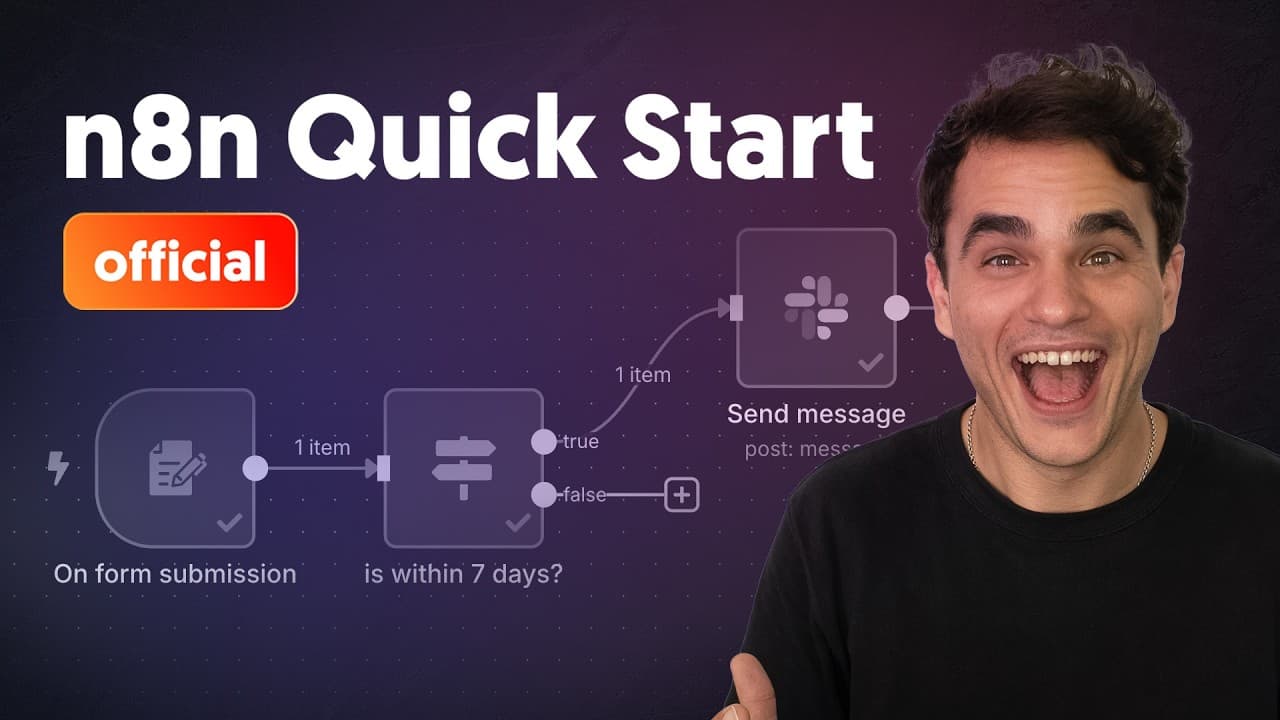
Learn the essentials of creating workflows in n8n, including setting up triggers, mapping data, and integrating with apps like Slack. This tutorial guides you through building a simple workflow that automates form submissions to send notifications, emphasizing foundational skills for more advanced automation tasks.
Transcript
hey I'm Max the original flowgrammer and welcome to your n8n quick start i'm going to teach you the key fundamentals to building any n8n workflow that includes triggers and actions how items of data work between steps in your n8n workflows how to map data between those steps and transform it and route it based on business logic i'm also going to... Read More
Key Insights
- n8n workflows consist of triggers and actions that automate tasks.
- Data flows between workflow steps as items, which can be mapped and transformed.
- Conditional routing allows workflows to branch based on business logic.
- Connecting n8n to apps like Slack enables real-time automation and notifications.
- Pinning data in n8n helps test workflows without generating new test data each time.
- Activating a workflow allows it to run automatically and log executions.
- n8n provides helper functions for date and time operations, simplifying logic.
- The n8n community and resources support learning and workflow development.
Install to Summarize YouTube Videos and Get Transcripts
Explore YouTube Video Summarizer or Get YouTube Transcript Extractor
Questions & Answers
Q: How to set up a trigger in n8n?
To set up a trigger in n8n, start by adding a trigger node to your workflow canvas. Choose the type of trigger based on your needs, such as an event in an app or a form submission. Configure the necessary parameters, like form fields or event details, to initiate the workflow when the specified condition is met.
Q: What is the role of data mapping in n8n workflows?
Data mapping in n8n workflows involves transferring data between workflow steps. It allows you to dynamically use data from previous steps in subsequent nodes, ensuring the correct data is used for actions or conditions. Mapping is crucial for transforming data and making workflows responsive to input changes.
Q: Why is conditional routing important in n8n?
Conditional routing in n8n is important because it enables workflows to branch based on specific criteria, allowing for more complex and tailored automation. By using conditional nodes, you can direct the workflow to different paths based on data values or logic, ensuring that actions are only performed when certain conditions are met.
Q: How can n8n connect to external apps like Slack?
n8n connects to external apps like Slack through app nodes that require credentials. These credentials allow n8n to authenticate and perform actions on your behalf. For Slack, you can use OAuth or access tokens to set up the connection. Once connected, you can configure actions like sending messages directly from your workflow.
Q: What is the benefit of pinning data in n8n?
Pinning data in n8n is beneficial because it allows you to test workflows without repeatedly generating new test data. By pinning, you can reuse a fixed set of data, making it easier to debug or refine workflows. This feature is particularly useful when dealing with complex data setups or when replicating events is challenging.
Q: How does n8n handle date and time operations?
n8n handles date and time operations using helper functions that simplify calculations and comparisons. You can use expressions to manipulate dates, such as adding or subtracting days, and compare them using operators. These functions are integrated into the workflow, allowing for seamless date and time logic implementation.
Q: What happens when an n8n workflow is activated?
When an n8n workflow is activated, it begins to run automatically, executing whenever the trigger condition is met. All executions are logged, allowing you to monitor and review workflow performance. Activation ensures that the workflow operates in a production environment, responding to real-time events and data changes.
Q: Where can I find resources to learn more about n8n?
To learn more about n8n, you can visit the official documentation at docs.n8n.io, join the community forums at community.n8n.io, and explore the n8n templates library at n8n.io/workflows. These resources provide comprehensive guides, community support, and pre-built workflow templates to help you get started and advance your automation skills.
Summary & Key Takeaways
-
The tutorial introduces n8n's workflow automation capabilities, focusing on triggers and actions. It shows how to map and transform data between steps, and how to set up conditional logic for routing. The example workflow automates a form submission to send a Slack notification, demonstrating key concepts.
-
Using n8n, you can automate tasks by connecting various apps and services. This tutorial walks through creating a simple workflow that starts with a web form submission and ends with a Slack notification. It covers essential concepts like data mapping, conditional logic, and workflow activation.
-
Max explains how to build an n8n workflow from scratch, highlighting the importance of understanding triggers, data flow, and app integrations. The tutorial provides a step-by-step guide to creating a form-based workflow, emphasizing foundational skills for more complex automation scenarios.
Read in Other Languages (beta)
Share This Summary 📚
Summarize YouTube Videos and Get Video Transcripts with 1-Click
Try YouTube Summary with ChatGPT & Claude or YouTube Transcript Generator
Explore More Summaries from n8n 📚
![Stop Vibe Coding: Context Engineering & RAG for AI Agents [# 12 Cole Medin] thumbnail](/_next/image?url=https%3A%2F%2Fi.ytimg.com%2Fvi%2F7zZtxUW6dhc%2Fhqdefault.jpg&w=750&q=75)
![Automating Gong Sales Call Analysis with n8n and AI [n8n At Scale] thumbnail](/_next/image?url=https%3A%2F%2Fi.ytimg.com%2Fvi%2FAIiJ29hEn80%2Fhqdefault.jpg&w=750&q=75)
Summarize YouTube Videos and Get Video Transcripts with 1-Click
Try YouTube Summary with ChatGPT & Claude or YouTube Transcript Generator