How to dominate YouTube thumbnails in 2026
TL;DR
Thumbnails that grab attention are key this year. Use the nine styles covered to boost clicks, test them with YouTube AB testing and VidIQ tools, and refine your approach by reducing clutter and improving contrast. The best results come from clear signals, strong visuals, and consistent experimentation across videos.
Transcript
Here's the reality. When it comes to picking their next video, your YouTube audience has the attention span of a golden retriever. And the meta around which thumbnails get picked has already changed in the 6 months since we made the last video. So, we went and found nine new thumbnail formats, dominating, doubling views, creating outliers, and grow... Read More
Key Insights
- Thumbnails have a changing meta, and new formats are dominating in 2026.
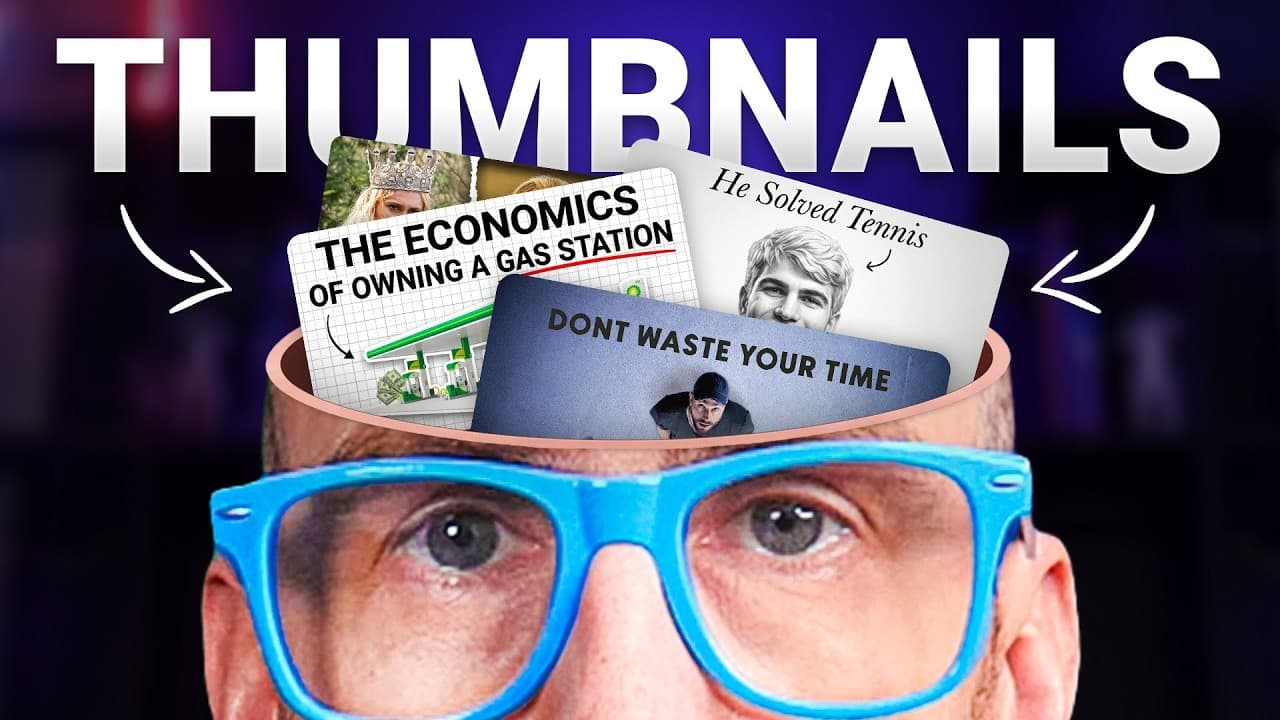
- The inside the head metaphor uses visual impact by removing the top of the head and inserting a symbol to represent the idea.
- The Every Xplained style now emphasizes fewer, clearer images rather than many elements.
- Blueprint based thumbnails use a quiet, prestige look with white backgrounds or sketches to signal research value.
- Split screen thumbnails require brutal contrast to be effective and tell a clear story.
- Unusual camera angles create curiosity and can align with strong hooks in the video title.
- Three head grid thumbnails are a recognized format that emphasizes multiple ideas without clutter.
- Testing thumbnails with AB tests and VidIQ analytics helps identify winners and reduce risk.
Install to Summarize YouTube Videos and Get Transcripts
Explore YouTube Video Summarizer or Get YouTube Transcript Extractor
Questions & Answers
Q: How should I start implementing new thumbnail formats in 2026?
Begin by selecting a few of the nine discussed formats that best fit your content and audience. Create test thumbnails that simplify visuals, use clear signals, and pair them with direct, informative titles. Then use YouTube AB testing and VidIQ analytics to compare performance against your current thumbnails, focusing on metrics like click rate and retention to guide decisions.
Q: What makes the inside the head metaphor effective for thumbnails?
This format creates a strong visual hook by showing a symbolic insert into the head, signaling a deep dive into an idea. The effect is visually striking and can dramatically increase curiosity and clicks, especially when paired with a matching title that promises a clear, intriguing concept.
Q: Why is the split screen thumbnail considered powerful, and what rule is critical?
Split screen thumbnails are powerful because they visually contrast two states or ideas, telling a concise story at a glance. The critical rule is that the contrast must be brutal; if the frames show similar expressions, viewers may not feel a strong enough transformation to click, so aim for clear good versus evil or dramatic change.
Q: How can I use the three image grid effectively without cluttering the thumbnail?
Use fewer, high-quality images rather than many small elements. The goal is to present six to three clear images with a neutral background and minimal text, ensuring each image communicates a distinct idea. This approach reduces visual noise while still conveying the video’s breadth or key points.
Q: What role do colors and backgrounds play in creating effective thumbnails?
Color and background choice influence perceived tone and credibility. Quiet, high-contrast designs with white or textured backgrounds and clean sketches tend to signal research and prestige, while loud, saturated thumbnails remain effective for dynamic or entertainment content. Align background and color with the video’s subject and audience expectations.
Q: How can I leverage YouTube Shorts with custom thumbnails in 2026?
YouTube Shorts can use custom thumbnails to improve click-through by providing clear signals about the topic in a compact format. Since Shorts have zero seconds to waste, a striking, instantly understandable thumbnail helps attract viewers quickly and increases the likelihood of watching the short to completion.
Q: What is the recommended approach to testing thumbnails on my channel?
Adopt a continuous testing mindset using the AB testing features in YouTube Studio and extensions like VidIQ to compare new thumbnails with existing ones. Track winners by measurable impact, such as increased click-through rates and subsequent video performance, and implement the top performers while iterating on the rest.
Q: How should I pair thumbnails with titles for maximum impact?
Pair thumbnails with titles that reinforce the same idea and promise clarity. Use visuals that reflect the content’s core takeaway, whether a single focal concept or a comparison, so the thumbnail and title work together to set accurate expectations and entice clicks without overpromising.
Summary & Key Takeaways
-
This section highlights that thumbnail meta is changing and that nine new formats are dominating in 2026, including an inside the head motif, three image grids, and bold split screens. It emphasizes testing and iteration, using AB tests and analytics to identify winners. It also notes YouTube shorts now support custom thumbnails.
-
The video explains specific thumbnail styles with examples, such as the inside the head metaphor, Every Xplained, blueprint style, sketch portraits, and split screen, stressing their impact on views and discovery. It discusses when to use quiet versus loud visuals and how to pair thumbnails with titles for maximum effect.
-
The overall advice is to experiment, simplify visuals, and target relevant niches with coherent design choices. It suggests a measured approach to risk, using data from tests to guide future thumbnail decisions, and leveraging platform tools to optimize performance for long and short videos alike.
Read in Other Languages (beta)
Share This Summary 📚
Summarize YouTube Videos and Get Video Transcripts with 1-Click
Try YouTube Summary with ChatGPT & Claude or YouTube Transcript Generator
Explore More Summaries from vidIQ 📚

Summarize YouTube Videos and Get Video Transcripts with 1-Click
Try YouTube Summary with ChatGPT & Claude or YouTube Transcript Generator