How to Create a Custom PCB for Digital Readouts
TL;DR
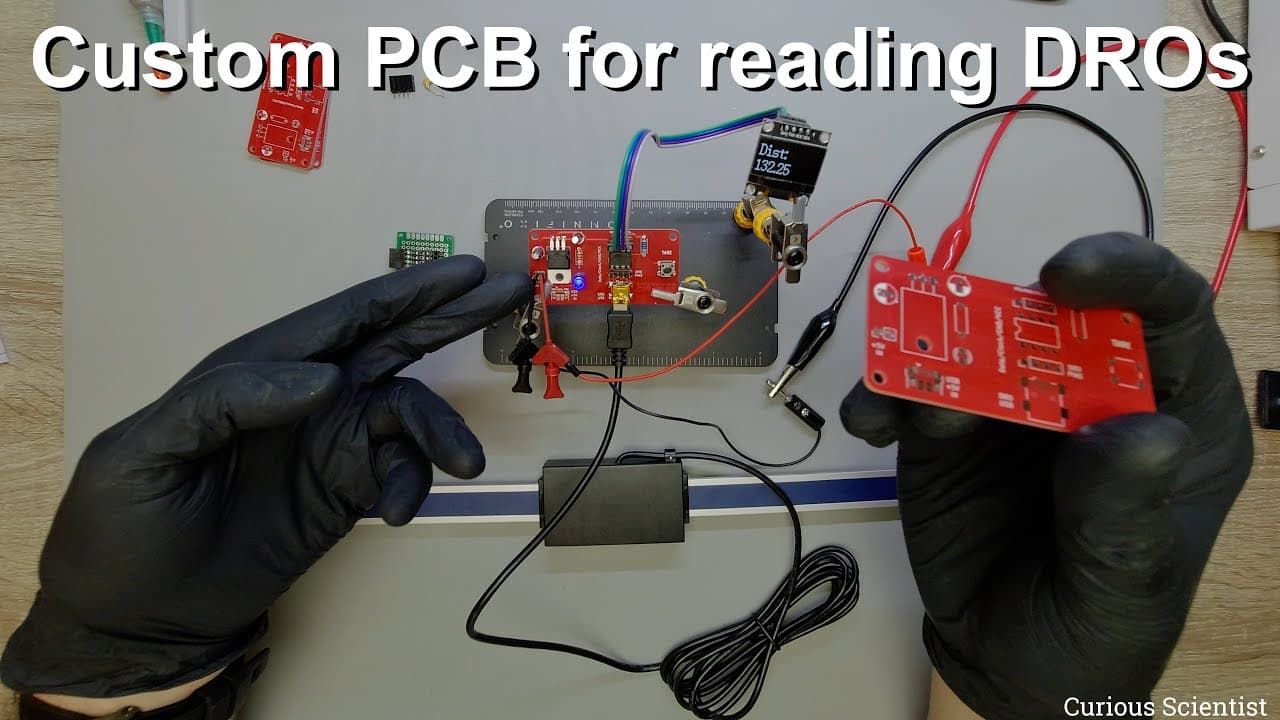
To create a custom PCB for digital readouts, start by designing the circuit layout using an ATTiny85 for signal processing, and ensure it includes features like a voltage regulator for stable power from USB or a 5V supply. After assembly, troubleshoot any wiring issues and test functionality to verify measurement accuracy.
Transcript
welcome everyone in this video i'm going to continue the work with my dro converter kind of converter so in the previous video you could see that i made a circuit board which was actually this tiny circuit board here and this was able to connect to a dro and by using an 80 tiny 85 i was able to capture the output signal of it and convert it into mi... Read More
Key Insights
- 🎨 The design process of a DRO converter PCB encompasses various technical aspects, from component selection to layout specifications, to ensure optimal functionality.
- ⚡ Integration of components like voltage regulators and capacitors is crucial for the stability and reliability of electronic circuits in practical applications.
- 👤 Visual design considerations, such as color contrast, significantly enhance user interaction with electronic devices, improving readability and overall aesthetics.
- 🐕🦺 Customization services provided by PCB manufacturers streamline the DIY electronic project process, making it accessible to a broader audience with varying skill levels.
- 🛟 Troubleshooting during the assembly phase can serve as valuable learning experiences, highlighting the importance of meticulous design and execution in electronics projects.
- 🦮 The guide serves both hobbyists and professionals, promoting flexibility in using the DRO converter across multiple measurement tools within electronics.
- 😒 The use of efficient power management in electronic circuits remains a core tenet of modern design, influencing usability in portable applications.
Install to Summarize YouTube Videos and Get Transcripts
Explore YouTube Video Summarizer or Get YouTube Transcript Extractor
Questions & Answers
Q: What improvements are made in the new DRO converter board compared to the previous version?
The new DRO converter board features a professional design with improvements such as enhanced power supply options, including USB and 5V power input, as well as a redesigned layout for better readability. This improved setup increases convenience and reliability, making the board more user-friendly.
Q: How does one customize a PCB using the services provided by PCBA?
PCBA allows users to customize their PCB by selecting parameters like board material, trace thickness, and color. After uploading Gerber files to their site, users can specify their choices, enabling a tailored production that fits their project needs, ensuring that the PCB suits individual requirements.
Q: What were some of the challenges faced during the assembly of the circuit?
During assembly, the presenter encountered a couple of challenges, such as a layout mistake involving the connection pins for the OLED display, which led to incorrect data alignment. Additionally, soldering issues caused short circuits, compromising functionality until resolved, illustrating the intricate nature of PCB assembly.
Q: Why is the choice of LED color significant in the project's design?
The choice of a blue LED on a red PCB adds a visual contrast that enhances readability and aesthetic appeal. The presenter noted that this high contrast makes it easier to see the LED’s indication of power status, contributing to a visually pleasing and functional design.
Q: Can this DRO converter be used with other types of measuring tools?
Yes, the upgraded DRO converter is compatible with various tools, including digital calipers. By utilizing specific connections, users can adapt the converter for different measuring devices, enhancing its versatility and utility in a range of applications beyond the initial design.
Q: How does the circuit manage power consumption?
The presented circuit operates with a low power consumption of 17 milliamps at 5 volts, which is efficient for portable applications. This low power usage is beneficial for extended operation without frequent battery changes, making it an ideal choice for users needing long-lasting performance in their devices.
Q: What additional resources are provided for users interested in this project?
The presenter offers access to different code versions suitable for both the ATtiny85 and Arduino platforms on their website. Links to more detailed content, including code samples and PCB orders, are provided to help users replicate the project and encourage exploration of the concept in their own applications.
Summary & Key Takeaways
-
The content discusses the creation of a new PCB for a DRO (Digital Readout) converter, emphasizing improved functionality and aesthetics, including options to power it via USB or a 5V supply.
-
The presenter highlights the services provided by PCBA for PCB manufacturing and assembly, showing customization options like color choice and component sourcing to ease the development process.
-
The final circuit assembly revealed some design and assembly mistakes, which were addressed, resulting in a functional display that accurately shows measurements and allows for manual resets.
Read in Other Languages (beta)
Share This Summary 📚
Summarize YouTube Videos and Get Video Transcripts with 1-Click
Try YouTube Summary with ChatGPT & Claude or YouTube Transcript Generator
Explore More Summaries from Curious Scientist 📚
![Building a Peltier cooler-based cooling box - First iteration, improvements [Part 2/6] thumbnail](/_next/image?url=https%3A%2F%2Fi.ytimg.com%2Fvi%2F0YlNw0EGnzI%2Fhqdefault.jpg&w=750&q=75)



Summarize YouTube Videos and Get Video Transcripts with 1-Click
Try YouTube Summary with ChatGPT & Claude or YouTube Transcript Generator