How to Build Agentic AI with LangChain and RAG
TL;DR
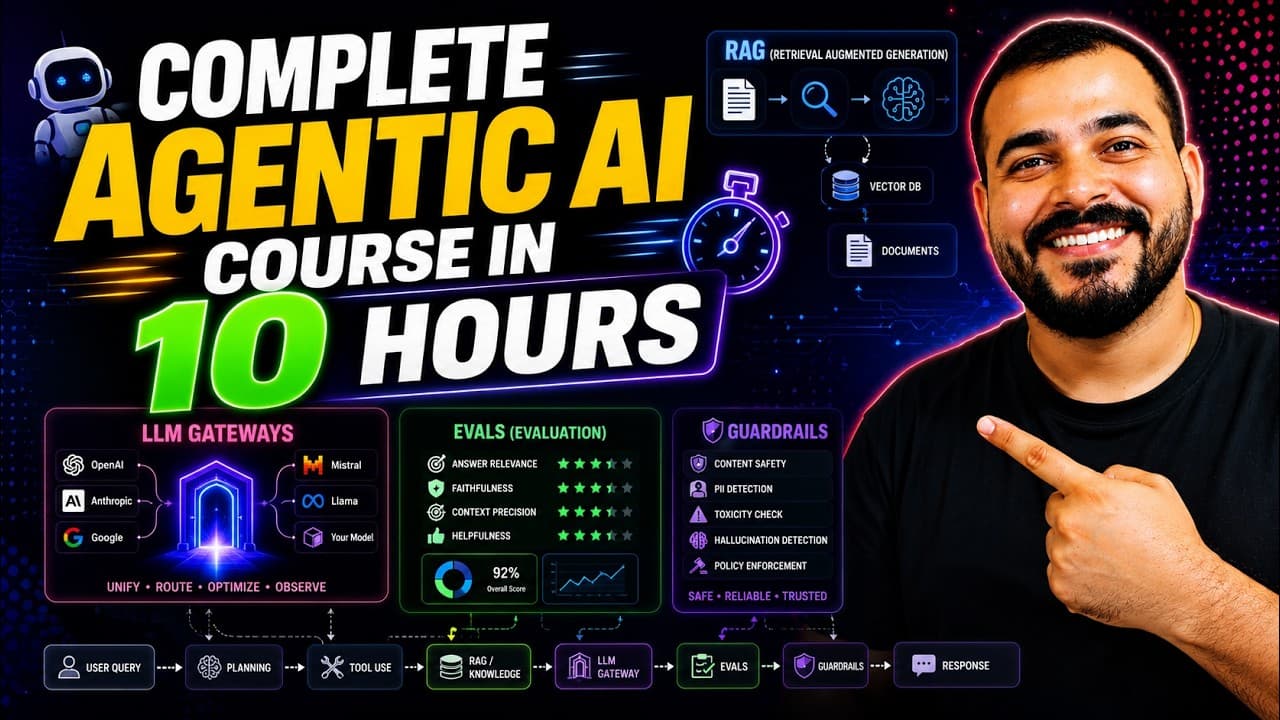
Build agentic AI applications by combining updated LangChain agent features, LangGraph workflows, retrieval methods, deep agents, guardrails, evaluations, and LLM gateways. The course organizes these subjects into practical modules, compares traditional vector RAG with vectorless RAG, and uses open-source libraries and linked implementations to help learners prepare for projects and interviews.
Transcript
Hello all, my name is Krishna and welcome to my YouTube channel. So guys, super excited to bring this specific video which is more than 10.5 hours and the best part about this video will be that from past four to 5 months every important topics that has actually evolved in AI specifically in the field of generative AI and agentic AI have covered al... Read More
Key Insights
- LangChain version 1 introduces changes to agent creation and memory, alongside the newer middleware concept. The course reorganizes its LangChain instruction around these documentation updates so learners can practice the current syntax and supported patterns described in the source material.
- LangChain supports multiple model integrations, tool calls, structured outputs, and several message types. The covered message categories include AI messages, human messages, and tool messages, which are presented as foundations for constructing and coordinating agent interactions.
- Short-term memory and streaming are included as practical LangChain capabilities. The course also distinguishes built-in middleware from custom middleware, placing both concepts within the updated framework material alongside agents, messages, tools, structured output, and guardrails.
- LangGraph is used to focus specifically on building agentic AI applications. Its crash-course module follows the LangChain section and is positioned as a practical framework component, with a linked GitHub repository containing the associated Agentic LangGraph course materials.
- RAG is covered through traditional retrieval, agentic RAG, and vectorless RAG. The curriculum explicitly compares traditional vector RAG with vectorless RAG, while the description provides a RAG repository and a dedicated PageIndex vectorless RAG notebook for implementation work.
- Deep agents and deep research agents form a separate practical module. The stated objective is to understand these agent types and examine their implementation after the retrieval modules, with additional course material supplied through the linked Deep Agents file.
- Guardrails are presented as part of AI security rather than only as an application feature. The course provides a dedicated guardrails module and notebook, then connects safety controls with a separate discussion of techniques for evaluating large language model systems.
- LLM gateways conclude the course with approximately 30 to 40 minutes of conceptual and implementation material. This final module follows LLM evaluation and is supported by a dedicated gateway tutorial notebook linked in the description.
Install to Summarize YouTube Videos and Get Transcripts
Explore YouTube Video Summarizer or Get YouTube Transcript Extractor
Questions & Answers
Q: How should I study this agentic AI course?
Study the material module by module rather than trying to complete all 10.5 hours in one day. The instructor suggests that learners may take about one month. Follow the timestamps from LangChain through LangGraph, RAG, vectorless RAG, deep agents, guardrails, LLM evaluation, and gateways, while using the linked repositories and notebooks for implementation practice.
Q: What does the updated LangChain section cover?
The updated LangChain section covers changes associated with version 1, including revised syntax for creating agents and applying memory. It also addresses multiple model integrations, tool calling, structured output, AI, human, and tool messages, short-term memory, streaming, built-in and custom middleware, and guardrails. The material follows the recently updated LangChain documentation described in the transcript.
Q: How do I start the LangChain project with UV?
Install the UV package manager using the command provided for the learner's operating system, then open a terminal in the intended working folder. Run "uv init" to initialize that folder as a working repository. The demonstrated initialization creates basic project files, including pyproject.toml, a default main.py file, and a Python version file showing Python 3.13.
Q: What is the role of LangGraph in the course?
LangGraph is taught as the framework used for the course's focused construction of agentic AI applications. Its module begins at 02:35:12, after the LangChain course, and is presented as a complete crash course. The description also links a dedicated Agentic LangGraph crash-course GitHub repository so learners can follow the associated implementation materials.
Q: What types of RAG are covered in the course?
The retrieval curriculum covers traditional RAG, agentic RAG, and vectorless RAG. The main RAG course begins at 05:02:29, while the vectorless RAG section starts at 07:10:43. The instructor also plans a direct comparison between traditional vector RAG and vectorless RAG, supported by a general RAG repository and a dedicated PageIndex vectorless RAG notebook.
Q: What are deep agents in this course used to demonstrate?
Deep agents and deep research agents are included as a separate topic after the RAG and vectorless RAG modules. The stated emphasis is on understanding these agent concepts and seeing a practical implementation. The timestamp places the module at 08:02:11, and the description supplies a linked Deep Agents file for learners who want the accompanying material.
Q: How are guardrails and LLM evaluation addressed?
Guardrails are introduced within the course's AI security section, with the dedicated module beginning at 08:45:43. LLM evaluation follows at 09:22:55 and covers various evaluation techniques, with an intention to use open-source libraries. The description links both a LangChain guardrails notebook and a RAG evaluation notebook for practical study of these subjects.
Q: What does the LLM gateway module include?
The LLM gateway module closes the full course and begins at 10:30:25. It includes both an explanation of the topic and an implementation, with the instructor describing the concluding coverage as roughly 30 to 40 minutes. A dedicated llm_gateway_tutorial.ipynb notebook is linked in the description as the supporting implementation resource for this final section.
Summary & Key Takeaways
-
The course begins with updated LangChain concepts, including agent creation, model integrations, tool calling, structured output, message types, short-term memory, streaming, middleware, and guardrails. It also demonstrates project setup with the UV package manager, virtual environments, a newly initialized repository, and a recent Python version in an agentic development environment.
-
LangGraph is presented as the framework-focused module for building agentic AI applications. The broader retrieval section then covers traditional RAG, agentic RAG, and vectorless RAG, with attention to practical implementation and the differences between vector-based and vectorless approaches. Linked repositories and notebooks support hands-on study across these modules.
-
Later modules examine deep agents and deep research agents through practical implementation, followed by AI security through guardrails. The course then covers LLM evaluation techniques using open-source libraries and concludes with roughly 30 to 40 minutes on LLM gateways and their implementation. The complete program runs for about 10.5 hours.
Read in Other Languages (beta)
Share This Summary 📚
Summarize YouTube Videos and Get Video Transcripts with 1-Click
Try YouTube Summary with ChatGPT & Claude or YouTube Transcript Generator
Explore More Summaries from Krish Naik 📚
Summarize YouTube Videos and Get Video Transcripts with 1-Click
Try YouTube Summary with ChatGPT & Claude or YouTube Transcript Generator