How to Build an App With No Code Using AI and Mobbin
TL;DR
Combine three tools to build functional app prototypes fast: ChatGPT for planning and prompt engineering, Mobbin for battle-tested UI patterns from live apps like Airbnb and Uber, and a no-code builder to generate screens. Most apps fail because of confusing interfaces, so borrowing proven layouts keeps users engaged and converting.
Transcript
Is it possible to build fully functional app in 15 minutes? No code, no developer, just AI, the right workflow, and a platform called Mobin. And by the end of this video, you'll be able to do the same thing. Here's the reality. In 2025, spinning up an app is easier than ever. AI can generate screens, build prototypes, even spit out code. But here's... Read More
Key Insights
- The real bottleneck in 2025 is not access to AI but knowing how to use it to build interfaces that work, because roughly 90% of apps still fail due to bad interfaces that confuse users and make them bounce, not because the underlying technology is weak.
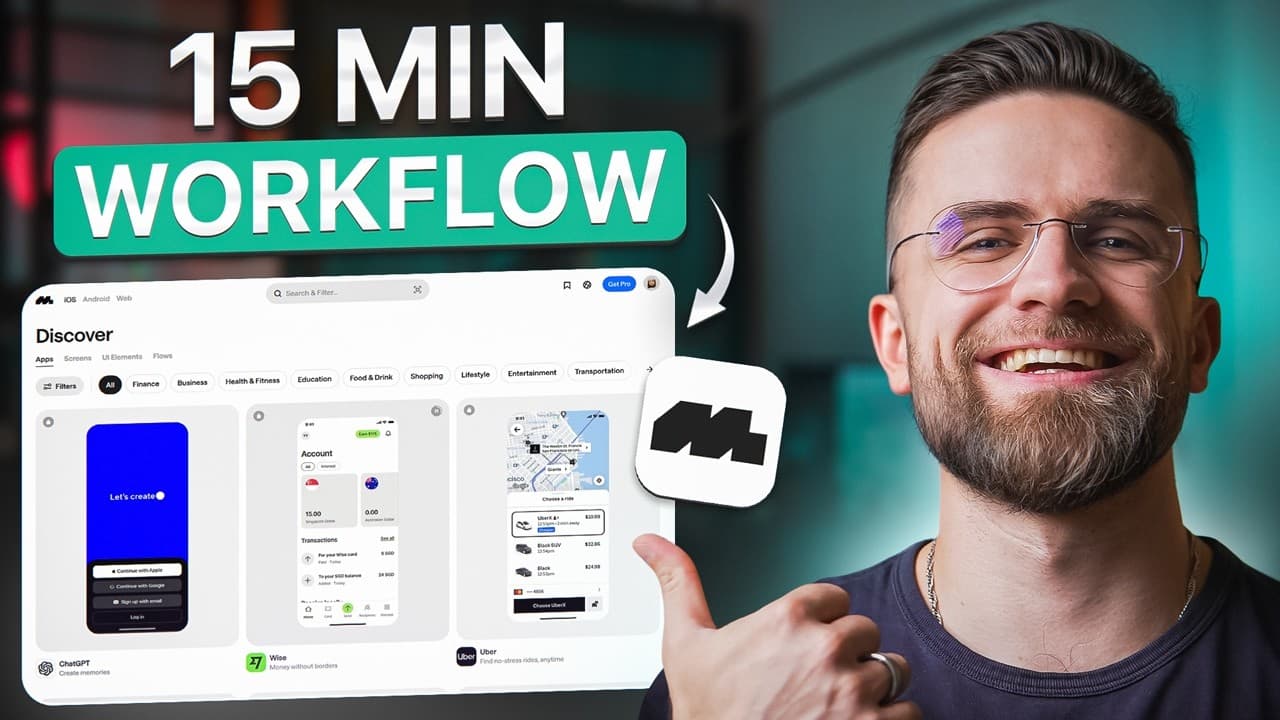
- Mobbin is a design reference library that catalogs real, live apps rather than concept art, with over 500,000 screens from more than 1,200 industry-leading apps like Airbnb, Uber, Netflix, Spotify, DoorDash, and TikTok.
- Mobbin's UI patterns are valuable because they are battle-tested and already AB-tested by companies with large design teams, so a booking flow from Airbnb or a homepage layout from Netflix is known to convert and be understood instantly.
- Mobbin lets you search by element or screen type, filter by platform (iOS or web) and category like finance or social, run visual searches, save screens into collections, and export directly into Figma through a plugin.
- Mobbin documents over 260,000 user flows and offers a flow tree feature, an X-ray blueprint that maps an app's entire screen hierarchy and navigation so you can copy proven information architecture instead of guessing.
- The core workflow combines three tools that each do one thing brilliantly: ChatGPT for planning and prompts, Mobbin for proven UI patterns, and a no-code platform to bring it all to life.
- ChatGPT acts as a product manager and prompt engineer, thinking through the app idea, suggesting a three-screen MVP such as home, menu, and checkout, and writing clean structured prompts that feed directly into no-code app builders.
- The reference-prompt-generate-refine loop produces screens that are 80 to 90% complete in seconds, matching a proven layout structure while keeping unique branding, and each screen takes minutes rather than hours because you build on patterns that already work.
Install to Summarize YouTube Videos and Get Transcripts
Explore YouTube Video Summarizer or Get YouTube Transcript Extractor
Questions & Answers
Q: How do you build an app in 15 minutes with no code?
You combine three tools that each do one thing brilliantly: ChatGPT for planning and prompt engineering, Mobbin for proven UI patterns from real live apps, and a no-code platform to generate functional screens. You plan the app and write optimized prompts in ChatGPT, pull battle-tested design references from Mobbin, then feed both the reference screenshots and prompts into a no-code builder that generates screens 80 to 90% complete in seconds, iterating until they fit.
Q: What is Mobbin and how does it work?
Mobbin is a design reference library that catalogs real apps that are live in the app stores right now, unlike Dribbble or Behance which show concept art. It holds over 500,000 screens from more than 1,200 industry-leading apps such as Airbnb, Uber, Netflix, and TikTok. You search for a screen type like sign up, filter by platform or category, run visual searches, zoom into high-resolution details, save screens into collections, and export directly into Figma with a plugin.
Q: Why do most apps fail according to this video?
About 90% of apps still fail, and not because the technology is bad but because the interface is bad. Users open the app, get confused, bounce, and never come back, and no users means no revenue. When a UI looks amateur or confusing, it does not matter how powerful the back end is. The real problem in 2025 is not access to AI but knowing how to use AI to build interfaces that keep people engaged and feel intuitive from the first step.
Q: Why are Mobbin's UI patterns considered reliable?
Mobbin's UI patterns are battle-tested because they come from apps that millions of people actually use and have been AB-tested by companies with massive design teams and huge budgets. If Airbnb settled on a particular booking flow, it is because that flow converts, and if Netflix uses a specific homepage layout, it is because millions of users understand it instantly. Instead of guessing, you borrow proven patterns from the best apps, so your interface follows conventions users already recognize.
Q: What is Mobbin's flow tree feature?
Flow tree is basically an X-ray view of any app's structure. Mobbin takes every screen in an app and maps out the entire hierarchy, showing how screens connect, where users can navigate, and what the information architecture looks like. It is like having the app's blueprint. When designing your own navigation, you can see exactly how Netflix structures their categories or how Spotify organizes their menu system, so you can copy the structure that works instead of guessing.
Q: How is ChatGPT used in this app-building workflow?
ChatGPT serves two roles. First it acts as a planning assistant: you describe your app idea and it thinks through the problem, suggests a three-screen MVP such as home, menu, and checkout, and recommends which features to prioritize for version one, like a product manager in your pocket. Second it handles prompt engineering, helping you write specific detailed prompts for your no-code platform, such as a prompt for a restaurant home screen with horizontal carousels, a search bar, and featured restaurants, saving hours of trial and error.
Q: What steps did the creator follow to build the QuickBite app live?
The creator built QuickBite, an ultra-fast food delivery app focused on local restaurants with three screens: home, menu, and checkout. He searched Mobbin for restaurant home, food menu, and checkout examples from DoorDash, Uber Eats, Postmates, and GrubHub, saved them, and exported all three into Figma via the plugin. He then wrote a ChatGPT prompt for the home screen, uploaded the DoorDash reference to the no-code builder, generated a screen 85 to 90% complete in 20 to 30 seconds, and iterated with new prompts.
Q: How does this workflow keep an app's design consistent?
Consistency comes from using Mobbin references from apps in the same category, so the screens naturally feel cohesive. The navigation patterns are familiar and button placements make sense because they follow conventions users have seen in every other app of that type. When someone opens QuickBite, they instinctively know how to use it because it mirrors the layouts of other food delivery apps. Users do not have to learn a new interface, which reduces confusion and helps retention.
Summary & Key Takeaways
-
In 2025, spinning up an app is easier than ever because AI can generate screens, prototypes, and code, but about 90% of apps still fail due to confusing interfaces rather than weak technology. No users means no revenue, so the challenge is using AI to build interfaces that keep people engaged and feel intuitive.
-
Mobbin is a design reference library cataloging over 500,000 screens from more than 1,200 live apps like Airbnb, Uber, and Netflix. You search by screen type, filter by platform and category, inspect high-resolution details, save collections, and export to Figma. It also documents 260,000+ flows and a flow tree that maps any app's structure.
-
The workflow combines ChatGPT for planning and prompts, Mobbin for proven UI references, and a no-code builder. The creator builds QuickBite, a food delivery app with home, menu, and checkout screens, using DoorDash, Uber Eats, and GrubHub references. The reference-prompt-generate-refine loop yields 85 to 90% complete screens in seconds with unique branding.
Read in Other Languages (beta)
Share This Summary 📚
Summarize YouTube Videos and Get Video Transcripts with 1-Click
Try YouTube Summary with ChatGPT & Claude or YouTube Transcript Generator
Explore More Summaries from AI Master 📚


Summarize YouTube Videos and Get Video Transcripts with 1-Click
Try YouTube Summary with ChatGPT & Claude or YouTube Transcript Generator