How to Take Great Notes in Class Using OneNote
TL;DR
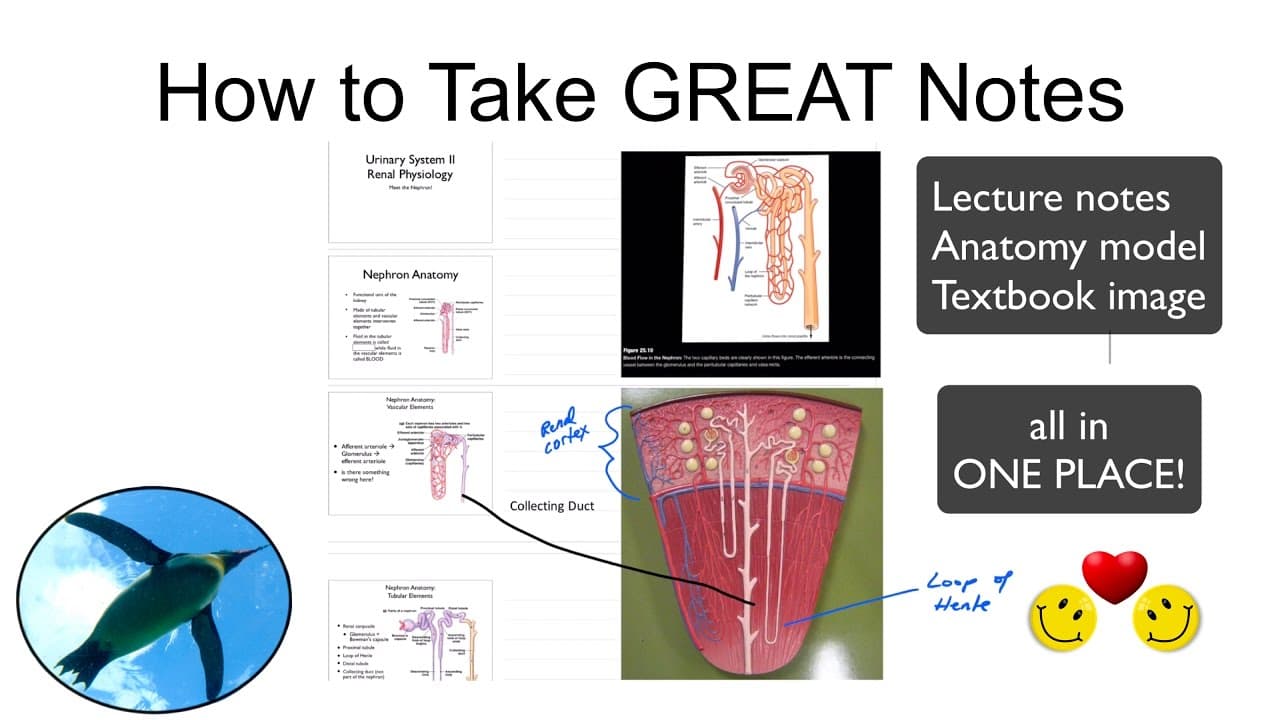
To take great notes in class using Microsoft OneNote, keep your materials organized in one place, sync across devices, and incorporate professor-provided materials. Utilize features like image insertion and drawing tools to enhance your notes, making them visually dynamic and easy to review later.
Transcript
Hello, and welcome to the Penguin Prof Channel. This is part of my College Success series. I want to talk about how to take great notes in class. So some of my notetaking strategies today, we're going to look at Microsoft OneNote, and specifically, how to incorporate your own notes with materials provided by your professor, which is very common,... Read More
Key Insights
- 🎵 Effective notetaking involves keeping notes in one place, accessible on all devices, and combining personal notes with professor-provided materials.
- 👻 Microsoft OneNote is a versatile platform for notetaking, allowing users to easily sync between devices and edit various file types.
- 😀 Other recommended notetaking apps include GoodNotes, Evernote, and Simplenote, each with their own advantages and target audience.
- 👤 Microsoft OneNote enables users to incorporate photos, draw on notes, and crop images, enhancing the learning and studying experience.
Install to Summarize YouTube Videos and Get Transcripts
Explore YouTube Video Summarizer or Get YouTube Transcript Extractor
Questions & Answers
Q: What are the advantages of using Microsoft OneNote for notetaking?
Microsoft OneNote offers features such as syncing across devices, the ability to combine personal and professor-provided materials, and easy editing of documents, photos, and PDFs.
Q: Is Microsoft OneNote compatible with all devices?
Yes, Microsoft OneNote is available on desktops, tablets, and iPhones, allowing users to access their notes wherever they go.
Q: Are there any other recommended notetaking apps?
GoodNotes, Evernote, and Simplenote are also popular options among students. GoodNotes is limited to iOS devices and is not free, while Evernote offers both free and premium versions.
Q: How can Microsoft OneNote be used to incorporate photos and eBooks into notes?
Users can easily insert photos into their notes, making it helpful for adding labels and annotations to anatomy models. OneNote also allows users to have their lecture notes, anatomy models, and textbook images all in one place.
Summary & Key Takeaways
-
The importance of keeping notes all in one place, accessible on all devices, and being able to combine personal notes with professor-provided materials.
-
Suggestions for other notetaking apps, such as GoodNotes, Evernote, and Simplenote.
-
The benefits of using Microsoft OneNote on different devices, including a desktop, tablet, and iPhone.
Read in Other Languages (beta)
Share This Summary 📚
Summarize YouTube Videos and Get Video Transcripts with 1-Click
Try YouTube Summary with ChatGPT & Claude or YouTube Transcript Generator
Explore More Summaries from ThePenguinProf 📚



Summarize YouTube Videos and Get Video Transcripts with 1-Click
Try YouTube Summary with ChatGPT & Claude or YouTube Transcript Generator