How Does DeepSeek Harness Make AI Work Traceable?
TL;DR
DeepSeek Harness makes AI development unusually modular and inspectable by treating every capability as a plugin and recording every message, tool call, loaded skill, payload, result, and timing detail. Its developer preview can run from source, connect to multiple model providers, operate on local workspaces, export session logs, and create new plugins from natural-language requests through creator mode.
Transcript
Today we're going to take a look at the new Deep Seek harness. Yesterday on August 13th, they released a developer preview and the approach that they're taking is very unique and interesting. The philosophy is that everything in this harness is a plug-in and I mean everything. The UI sidebar, the tool use capabilities, the system prompt, everything... Read More
Key Insights
- DeepSeek Harness is organized around a plugin architecture in which interface elements, tool capabilities, system prompts, and other features can be activated or deactivated. This makes the environment highly modular and allows users to control individual components at a very granular level.
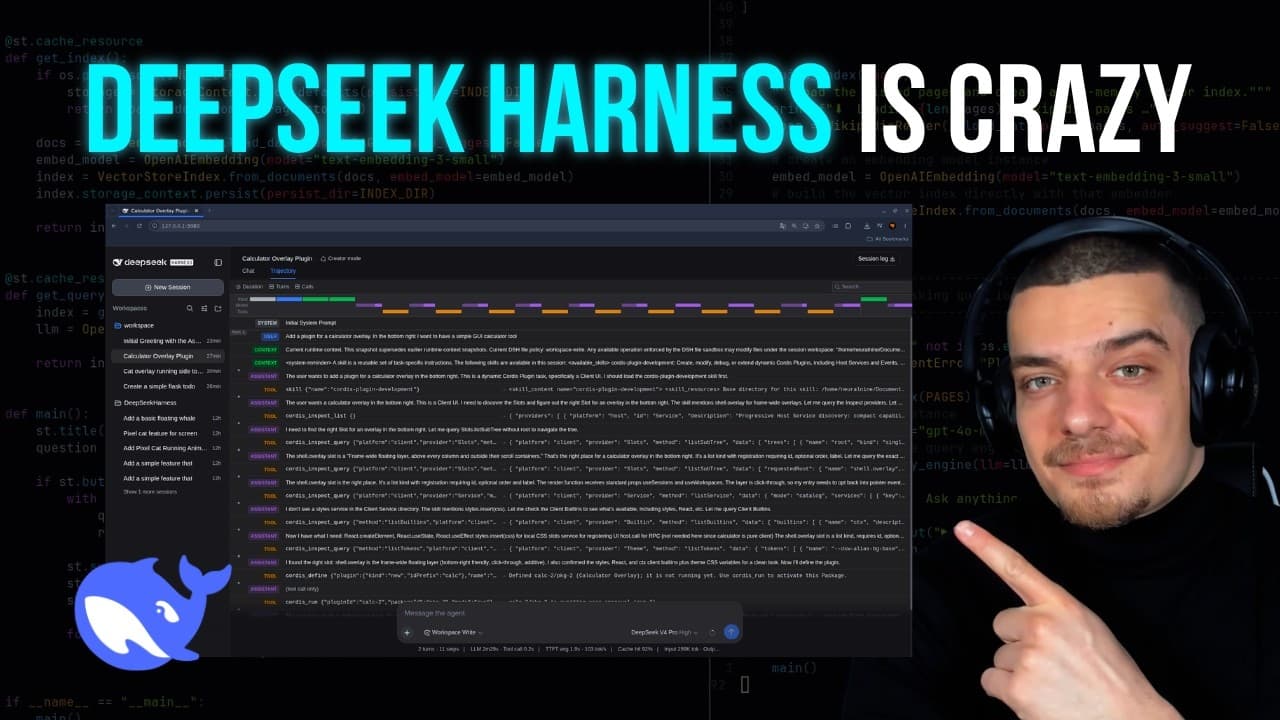
- Every DeepSeek Harness run is traceable through a graphical trajectory view that exposes the system prompt, user prompt, loaded context, assistant messages, reasoning, tool calls, payloads, and tool results. The interface also reports timing, duration, turn counts, and the sequence of events.
- Session records can be exported as a ZIP file containing a session JSONL file. This provides a portable record of what occurred during a run, including the underlying messages and actions that users can inspect outside the web interface with ordinary command-line tools.
- The harness is based on Cordis, which is associated with a formal paradigm centered on reversible actions and composability. The described concept gives actions inverse operations and emphasizes adding or removing components without unwanted side effects while reactively managing dependencies between components.
- Running DeepSeek Harness from source requires cloning its repository, installing dependencies with PNPM, building the project, and launching its web interface. The demonstrated workflow opens the harness locally and uses a selected workspace directory as the target for generated project files.
- Model access is configurable rather than limited to the DeepSeek API. The settings interface can add external providers through API keys or custom endpoints, as demonstrated with Open Code Go and a custom Ollama installation running models on another device.
- Agent presets provide different capability configurations for different tasks. The available options shown are standard mode, code mode, minimal mode, and creator mode, with creator mode specifically intended for developing plugins and constructing customized presets through prompted requests.
- Creator mode can build and activate a plugin from a natural-language description during a session. In the demonstration, it loads a Cordis plugin-development skill, creates a cat overlay moving across the bottom of the screen, requests confirmation, and dynamically activates the result.
Install to Summarize YouTube Videos and Get Transcripts
Explore YouTube Video Summarizer or Get YouTube Transcript Extractor
Questions & Answers
Q: What is DeepSeek Harness designed to do?
DeepSeek Harness is designed as a modular environment for working with AI models, tools, workspaces, and generated applications. Its two defining ideas are that every capability is implemented as a plugin and every run can be inspected in detail. Users can configure model providers, choose agent presets, trace actions, export session records, and create additional capabilities through prompts.
Q: How does DeepSeek Harness trace an AI agent run?
DeepSeek Harness provides a graphical trajectory view containing each stage of an agent run. Users can inspect the system prompt, user prompt, loaded context, assistant messages, reasoning text, tool calls, exact payloads, and returned results. The interface also shows statistics such as turn count, timestamps, call duration, and the order in which individual actions occurred.
Q: How do you install and launch DeepSeek Harness from source?
The demonstrated installation process starts by cloning the DeepSeek Harness repository and entering its directory. Dependencies are then installed with PNPM, followed by the project build command. The web interface is launched with the harness web command, which provides a local link that can be opened in a browser to configure providers, workspaces, presets, and sessions.
Q: Can DeepSeek Harness use model providers besides DeepSeek?
DeepSeek Harness can connect to providers other than the DeepSeek API through its model settings. The demonstration adds Open Code Go with an API key and also connects to a custom Ollama service running on another device. The presenter states that many providers can be configured, although a ChatGPT subscription could not be connected as far as he knew.
Q: What information can be exported from a DeepSeek Harness session?
A DeepSeek Harness session can be exported from the trajectory interface as a ZIP file. The exported archive contains a session JSONL file that records session activity for external inspection. This complements the graphical trace, allowing users to examine the underlying sequence of messages and actions with command-line utilities or other tools that can read JSONL data.
Q: How can a plugin be disabled in DeepSeek Harness?
In the developer preview, a plugin can be disabled by editing the Cordis patch YAML configuration rather than clicking a control in the interface. The demonstration opens the web profile configuration, adds the UI sidebar plugin identifier, and marks it as disabled. Reloading removes the sidebar, while restoring the empty list and reloading brings the sidebar back.
Q: What is creator mode in DeepSeek Harness?
Creator mode is an agent preset specifically intended for adding plugins dynamically and creating customized capabilities. A user describes the desired feature in natural language, and the harness loads its Cordis plugin-development skill to build it during the session. Before activation, the interface asks the user to confirm the new plugin, after which the feature becomes available immediately.
Q: How does DeepSeek Harness create a plugin from a prompt?
The user starts a session in creator mode, selects a model and reasoning level, and describes the desired behavior. In the demonstration, the request specifies a cat overlay moving from left to right and back along the bottom of the screen. The harness develops the plugin, presents an approval control, activates the animation after confirmation, and provides a way to stop it.
Summary & Key Takeaways
-
DeepSeek Harness is presented as a developer preview built around two principles: every component is a plugin, and every run is traceable. Its modular structure covers interface elements, tools, system prompts, and skills, while its trajectory view exposes the complete sequence of messages, reasoning, calls, results, timestamps, and durations.
-
The harness can be cloned, installed with PNPM, built from source, and launched through its web interface. Users can supply a DeepSeek API key or configure other providers, including API-based services and a custom Ollama deployment. Agent presets include standard, code, minimal, and creator modes for different capability levels.
-
Plugin management is highly granular, although the preview still requires configuration-file edits for some changes. The demonstration disables and restores the sidebar through YAML, then uses creator mode to request a moving cat overlay. The harness develops the plugin during the session, asks for approval, activates it, and allows it to be stopped.
Read in Other Languages (beta)
Share This Summary 📚
Summarize YouTube Videos and Get Video Transcripts with 1-Click
Try YouTube Summary with ChatGPT & Claude or YouTube Transcript Generator
Explore More Summaries from NeuralNine 📚

Summarize YouTube Videos and Get Video Transcripts with 1-Click
Try YouTube Summary with ChatGPT & Claude or YouTube Transcript Generator