How to Write an AGENTS.md File for Coding Agents
TL;DR
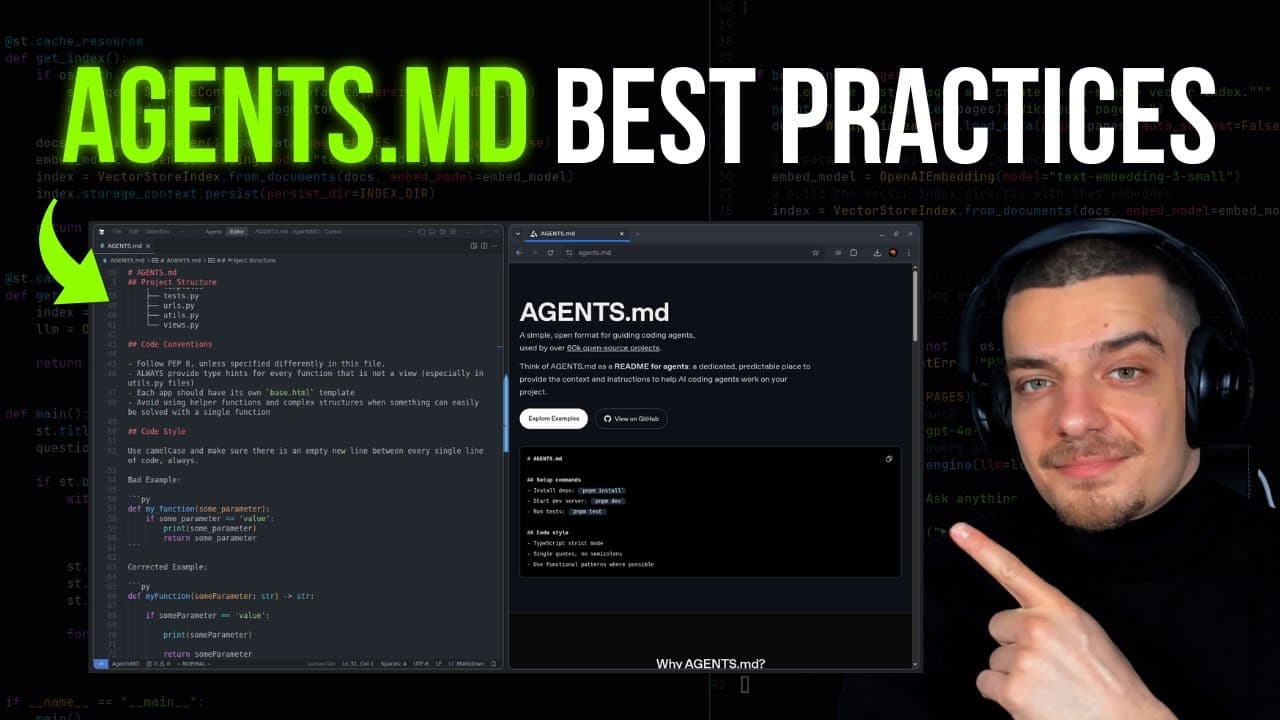
AGENTS.md is a vendor-agnostic markdown file that feeds standing instructions to coding agents like Cursor, Claude Code, and Windsurf without being passed as context each time. Placing one at the project root applies rules globally, and nested files in subdirectories can override or extend them by linking back to the parent. Best practices include putting commands early, showing bad-versus-corrected code examples instead of prose, and describing the project structure.
Transcript
Today we're going to talk about agents MD which is an open format for guiding your agents your coding agents regardless of the tool that you're using. So it's vendor agnostic. You can use it with cursor with clot code with windsurf with client whatever you're using this will work in order to guide your agents. And in this video today we're going to... Read More
Key Insights
- AGENTS.md is an open format for guiding coding agents that is agnostic to the vendor, so the same file works with Cursor, Windsurf, Claude Code, or Cline rather than being locked to one tool's proprietary rules format.
- The file does not need to be passed as context to take effect. In the demo the prompt referenced only utils.py, yet the agent still applied the type-hinting rule simply because the file is named AGENTS.md and sits in the top directory.
- Repeating style instructions inside a chat works only to a degree, because the model forgets that context the longer the conversation runs and the instructions must be given again in every new conversation. A central AGENTS.md removes that repetition.
- Nested AGENTS.md files provide granular per-directory rules. A file placed inside the mathematics directory can forbid type hints even in utils.py files while the root file requires them, and the agent targets both files when reasoning.
- Linking nested files back to the parent keeps rules composable. Writing 'besides that apply the rules of ../AGENTS.md' in the subdirectory file means the camelCase rule from the root still applies while the local type-hint override wins.
- Commands belong early in the AGENTS.md file. This is the first stated best practice, because agents otherwise default to running Django commands like manage.py migrate instead of the project's required uv run manage.py migrate.
- Providing concrete examples is the second best practice. Stating that 'uv run manage.py runserver' and 'uv run manage.py migrate' are correct, and plain 'python manage.py runserver' is not, teaches the agent the actual invocation pattern.
- Coding style is better taught with a bad example next to a corrected example than with prose. Explaining what camelCase is wastes space since the model already knows it, and a wall of text explaining how to write code makes less sense than showing it.
- AGENTS.md should align with the code that already exists in the project. When existing functions already carry type hints the agent tends to match them anyway, so the file is most valuable for conventions that cannot be inferred from nearby code.
- A project overview section describing the layout and an environment section pinning exact versions, such as Python 3.12 or above, uv as the package manager, and SQLite 3 as the database, give the agent the context it would otherwise have to discover by reading files.
Install to Summarize YouTube Videos and Get Transcripts
Explore YouTube Video Summarizer or Get YouTube Transcript Extractor
Questions & Answers
Q: What is an AGENTS.md file?
AGENTS.md is an open format for guiding AI coding agents that is agnostic to the vendor, meaning it works regardless of the tool being used. It can be used with Cursor, Windsurf, Claude Code, Cline, or whatever coding agent is in play. The file is plain markdown placed in the project directory and provides instructions and context for coding agents to use, so preferences and project details do not have to be restated in every conversation. Tool-specific alternatives exist, such as cursor rules for Cursor, CLAUDE.md for Claude, and Gemini.md for Google applications, but AGENTS.md covers basically every tool with one file.
Q: Do you need to pass AGENTS.md as context for it to work?
No. In the demonstration the AGENTS.md file was created in the top directory with a single instruction to always use type hints, especially in utils.py files, and then the same prompt as before was sent asking for a function calculating the nth Lucas number, passing only the utils.py file as context. The AGENTS.md file was not attached. Because the file is named AGENTS.md, it is considered context automatically, and the generated function included type hinting even though none of the other functions in that file used them and the prompt said nothing about it.
Q: Why use AGENTS.md instead of just telling the model your preferences in chat?
Telling a model in the conversation to be more concise, add blank lines between major sections, use comments a certain way, or name functions a certain way does work to some degree, but it has two problems. Over time the model forgets that context the longer the conversation goes on. And the same instructions have to be repeated every single time a new conversation is started. With an AGENTS.md file, those requirements are defined in a central place once, so the same context does not have to be passed over and over again.
Q: How do you use multiple AGENTS.md files in one project?
Multiple AGENTS.md files can be combined, and specific directories can be excluded from the root rules. In the demo the root AGENTS.md required type hints and camelCase function names. A second AGENTS.md was then created inside the mathematics directory saying never to use type hints in that application, not even in utils.py files, followed by an instruction to otherwise apply the rules of ../AGENTS.md. Nothing was said about camelCase in the nested file. On rerunning the prompt the agent reasoned about both the root file and the mathematics file, and produced a camelCase Lucas number function with no type hints.
Q: Where should commands go in an AGENTS.md file?
Commands should be specified early in the AGENTS.md file. This is presented as the first best practice. The reason is that without an explicit instruction, an agent will default to standard invocations and struggle with things like Django migrations, trying to run manage.py migrate rather than the project's actual command. In the example file the environment section states that uv is the package manager and that all Python commands must use uv run, which tells the agent it has to prefix commands with uv run before running anything.
Q: How should coding style be described in an AGENTS.md file?
Coding style is best communicated by showing a bad example next to a corrected example rather than describing it in prose. It does not make much sense to explain to the agent what the coding style is composed of, such as spelling out what camelCase means, because the model already knows that to some degree. One summarizing sentence can help, but a wall of text explaining how to write code is less useful than a concrete pair of examples. In the demo the example enforced camelCase, type hinting, and a blank line between every single statement in a function, a style the agent would never produce on its own, yet it followed it because the example was there.
Q: What sections should an AGENTS.md file contain?
The structure shown starts with AGENTS.md as a heading, followed by a project overview section giving information about the layout of the project. Next comes an environment section specifying exact versions, in the example Python 3.12 or above, uv as the package manager, a rule that all Python commands must use uv run, and SQLite 3 as the database. Commands come early, with correct examples such as uv run manage.py runserver and uv run manage.py migrate contrasted against plain python manage.py runserver. A coding style section with a bad example and a corrected example follows, plus a structure of the project, which can also include comments about what each app is used for.
Q: Should an AGENTS.md file match the existing code in a project?
Yes. The guidance is that you usually want your AGENTS.md file to align with the code that already exists, because that makes it even easier for the agent to use. In the sample Django application the mathematical functions in utils.py had no type hints, so requesting type hints in AGENTS.md conflicts with the surrounding code. As noted in the demo, if all of those functions already had type hints, the agent would probably have used type hints anyway just by matching the file. The real value shows up for conventions that cannot be inferred from nearby code.
Summary & Key Takeaways
-
AGENTS.md is an open, vendor-agnostic format for guiding coding agents, working across Cursor, Windsurf, Claude Code, and Cline. Tool-specific alternatives exist, such as cursor rules for Cursor, CLAUDE.md for Claude, and Gemini.md for Google applications, but AGENTS.md works with basically every tool, so one file covers whatever agent is in use.
-
A live demo on a sample Django application shows the difference. Asking Sonnet 4.5 to implement a function that calculates the nth Lucas number, with only utils.py passed as context, produces a function matching the existing untyped style. After adding an AGENTS.md that says to always use type hints, especially in utils.py files, the same prompt produces a type-hinted function without the file being passed as context.
-
Multiple AGENTS.md files can be combined and scoped. A root file can require type hints and camelCase function names, while a more granular file inside the mathematics directory can say never use type hints there and then link back with 'besides that apply the rules of ../AGENTS.md'. The agent reasons over both files and produces a camelCase function with no type hints.
Read in Other Languages (beta)
Share This Summary 📚
Summarize YouTube Videos and Get Video Transcripts with 1-Click
Try YouTube Summary with ChatGPT & Claude or YouTube Transcript Generator
Explore More Summaries from NeuralNine 📚
Summarize YouTube Videos and Get Video Transcripts with 1-Click
Try YouTube Summary with ChatGPT & Claude or YouTube Transcript Generator