4 channel temperature logger based on the DS18B20 sensors
TL;DR
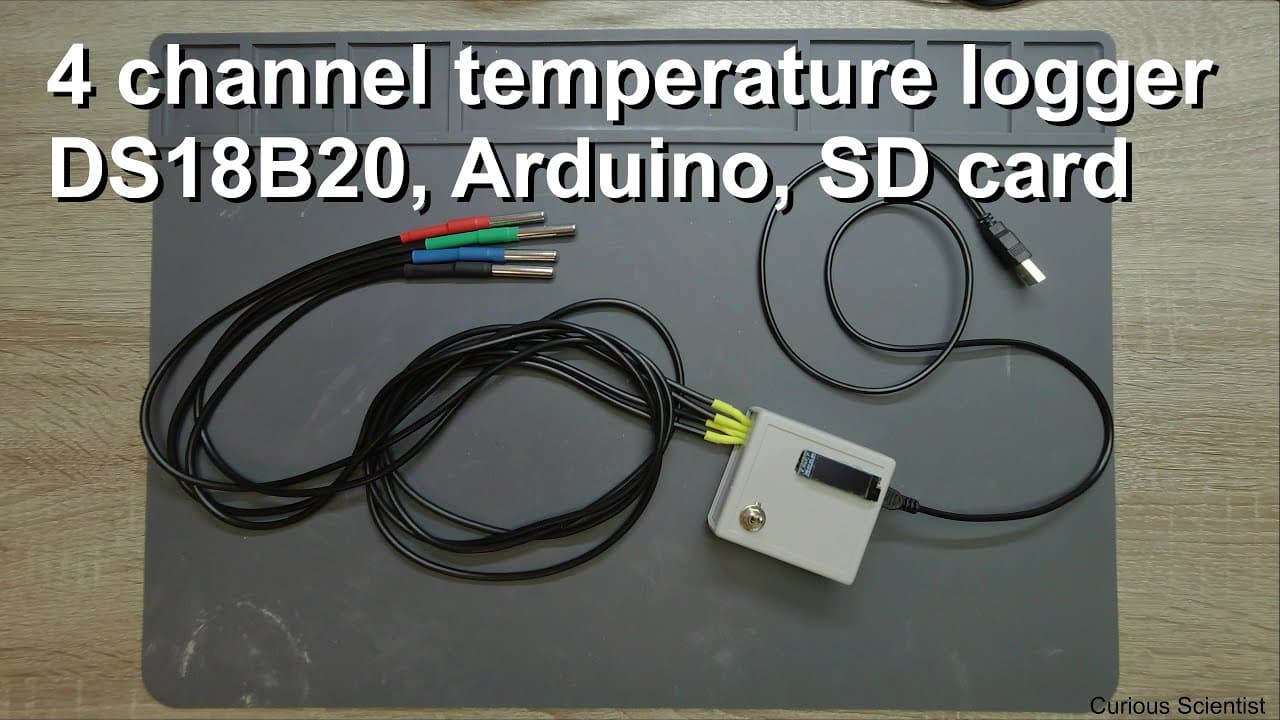
This video demonstrates building a temperature sensor data logger using DS18B20 sensors and Arduino.
Transcript
welcome everyone in this video I'm going to show you another temperature sensor - data Locker so this guy that you can see here is a Diaz 18 B 20 based thermometer and these are the thermometer units so the chips are in capsule in these small stainless steel units and I put some heat shrink tubes there just to distinguish them so RGB like the color... Read More
Key Insights
- ♻️ The DS18B20 sensor is versatile and fits well in environments where waterproofing and accuracy are crucial.
- 👻 Utilizing a one-wire interface allows for easy integration of multiple temperature sensors, simplifying complex setups.
- 👨💻 The code includes specific libraries that optimize memory usage, vital for Arduino projects with limited resources.
- 🧑💻 The project emphasizes the importance of real-time data visualizations complemented by logging capabilities for later analysis.
- 👻 A toggle switch enhances user control, allowing dynamic interactions with the device's data logging functionality.
- 😄 The design includes clear dimensions for the project casing, highlighting the ease of portability and compactness.
- 👨💻 Detailed explanations of the coding process support beginners in understanding Arduino programming for sensor integration.
Install to Summarize YouTube Videos and Get Transcripts
Explore YouTube Video Summarizer or Get YouTube Transcript Extractor
Questions & Answers
Q: What are the main advantages of using the DS18B20 temperature sensor in this project?
The DS18B20 sensor provides significant advantages due to its waterproof design, wide temperature range from -55 to 125 degrees Celsius, and the simplicity of a one-wire communication interface. This allows for efficient implementation as multiple sensors can be connected in parallel to the same data line, reducing complexity and wiring.
Q: How is the temperature data displayed and logged in this setup?
The temperature data is displayed on a 128x32 OLED screen connected to the Arduino, while simultaneous logging occurs on an SD card. The code manages the display of current temperatures and elapsed time, and data is recorded when a toggle switch indicates logging is active.
Q: Why is the ability to choose different resolutions significant for the DS18B20 sensor?
The ability to select sensor resolutions from 9 to 12 bits allows for tailored accuracy in temperature readings according to the project's needs. Higher resolutions result in more precise temperature measurements, which is crucial for applications requiring detailed temperature monitoring, such as in cooling systems or environmental testing.
Q: How does the code manage the writing of data to the SD card?
The code is designed to append data to the SD card file rather than overwrite it, allowing for continuous logging. It opens the file at the end and writes new measurements sequentially, ensuring that data from multiple sessions can coexist in one log file, making later analysis easier.
Q: What challenges did the presenter face during assembly and how were they addressed?
One challenge mentioned was ensuring waterproofing, which was problematic with the previous LM33 setup. The presenter resolved this by switching to the DS18B20 sensors, which are inherently waterproof, thus allowing the device to operate in wet environments without risk of damage or data loss.
Q: Can the setup be adjusted for different types of sensors or additional features?
Yes, the setup can be adapted by using different temperature sensors or integrating additional features such as humidity sensors or advanced data analysis tools. The Arduino platform's flexibility allows for varied sensor types with minimal modifications to both wiring and code.
Q: What does the toggle switch in the device do?
The toggle switch controls the logging function of the temperature data. When positioned to enable logging, the device starts recording temperature data to the SD card and resets the elapsed time for each new measurement session, providing clarity on different logging intervals.
Q: What future projects might the presenter be planning using this setup?
The presenter hinted at developing a test unit for Peltier coolers, which would involve measuring temperature on both hot and cold sides, as well as tracking power consumption. This project aims to enhance the monitoring capabilities and performance evaluation of cooling systems.
Summary & Key Takeaways
-
The presenter explains how to utilize DS18B20 temperature sensors for accurate logging of temperature data using an Arduino setup, showcasing the assembly and functionality of the device.
-
Key features of the setup include a waterproof design, ability to log temperature from -55 to 125 degrees Celsius, and a simple one-wire interface for multiple sensors.
-
The video concludes with a demonstration of the code enabling data logging to an SD card, displaying real-time temperature readings on an OLED screen, and emphasizes future project plans.
Read in Other Languages (beta)
Share This Summary 📚
Summarize YouTube Videos and Get Video Transcripts with 1-Click
Try YouTube Summary with ChatGPT & Claude or YouTube Transcript Generator
Explore More Summaries from Curious Scientist 📚
![Building a coil winder [Part 6] - A few improvements thumbnail](/_next/image?url=https%3A%2F%2Fi.ytimg.com%2Fvi%2F3eyxG_g2iUA%2Fhqdefault.jpg&w=750&q=75)



Summarize YouTube Videos and Get Video Transcripts with 1-Click
Try YouTube Summary with ChatGPT & Claude or YouTube Transcript Generator