How Do You Solo Build an AI Native Business, Achieve Viral Success, and Create a Gmail Agent with Claude Code and MCP? Week 2
TL;DR
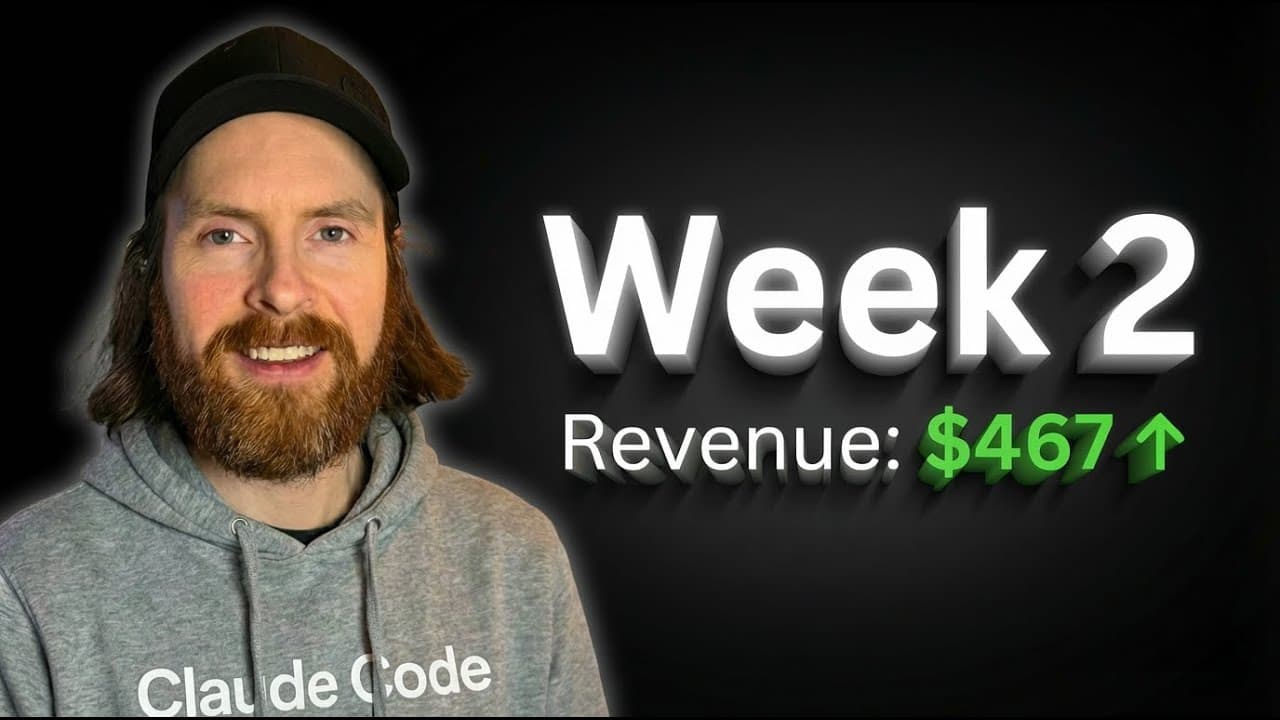
Build a Gmail agent by connecting Claude Code to Gmail through an MCP server, then configure Google Cloud access, OAuth scopes, credentials.json, and token.json. In Week 2 of Solo Building an AI Native Business, the creator also reports $467 in January revenue and shows one new channel reaching 493,000 views in about 15 hours. Read on for the setup steps, revenue breakdown, and viral Shorts results.
Transcript
Hello. Hope you are doing well. So yeah, this is week two. If you watched the last episode, you know we are doing a bit of a different thing this year. We're just going to build out all these AI micro businesses from everything we learned the last 3 years. And we're going to track everything and I'm going to share a bit here what I'm doing each wee... Read More
Key Insights
- Building an AI micro business here means everything is AI generated: the creator built an AI video course platform from scratch using Claude Code, buying nothing and generating the product with AI rather than assembling it manually.
- A single AI-generated YouTube Short can go viral fast, pulling hundreds of thousands of views within hours and gaining subscribers rapidly, showing that faceless shorts channels can produce real ad revenue when the right format hits.
- A Gmail agent can be connected to Claude Code through MCP, letting the assistant list, read, send, reply to, and search emails once the Google Cloud credentials and token are in place.
- Setting up the Gmail API starts in Google Cloud Console by creating a project, then going to APIs and Services to find and enable the Gmail API, which the creator describes as a very easy step.
- Configuring the OAuth consent screen requires adding Gmail scopes: the modify scope, the read-only scope, and the send scope, all managed through the add and remove scopes interface under data access.
- Creating OAuth credentials means going to Credentials, creating an OAuth client ID, selecting the desktop app type, naming it something like Gmail MCP server, and downloading the resulting credentials.json file into the agent folder.
- Authentication produces a token by running an auth flow that opens a link, confirms success in the browser, and writes a token.json file the MCP server needs before it can be added to Claude Code.
- Planning mode in Claude Code lets you review the agent's proposed steps, such as required scopes, credential paths, and token handling, before executing, so you validate the approach before any code runs.
- "So, so far we have $467 in January." (1:21)
- "I built the platform from scratch using cloud code." (1:43)
- "So, in like 15 hours or something, 493,000 views and the last 60 minutes, it's 72,000 views." (3:12)
- "And this is a new channel, so I got like 1,500 subs in one day." (3:47)
- "So we're just going to build like a simple Gmail agent." (5:10)
Install to Summarize YouTube Videos and Get Transcripts
Explore YouTube Video Summarizer or Get YouTube Transcript Extractor
Questions & Answers
Q: How do you build a Gmail agent with Claude Code and MCP?
Create an email-agent directory, save the Claude Code MCP documentation there, and ask Claude Code to plan a simple Gmail agent. Then enable Gmail access in Google Cloud, configure OAuth, download credentials.json, authenticate to create token.json, add the MCP server, and test it with recent emails.
Q: What can the Gmail agent do after it is connected?
The agent can list, read, send, reply to, and search emails. These actions become available after the Google Cloud credentials and authentication token are in place.
Q: Which Gmail OAuth scopes does the MCP server need?
The setup uses the Gmail modify, read-only, and send scopes. They are added through the OAuth consent screen under the data access section.
Q: What OAuth client type should you create for the Gmail MCP server?
Create an OAuth client ID and select desktop app as the application type. After naming the client, such as Gmail MCP server, download its credentials.json file into the email-agent folder.
Q: How do you create token.json for the Gmail MCP server?
Run the authentication flow after placing credentials.json in the agent folder. Open the generated authorization link and complete the approval process, which writes token.json for the MCP server.
Q: How much revenue did the AI micro businesses generate in January?
The creator reports $467 in January from the AI micro businesses, excluding the main YouTube channel and other businesses. The AI video course platform contributed $210, while the Shorts channels amounted to $257.
Q: How quickly did the new AI Shorts channel go viral?
Its only video reached 493,000 views in about 15 hours and recorded 72,000 views in the latest 60 minutes shown. The new channel also gained about 1,500 subscribers in one day.
Q: What makes the AI video course an AI micro business?
The creator says the platform was built from scratch using Claude Code and that everything is AI generated. Nothing was purchased for the platform, and it produced $210 during the reported month so far.
Summary & Key Takeaways
-
This is week two of a series documenting the solo build-out of AI micro businesses, using lessons from prior years. The creator tracks revenue from side-hustle ventures separate from the main YouTube channel, including an AI-built video course platform and several faceless shorts channels, and built a custom tool to track monthly growth.
-
The creator shows a newly created shorts channel whose single video went viral, accumulating a large number of views within hours and gaining many subscribers in a day. This is presented as proof that AI-generated shorts can produce meaningful ad revenue and is offered as an accessible AI micro business others can try.
-
The main build is a Gmail agent using Claude Code and an MCP server. The walkthrough covers gathering MCP documentation, dictating a plan to Claude Code, enabling the Gmail API, configuring the consent screen with the needed scopes, creating desktop-app credentials, authenticating for a token, adding the server, and testing it by listing recent emails.
Read in Other Languages (beta)
Share This Summary 📚
Summarize YouTube Videos and Get Video Transcripts with 1-Click
Try YouTube Summary with ChatGPT & Claude or YouTube Transcript Generator
Explore More Summaries from All About AI 📚
Summarize YouTube Videos and Get Video Transcripts with 1-Click
Try YouTube Summary with ChatGPT & Claude or YouTube Transcript Generator