How to Build a No-Code Personal Assistant AI Agent in n8n
TL;DR
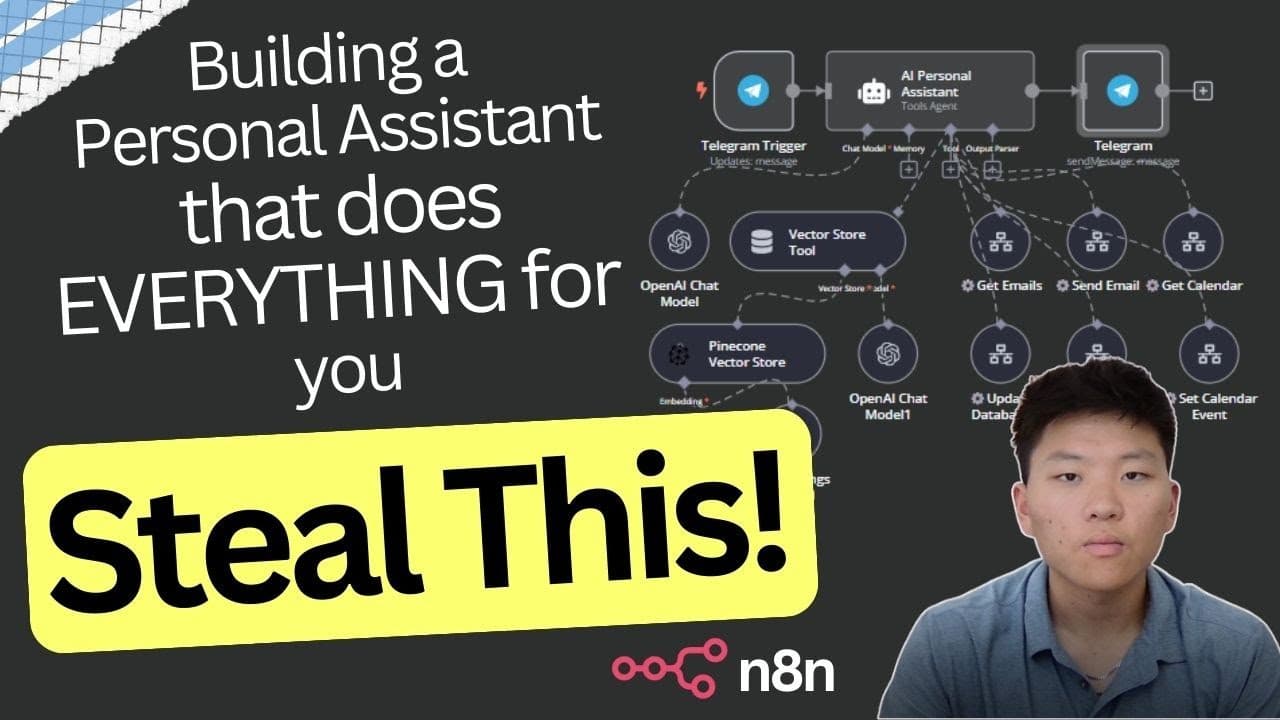
Build a no-code personal assistant AI agent in n8n by connecting Telegram to a GPT-4o agent and custom workflows for email, calendar, and database tasks. Pinecone stores contact information, while specialized nodes parse dates, summarize unread emails, aggregate results, and return a response to the main agent. Read on to understand how each component handles requests and reports completed actions.
Transcript
I'm super excited to share this AI agent build with you guys today I definitely think that it's going to change the way that I do my business especially anything personal Administration related and that's because I'm going to consider this a human personal assistant except for unlike a human this thing is going to be available to me 24/7 it's going... Read More
Key Insights
- The agent is controlled entirely through Telegram, so requests can be typed from a phone or desktop and the agent either returns a result or reports that it completed a back-end action like updating a database or setting a calendar event.
- GPT-4o serves as the brain of the agent entity, providing the reasoning that decides which sub-tool to call to complete a user's request.
- A Pinecone vector store holds contact information, letting the agent look up a person like Jenny or Mike by name and retrieve their email address before sending a message.
- Custom sub-tools built inside n8n (get emails, send email, get calendar, set calendar, update database, summarize database) are marked with a logo showing they connect to workflows the creator built in the same software.
- Email summarization works by filtering Gmail for inbox messages marked unread and received after the requested date, so already-read emails from the same day are excluded from the summary.
- An OpenAI node interprets relative dates by receiving the current date via a JavaScript '$now' script plus examples for 'today' and 'yesterday', ensuring consistent date parsing since the model does not always infer date math reliably.
- An aggregate node combines multiple email items into one output so Telegram returns all summaries at once instead of only messaging back the first email.
- Each sub-tool workflow must write a field named 'response' (or a value like 'sent' or 'done') that signals back to the agent that the task completed and supplies any information to relay to the user.
Install to Summarize YouTube Videos and Get Transcripts
Explore YouTube Video Summarizer or Get YouTube Transcript Extractor
Questions & Answers
Q: How do you build a no-code personal assistant AI agent in n8n?
Create an AI agent powered by GPT-4o, connect it to Telegram, and give it access to custom n8n sub-tools. The demonstrated tools get and send emails, get and set calendar events, update and summarize a database, and retrieve contact information from Pinecone.
Q: How do you interact with the n8n personal assistant AI agent?
You send requests through Telegram from a phone or desktop. The agent then returns the requested result or confirms that it completed a back-end action, such as updating the database or setting a calendar event.
Q: What model powers the personal assistant agent?
GPT-4o serves as the brain of the agent and provides its core reasoning. It decides which connected sub-tool should handle each request, while OpenAI nodes inside individual workflows can perform tasks such as parsing dates and summarizing emails.
Q: What is Pinecone used for in the n8n AI agent?
Pinecone stores contact information for the agent. When asked to email someone such as Mike or Jenny, the agent can find that person’s email address and pass it to the send-email workflow.
Q: How does the agent summarize emails from today?
An OpenAI node converts the requested relative date into a specific date, and a Gmail node retrieves inbox emails that are unread and received after that date. Each retrieved email is summarized, and an aggregate node combines the results before they are returned through Telegram.
Q: Why are read emails excluded from the summary?
The Gmail node filters specifically for messages marked as unread. Consequently, emails already read on the same day are excluded; in the demonstration, two unread emails were summarized while a read email from that day was skipped.
Q: How does the workflow interpret dates such as “today” and “yesterday”?
An OpenAI node receives the user’s JSON query and the current date supplied by the JavaScript $now value. Its prompt includes examples directing it to return the current date for “today” and the preceding date for “yesterday,” improving consistency when handling date calculations.
Q: How does a sub-tool report its result to the main agent?
Each sub-tool writes its output or completion status to a field named response. An email-summary workflow places the summarized content there, while the send-email workflow can return a value such as sent or done so the agent can confirm completion through Telegram.
Summary & Key Takeaways
-
The build is a personal assistant AI agent created with no code in n8n, interacted with through Telegram so the user can ask it to do tasks from a phone or desktop. It is pitched as available 24/7, responding immediately at a fraction of the cost of hiring a human personal assistant.
-
The agent uses GPT-4o as its brain and connects to a Pinecone vector store holding contact information, so it can find a person's email by name. Custom n8n sub-tools handle getting and sending emails, getting and setting calendar events, and updating and summarizing a database.
-
In the email demo, typing 'summarize my emails from today' filters unread inbox emails after the requested date, uses an OpenAI node to parse the date and another to summarize, aggregates them into one message, and returns a 'response' field to the agent to relay back on Telegram.
Read in Other Languages (beta)
Share This Summary 📚
Summarize YouTube Videos and Get Video Transcripts with 1-Click
Try YouTube Summary with ChatGPT & Claude or YouTube Transcript Generator
Explore More Summaries from Nate Herk | AI Automation 📚






Summarize YouTube Videos and Get Video Transcripts with 1-Click
Try YouTube Summary with ChatGPT & Claude or YouTube Transcript Generator