How to Build a No-Code AI Customer Support Agent
TL;DR
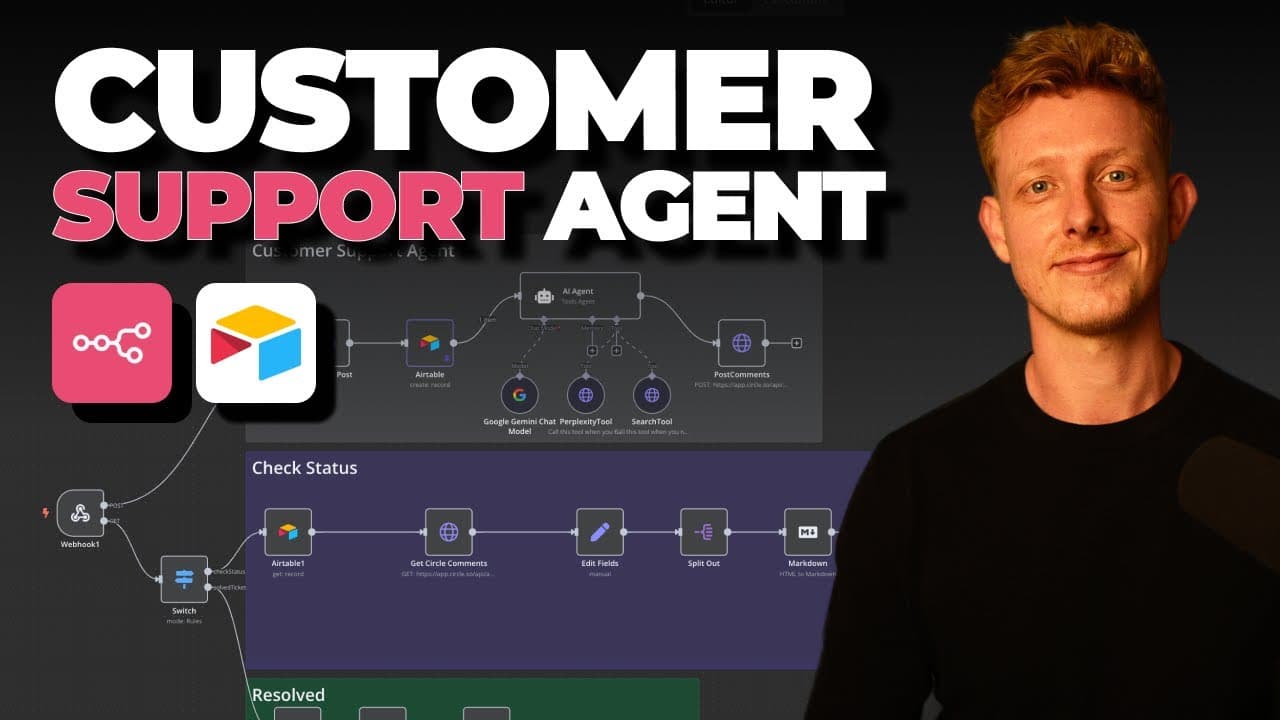
You can build an automated customer support agent with a ticketing dashboard using no-code tools like n8n and Airtable. The agent first searches past community questions for a relevant answer, then falls back to Perplexity if none exists, posts an HTML reply with a confidence level, and automatically updates ticket statuses as issues get resolved.
Transcript
So, in this video, I'll show you how to set up a customer support agent with a built-in ticketing dashboard without using code. Now, I built this system for my own circle community to help people get faster answers to their tech questions, but it can easily be adjusted to any other community platform like school, uh, Discord, Slack, WhatsApp or Fac... Read More
Key Insights
- The system is built with no code using n8n for automation and Airtable as the ticketing dashboard, and the complete template is offered for free in the video description.
- The agent triggers automatically whenever someone posts a tech question in the Circle community, then creates an Airtable ticket and generates an AI reply back on the original post.
- The AI agent's critical workflow is to always use the search tool first, scanning past community posts for similar answers, and only use the Perplexity tool if no relevant prior answer exists.
- Ticket statuses in Airtable include new, replied (or have not replied), solved, and urgent resolution, giving a clear pipeline for tracking whether each tech issue is actually resolved.
- A second automation checks each post's status by reading the post and its responses, deciding whether the question is resolved or needs more replies, and updating the Airtable status automatically.
- When a post is marked solved, either by a human or the automation, a final workflow updates the original Circle post and marks it as solved in the title.
- The agent's replies are always delivered in HTML format and include additional resources, links back to similar past community posts when relevant, and a confidence level for the answer.
- The same Circle webhook is reused for both the POST method (new questions) and the GET method (status checks from Airtable), keeping the setup clean rather than using three separate webhooks.
Install to Summarize YouTube Videos and Get Transcripts
Explore YouTube Video Summarizer or Get YouTube Transcript Extractor
Questions & Answers
Q: How do you build a no-code AI customer support system?
You set up an automation in n8n that triggers when someone posts a question in your community. The workflow retrieves the post details via a webhook, creates a ticket in an Airtable dashboard, and passes the post title and body to an AI agent. The agent searches past community answers or uses Perplexity, then posts a reply back. Airtable manages statuses, and additional workflows check resolution and mark posts as solved automatically. A free template is provided in the description.
Q: What tools does this AI support system use?
The system is built in n8n for the automation, with Airtable serving as the ticketing dashboard through its native n8n integration. The community platform in the demo is Circle, connected via a webhook and API calls. The AI agent has two tools: a search tool that queries past Circle community posts, and Perplexity for resolving questions when no prior community answer exists. Responses are delivered in HTML format.
Q: How does the AI agent decide how to answer a question?
The agent follows an exact sequence defined in its prompt: it always uses the search tool first. That search tool makes an API call to the Circle community to look for relevant past posts about the same topic and prioritizes prior answers given to similar queries. Only if it cannot find a relevant answer in the community does it fall back to using the Perplexity tool. It then posts the reply, sometimes linking back to similar past posts.
Q: What community platforms can this system work with?
The demo is built for a Circle community, but the creator states it can easily be adjusted to other community platforms like school, Discord, Slack, WhatsApp, or Facebook. It can also be used for customer support through email or websites. The setup would be very similar across platforms, though Slack would use a separate native integration trigger instead of a manual webhook. The core automation logic stays the same regardless of platform.
Q: How does the Airtable ticketing dashboard track support tickets?
When a new tech question comes in, the automation creates a ticket in Airtable containing the post title, post detail, user email, username, status, topics, post URL, and user ID. New tickets start with a status of new. The dashboard uses statuses such as have not replied, replied, solved, and urgent resolution so the team can make sure every tech issue in the community gets resolved. Statuses update automatically through the automation.
Q: How does the system know when a support ticket is resolved?
A second automation checks the status of a post. You can trigger it by clicking a check mark in Airtable, which sends a request to look at the post and its responses. The automation interprets whether the extra comments from other people actually resolved the user's question, then decides if it is resolved, needs extra replies, or is solved. Based on that conclusion it updates the status in the Airtable dashboard automatically and moves the ticket through the pipeline.
Q: What happens after a support ticket is marked as solved?
Once a post is solved, either a human moves it to solved or the automation detects it is solved. This triggers a final workflow that updates the original Circle post and marks it as solved inside the post's title. This closes the loop so the community can see the question has been handled. The status change in Airtable and the update on the community post happen automatically as part of the connected workflows.
Q: Why does the system use one webhook for multiple methods?
The creator set up a single Circle webhook that allows multiple HTTP methods because the same webhook handles both a POST method and a GET method. The POST method triggers when someone asks a question in the Circle community, while the GET method is used for checking the status from Airtable and marking the post as resolved. He notes you could separate this into three webhooks, but he prefers to keep it clean, which is why the same webhook is reused.
Summary & Key Takeaways
-
The video demonstrates a no-code AI customer support agent built for a Circle community to answer tech questions fast. When a member posts a question, the automation retrieves the post, creates an Airtable ticket, and has an AI agent reply directly in the community with a resolution.
-
The AI agent follows a strict sequence: it first uses a search tool that queries past Circle community posts for similar topics and prior answers, prioritizing those. Only when no relevant past answer is found does it fall back to the Perplexity tool to generate a response, always formatted in HTML.
-
A ticketing dashboard in Airtable tracks statuses like new, replied, solved, and urgent resolution. Separate automations interpret whether follow-up comments actually resolved the question, move tickets through the pipeline automatically, and update the original Circle post title to solved when complete.
Read in Other Languages (beta)
Share This Summary 📚
Summarize YouTube Videos and Get Video Transcripts with 1-Click
Try YouTube Summary with ChatGPT & Claude or YouTube Transcript Generator
Explore More Summaries from Ben AI 📚






Summarize YouTube Videos and Get Video Transcripts with 1-Click
Try YouTube Summary with ChatGPT & Claude or YouTube Transcript Generator