JCS-900 DRO with Arduino and LCD
TL;DR
This video demonstrates how to connect a DRO to Arduino and display measurements on an LCD.
Transcript
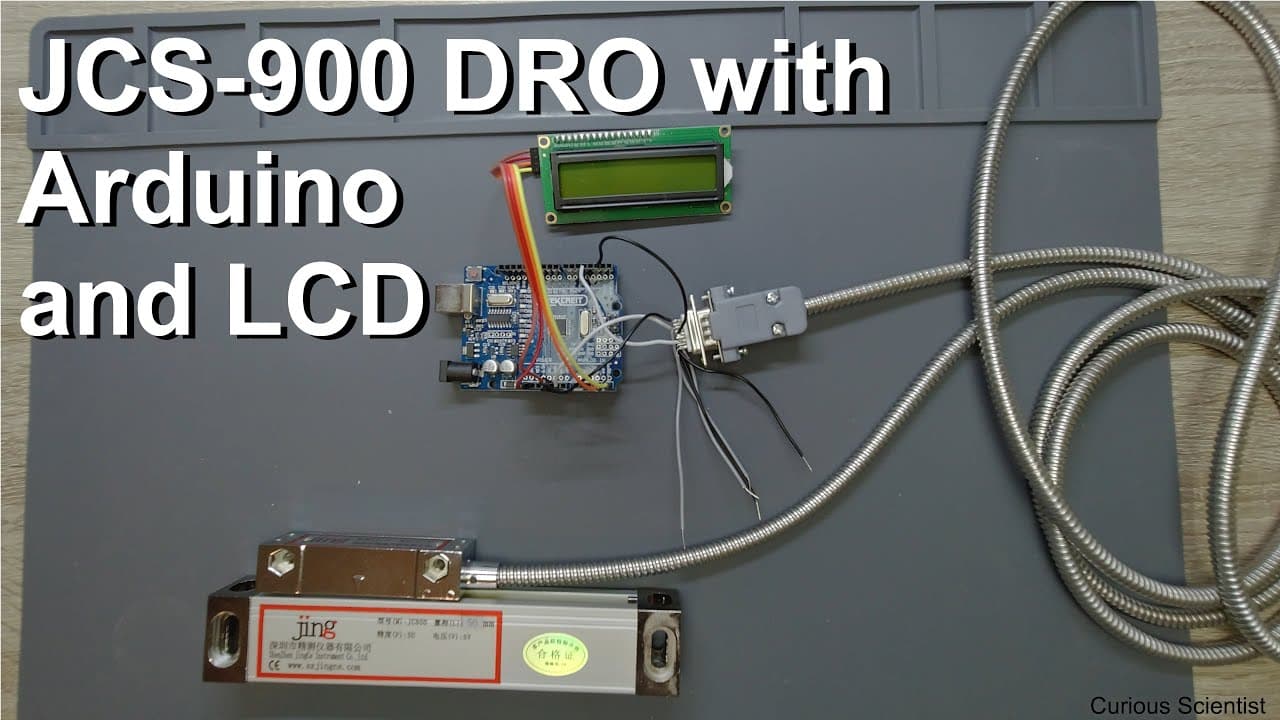
welcome everyone in this video I'm going to show you how to connect a digital readout Dro to your Arduino and show the numbers on an LCD screen that you can see here or send the data to the computer and process it there so as you can see there are three main components here we have the Dro this is a Chinese Dro JCS 900 so you can see that we have t... Read More
Key Insights
- 🔨 The JCS 900 DRO can measure displacements accurately up to 50mm with a resolution of 5 micrometers, making it an effective tool for precision tasks.
- 😒 The use of square waves from the DRO allows the Arduino to perform real-time monitoring, translating these signals into actionable data displayed on the LCD.
- 😥 The importance of calibration is underscored by the recommendation to establish a zero reference point to ensure accurate relative measurements.
- 🏑 The setup highlights the potential of combining digital readouts with microcontrollers like Arduino for versatile applications in various fields, particularly in manufacturing.
- 🎮 Rapid movements can compromise the measurement accuracy of the DRO, emphasizing the need for controlled operation during applications.
- 😴 Using I²C for connecting the LCD conserves pin usage on the Arduino, facilitating a more straightforward setup while still providing essential output display capabilities.
- 🤗 The video serves as a hands-on educational resource, illustrating practical electronics and programming skills applicable in DIY projects and professional settings.
Install to Summarize YouTube Videos and Get Transcripts
Explore YouTube Video Summarizer or Get YouTube Transcript Extractor
Questions & Answers
Q: What is a Digital Readout (DRO)?
A Digital Readout (DRO) is a device that provides a digital display of position or displacement, often used in machining and metrology. It translates the physical movement into a readable digital format. The DRO shown in the video, a JCS 900, utilizes a scale and an electronic unit to measure displacement with high resolution, making it suitable for precise measurements.
Q: How does the Arduino process the output from the DRO?
The Arduino processes the DRO's output, which consists of two square waves that are shifted in time relative to each other. By using interrupts, the Arduino can count these square waves, translating them into displacement values displayed on the LCD. The software calculates the displacement based on the frequency and timing of the incoming signals, ensuring accurate readings.
Q: What are the limitations of using this DRO setup with an Arduino?
One significant limitation is the DRO's inability to process rapid movements effectively, as shown in the video. If the scale is moved too quickly, the Arduino may miss counts of the square waves, resulting in inaccurate measurements. This setup is optimized for slow movements, such as those typical in milling machines where precision is critical.
Q: How is the LCD connected, and what role does it play in the project?
The LCD is connected using an I²C interface, which simplifies wiring by reducing the number of connections required. In the project, the LCD displays real-time displacement readings from the DRO, allowing users to see the measurements easily. It also indicates the position relative to a predetermined zero point, enhancing the user experience in monitoring displacement.
Q: What programming considerations were mentioned for the Arduino?
The Arduino code included setting up interrupts for the two signal inputs from the DRO, enabling precise monitoring of displacement changes. Additionally, the video highlights the importance of ensuring that the LCD is updated only when necessary to avoid flickering, which was managed by using flags in the code to indicate when the screen should refresh.
Q: What happens if there is a discrepancy between the numbers displayed on the LCD?
If there is a discrepancy in displayed numbers, particularly when transitioning from five-digit to three-digit values, residual characters may remain on the LCD. This issue was addressed in the video by updating the code to ensure the screen clears prior to updating with new values, thus preventing leftover characters from previous readings.
Summary & Key Takeaways
-
The video illustrates the process of connecting a Chinese DRO (JCS 900) to an Arduino, including its power and output wiring, to measure displacement accurately.
-
The system measures up to 50 millimeters with a 5-micrometer resolution and utilizes a square wave output, which is directly processed by the Arduino to show readings on an LCD screen.
-
Limitations include the DRO's inability to accurately register rapid movements, emphasizing that it is best suited for slow, precise measurements commonly required in milling machines.
Read in Other Languages (beta)
Share This Summary 📚
Summarize YouTube Videos and Get Video Transcripts with 1-Click
Try YouTube Summary with ChatGPT & Claude or YouTube Transcript Generator
Explore More Summaries from Curious Scientist 📚


![Building a Peltier cooler-based cooling box - First iteration, improvements [Part 2/6] thumbnail](/_next/image?url=https%3A%2F%2Fi.ytimg.com%2Fvi%2F0YlNw0EGnzI%2Fhqdefault.jpg&w=750&q=75)


Summarize YouTube Videos and Get Video Transcripts with 1-Click
Try YouTube Summary with ChatGPT & Claude or YouTube Transcript Generator