What Is Google Nano Banana and How to Use It Free
TL;DR
Nano Banana, officially Gemini 2.5 Flash Image, is Google's image editor that tops the AI image-editing leaderboard and can be used free in the Gemini app and Google AI Studio. It handles natural-language edits like head shots, movie posters, color correction, object removal, and colorizing old photos, often nailing tasks on the first try.
Transcript
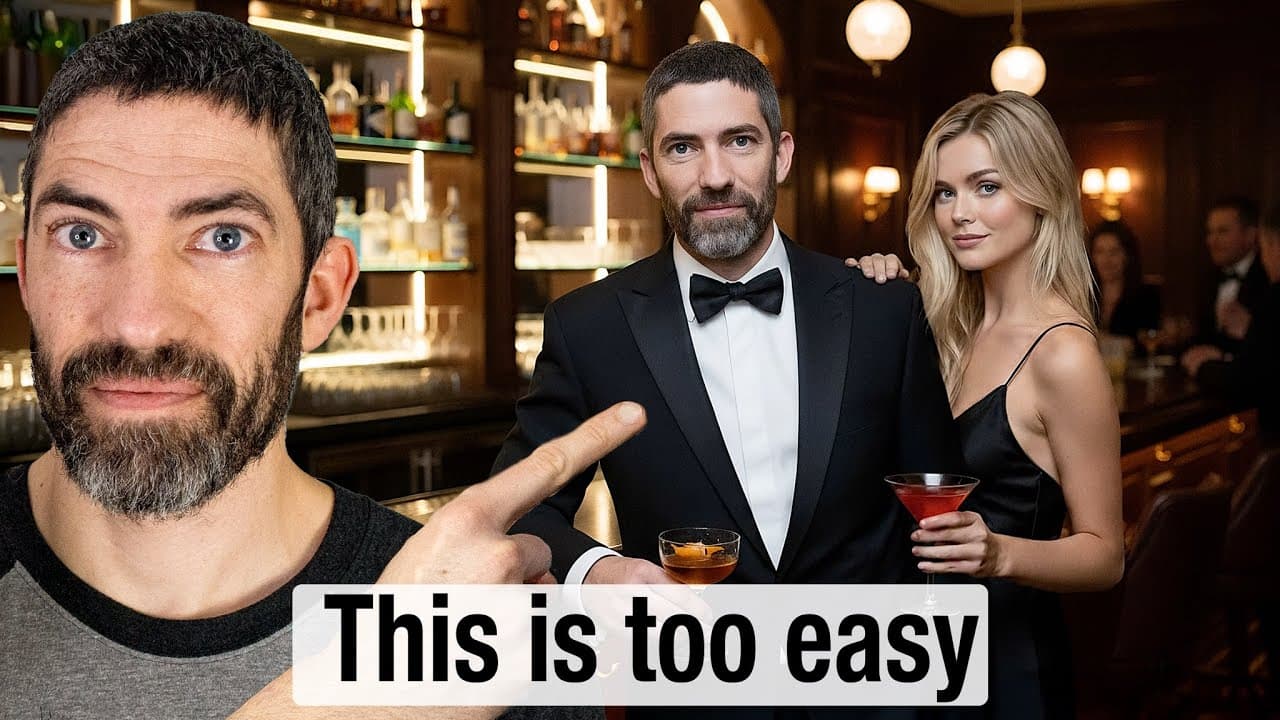
I have this image of me, but I want to look like I'm having a cool night out. Perfect. That looks like a typical Tuesday for me, but I could use some company. Boom. Now, that's more like a typical Wednesday for me. I kind of want to flex on Instagram. So, there it is. Hanging out on my yacht. But let's add in some of the homies. Bezos, Zuckerberg, ... Read More
Key Insights
- Nano Banana is Google's image editor officially named Gemini 2.5 Flash Image, and it has topped the AI image editing leaderboard by a wide margin, beating ChatGPT and Flux Kontext at natural-language image edits.
- It is not a standalone image model but part of Gemini 2.5, which gives it strong world understanding and natural language ability, so simple prompts can produce accurate results while more specific prompts guide it further.
- You can use Nano Banana for free right now in the Gemini app on the free plan, or in Google AI Studio, where image edit limits had not been hit despite heavy use.
- Collaborative edits through natural language are a core strength, letting you iteratively change hairstyles, hair length, eye color, facial hair, glasses, add tattoos, or swap outfits while retaining character and style consistency.
- When a generated image does not resemble the subject, re-uploading and asking to fix it tends to return the same image, so the reliable workaround is running the same prompt again to start from scratch.
- Nano Banana replicates common Photoshop tasks including color correction, adding people or objects into scenes, adding snow or clothing, and inserting custom text in fitting fonts, though faces can come out warped or low fidelity.
- It excels at removing people and objects from photos and colorizing old images like the Hindenburg and a famous Tesla photo, keeping an authentic old-school feel, making it one of the best colorization tools available.
- Output images are low fidelity, especially in the Gemini app, so running an upscaler like Magnific afterward is recommended, and photo restoration works only to a point since very damaged or blurry images get reimagined incorrectly.
Install to Summarize YouTube Videos and Get Transcripts
Explore YouTube Video Summarizer or Get YouTube Transcript Extractor
Questions & Answers
Q: What is Google Nano Banana?
Nano Banana is Google's AI image editor, officially known as Gemini 2.5 Flash Image, though the creator prefers its former code name. It is not a standalone image model but part of Gemini 2.5, which gives it very good understanding of the world and natural language. It has topped the AI image editing leaderboard by a wide margin, beating ChatGPT and Flux Kontext at natural-language image editing tasks.
Q: How can I use Nano Banana for free?
You can use Nano Banana for free right now in two places shown in the video. First, the Gemini app, where you sign up for the free plan and start using it immediately. Second, Google AI Studio, a platform where you can use many of Google's newest models for free. There are limitations on image and video generations, but the creator had not hit the image edit limit despite doing a lot of editing.
Q: What kinds of edits can Nano Banana make?
Nano Banana handles a wide range of natural-language edits, including creating Time magazine covers, professional head shots, and parody movie posters using your face. You can change hairstyles, hair length, eye color, facial hair, glasses, add tattoos, and swap outfits or backgrounds while keeping poses and character consistency. It also does color correction, adds people or objects into scenes, inserts text in fitting fonts, removes people, and colorizes old photos.
Q: Can Nano Banana replace Photoshop?
People in the AI world have suggested Photoshop is dead because of Nano Banana. The video tests typical Photoshop tasks: it fixed messed-up colors and brightness impressively, added a person leaning against a van, added snow to the ground, gave a subject a sweater instead of generative fill, and added glowing custom text. It handles these tasks well, though faces can come out warped or low fidelity and need fixing another way, such as with an upscaler.
Q: How do you combine multiple reference images in Nano Banana?
You cannot upload many reference images at once, so the workaround demonstrated by Travis Davids is to make a collage of the different items and add a label to each item. Using that method, he combined 10 things into one image, capturing every item with fine details, then pushed it further to 13 elements. The results looked basically perfect, showing you can merge many references into a single accurate composite image.
Q: Why does Nano Banana sometimes not look like the person, and how do you fix it?
Sometimes a generated image, like a movie poster, does not really look like the subject. The creator found that re-uploading the photo and asking it to fix the resemblance does not work, as it tends to give back the exact same image, seemingly thinking it already looks correct. The easiest workaround is to simply use the same prompt again and let it start from scratch, which produced a much more accurate likeness.
Q: How good is Nano Banana at colorizing and restoring old photos?
Nano Banana is really good at colorizing images, doing an incredible job with the Hindenburg and a famous Tesla image while keeping their old-school feel, making it one of the best ways to colorize photos. Restoration works only to a point: with a badly damaged photo it imagined new people clearly unlike the originals, such as turning an older woman into a young boy. Very blurry photos may get reimagined, changing details like a subject's position.
Q: Should you use an upscaler with Nano Banana?
Yes. The images you get back from Nano Banana are pretty low fidelity, especially when using it in the Gemini app, so using an upscaler after you are done is a very good idea. The creator mentions Magnific as one option that would work quickly to get a nice face onto an image where the face came out warped or unclear. Upscalers help compensate for the low resolution output while preserving the edits you made.
Summary & Key Takeaways
-
Nano Banana, Google's Gemini 2.5 Flash Image, tops the AI image editing leaderboard and is free in the Gemini app and AI Studio. Because it is part of Gemini 2.5 rather than a standalone model, it understands natural language and world context well, producing strong results from simple prompts.
-
The tool handles collaborative natural-language edits like Time magazine covers, professional head shots, hairstyle and tattoo changes, and parody movie posters using your face. It can combine many reference images via labeled collages, letting creators merge 10 to 13 elements into one accurate image.
-
It replaces many Photoshop tasks: fixing colors, adding people, snow, sweaters, and text, removing crowds, and colorizing historical photos. Limitations include warped low-fidelity faces needing upscalers, and failed restorations of heavily damaged or blurry images where it reimagines details incorrectly.
Read in Other Languages (beta)
Share This Summary 📚
Summarize YouTube Videos and Get Video Transcripts with 1-Click
Try YouTube Summary with ChatGPT & Claude or YouTube Transcript Generator
Explore More Summaries from Futurepedia 📚

Summarize YouTube Videos and Get Video Transcripts with 1-Click
Try YouTube Summary with ChatGPT & Claude or YouTube Transcript Generator