How to Make AI Motion Graphics with Nano Banana
TL;DR
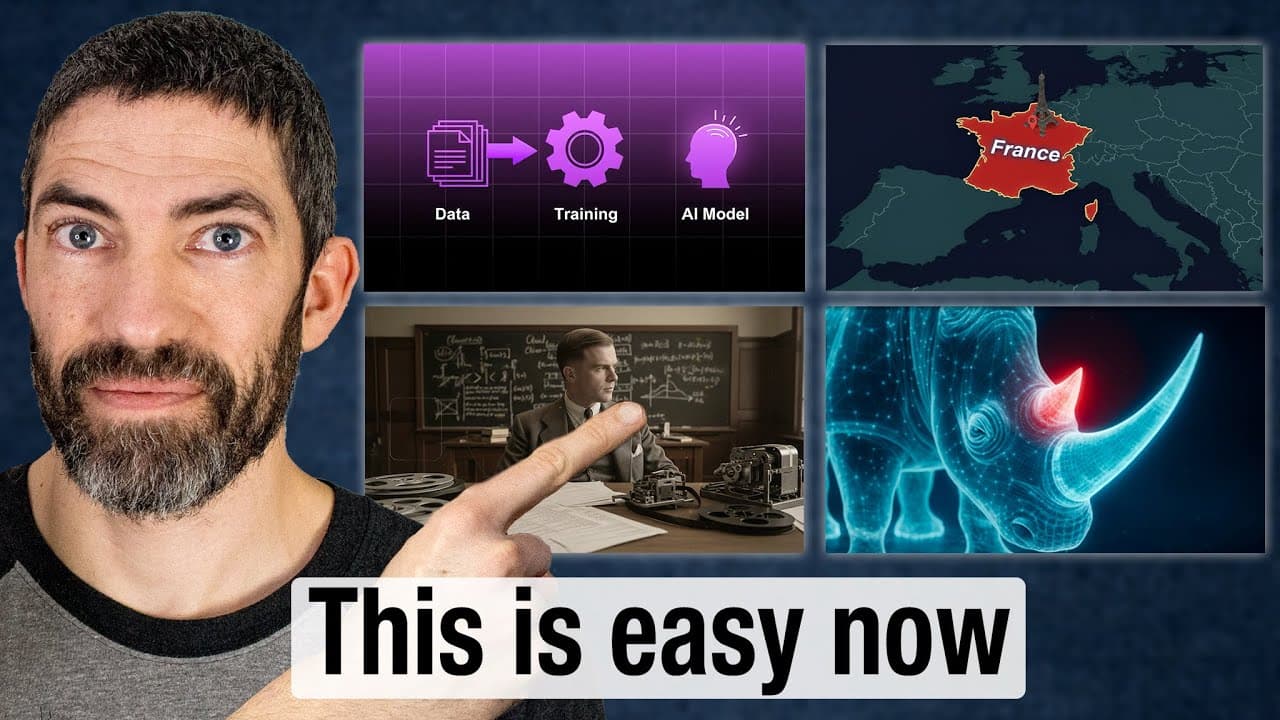
Nano Banana (Gemini's image editor) combined with AI video tools that support start and end frames, like Hailuo, Kling, and Midjourney, can create motion graphics such as lower-third name cards, data visualizations, explainer diagrams, and parallax scenes. A map animation that once took skilled animators days was made in under an hour.
Transcript
I had tried creating motion graphics with AI before, but Nano Banana helped finally crack the code. I was able to make this custom lower third name card animation. That was the easiest, but I also figured out a bunch of different styles that would apply for different use cases or niches like for explainer videos, data visualizations, the parallax d... Read More
Key Insights
- Nano Banana is the nickname for Google's Gemini image editor, and it lets you edit images through prompts inside the Gemini app or Google AI Studio, the latter being a completely free place to use it.
- Creating AI motion graphics works by editing two images with Nano Banana, then animating between them on a platform that supports start and end frames, so the tool has enough information to fill in the movement.
- The most reliable animation platforms tested were Hailuo, Kling, and Midjourney, with Hailuo winning in almost every case and Kling winning a couple of times.
- A complex map animation that traditionally requires a skilled animator or team and days of work was created in under an hour while still figuring out the process.
- Nano Banana used in Gemini or Google AI Studio adds a watermark, but tools using the API like Freepik have no watermark, and the small watermark is easy to remove with a quick generative fill selection.
- When the model gets an edit wrong it can get stuck, claiming it made changes while returning the identical image; the best fix is starting a new chat for fresh context.
- An upscaler like Magnific is very helpful for cleaning up images before animating them, though it is on the expensive side.
- Some images can be generated from text prompts alone using Google's Imagen 4, which has strong prompt adherence and nailed an AI-training diagram on the first try.
Install to Summarize YouTube Videos and Get Transcripts
Explore YouTube Video Summarizer or Get YouTube Transcript Extractor
Questions & Answers
Q: What is Nano Banana and where can you use it?
Nano Banana is the nickname for Google's Gemini image editor, described in the description as Gemini 2.5 Flash Image. You can use it inside the Google Gemini app or in Google AI Studio, which the creator calls a completely free place to use it. Tools that incorporate it through the API, such as Freepik, also provide access. When used in Gemini or AI Studio it adds a small watermark, while API-based tools do not.
Q: How do you create AI motion graphics with Nano Banana?
You first edit or generate two images with Nano Banana, a start frame and an end frame. Then you bring both images into an AI video platform that supports start and end frames, drag in the start frame, upload the ending frame, and type a short prompt. Because the images already contain so much information, the prompt can stay simple since the tool knows what it needs to do, and it animates the transition between the two frames.
Q: Which AI video tools work best for animating between frames?
The creator tested most examples in three platforms: Hailuo, Kling, and Midjourney. Hailuo won in almost every case, producing the best results, while Kling won a couple of times. All three support uploading a start frame and an end frame plus a text prompt to generate the animation. The key requirement is that the platform offers the option for start and end frames, which allows the smooth transition between the two edited images.
Q: How do you fix it when Nano Banana keeps returning the same image?
Sometimes when the model gets an edit wrong, like highlighting both rhino horns instead of one, it gets stuck and claims it made the changes while returning the exact same image repeatedly. The creator found the best solution is to start a new chat, which gives the model fresh context so you can try the edit again. A related tip is to copy an image rather than download it, then paste it into the same or a new chat to prompt with it again.
Q: Why should you use an upscaler in this workflow?
Using some method of upscaling the images before animating them is very helpful for cleaner results. The creator used Magnific, which is on the expensive side, and ran several images, including the rhino examples, through its creative upscaler. Upscaling improves image quality before it is fed into the animation step, though the creator admits to forgetting to upscale on some examples. It is presented as a nice-to-have tool that noticeably improves the final animations.
Q: How do you make a lower-third title card animation?
The lower-third title card was the easiest example. The creator got a base prompt from ChatGPT and made four different versions by only replacing the style section, including a standard version, a techy one with glossy gradients, and a futuristic neon version. They each came back solid on the first or second try. Depending on the style, using a green screen or black background makes it easier to remove later in Premiere by keying out the green screen or adding a blend mode.
Q: Can you create motion graphics from just a text prompt?
Yes. For a simplified diagram of how an AI model gets trained, the creator used a text prompt with no reference image, relying on Google's Imagen 4 image generator, which has great prompt adherence. It got the result right on the first try and nailed the intended style. The image was then taken into Hailuo as a start and end frame to animate icons appearing and data moving through training to the AI model, with minor fixes made in Premiere using a mask.
Q: What is the parallax documentary technique and how was it made?
The parallax effect uses multiple layers that come together to create a scene, common in faceless documentary channels on YouTube. The creator tried it with an Alan Turing scene generated purely from text, including a chalkboard and desk, and it looked very similar to him without any reference image. They then asked Nano Banana for each layer separately: the background, then just him (which worked on the second try), and then just the desk, planning to composite the layers together.
Summary & Key Takeaways
-
The creator finally cracked AI motion graphics by pairing Nano Banana, Google's Gemini image editor, with AI video tools. The workflow produces lower-third name cards, data visualizations, parallax documentary scenes, educational diagrams, and complex map animations, several of which traditionally demand skilled animators and days of specialized work.
-
The core technique edits two images in Nano Banana, then animates between them using a platform with start and end frame support. Hailuo performed best across tests, followed by Kling and Midjourney. Prompts can stay simple because the images already contain most of the needed information.
-
Practical tips include upscaling images with a tool like Magnific before animating, removing watermarks with generative fill, copying and pasting images instead of downloading them, and starting a new chat when the model gets stuck repeating the same wrong image.
Read in Other Languages (beta)
Share This Summary 📚
Summarize YouTube Videos and Get Video Transcripts with 1-Click
Try YouTube Summary with ChatGPT & Claude or YouTube Transcript Generator
Explore More Summaries from Futurepedia 📚
Summarize YouTube Videos and Get Video Transcripts with 1-Click
Try YouTube Summary with ChatGPT & Claude or YouTube Transcript Generator