How to use Omni Gen 2 for free offline image editing
TL;DR
Omni Gen 2 can edit images entirely offline for free and without limits. It supports colorizing black and white photos, style transfers, background swaps, and multi character edits all through simple text prompts. You can install and run it locally, then perform multiple rounds of editing while preserving character consistency across steps.
Transcript
All right, let's upload this image of a cat and then write replace the apple with the cat. Very nice. Notice it even changes the white balance of the cat to match the background. Or let's say we have this photo of a woman and a man. For the prompt, we can write, "Let the man and the woman kiss and hug and here's what we get." Or let's say we have t... Read More
Key Insights
- Omni Gen 2 is positioned as a free, open source image editor that works offline through text prompts.
- Colorizing, style transfer, and background swaps are demonstrated as core capabilities of Omni Gen 2.
- Editing can be done in multiple rounds to gradually refine the output while maintaining consistency with reference characters.
- It can combine references from two images and place objects in new scenes while preserving details.
- The tool can replace text in an image while keeping the font style and appearance consistent with the original.
- You can color line art and preserve complex details during transformation.
- Character consistency across edits is highlighted as a key strength for multi step edits.
- The video provides steps to install and run Omni Gen 2 offline using Git, Python, and possibly a virtual environment.
- More videos from this channel:
- More from this channel: AI Search
Install to Summarize YouTube Videos and Get Transcripts
Explore YouTube Video Summarizer or Get YouTube Transcript Extractor
Questions & Answers
Q: What is Omni Gen 2 and what can it do for image editing
Omni Gen 2 is an open source image editor that can run offline and for free. It handles colorizing black and white photos, applying different art styles to images, swapping and editing backgrounds, and combining multiple reference images into new composite scenes. It works through text prompts to guide edits and can perform several rounds of changes while maintaining consistency with reference elements.
Q: How does Omni Gen 2 handle colorizing and style transfer
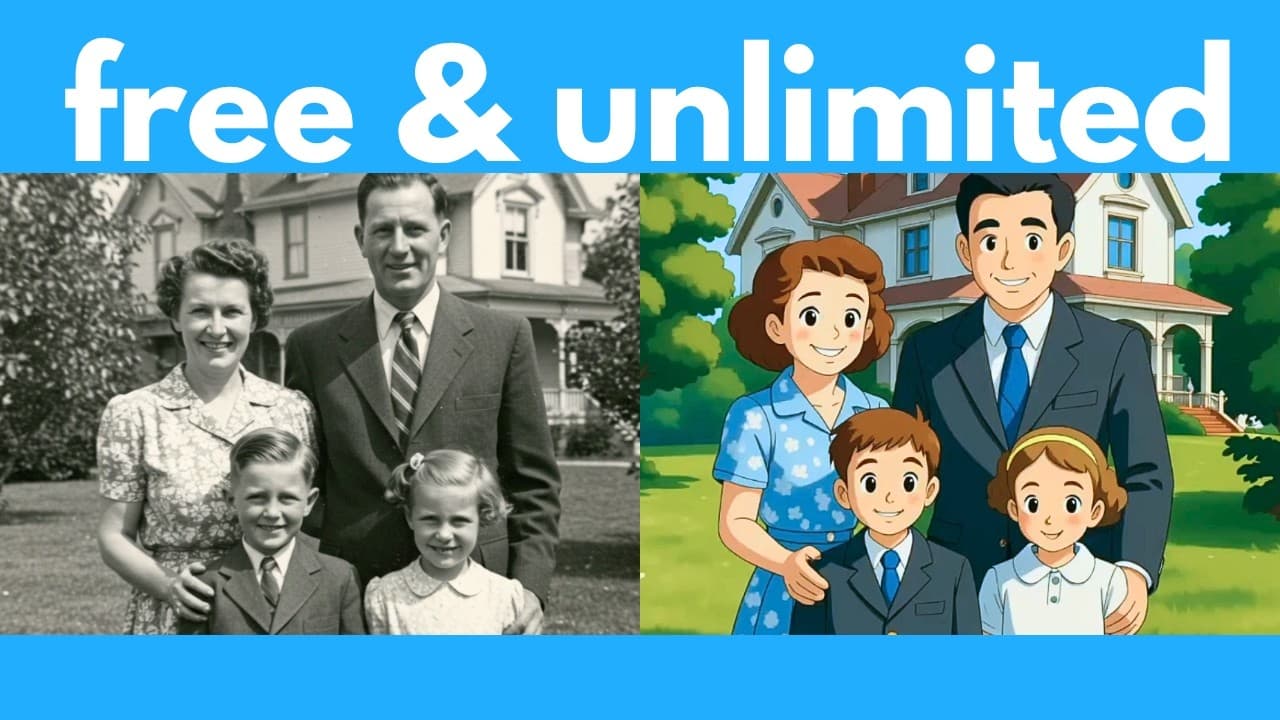
Colorizing is demonstrated by taking a black and white family photo and turning it into a colored scene with realistic skin tones and clothing, while style transfer turns the image into a different look such as Ghibli or Disney Pixar style. The system preserves background coherence and adapts lighting to match the new style, showing seamless integration of color and style changes.
Q: Can Omni Gen 2 combine two reference images in a scene
Yes, Omni Gen 2 can combine two reference images by referring to them as first image and second image in prompts. For example, you can prompt to add a plushy from the second image onto the bed of the first image, and the result keeps details from both sources. This demonstrates multi image compositing while maintaining element appearance.
Q: Is background editing possible with Omni Gen 2
Background editing is possible through prompts that describe a new background, such as turning a city scene into a snowy or beach setting. The tool adjusts white balance and environmental lighting to align with the new background, producing a coherent overall scene without manual masking.
Q: How does text editing work in Omni Gen 2
The tool can edit existing text within an image by prompting changes, for example changing a specific phrase in the background while preserving the font style and overall appearance. This capability enables updating signage or captions without re creating the entire image.
Q: What is required to install Omni Gen 2 offline
To install offline you clone the Omni Gen 2 repository, set up a virtual environment, and install necessary dependencies. The video walks through installing Git, creating a working directory, and using a command line to clone the repository, then configuring Python, potentially with Miniconda, to run the application locally.
Q: Does Omni Gen 2 support multi character scenes
Yes, Omni Gen 2 supports multi character scenes where prompts describe interactions between characters and place them in a chosen setting. The system preserves character appearance and outfit details across edits, and can adjust actions such as kissing or posing while maintaining identity features and stylistic consistency.
Q: Can Omni Gen 2 run online before offline installation
The video shows that there are online demos and Hugging Face spaces where you can try Omni Gen 2 interfaces for free. This allows users to sample colorization, style transfer, and background edits before proceeding with offline installation, giving a preview of capabilities without installing locally.
Summary & Key Takeaways
-
Omni Gen 2 enables offline, free image editing with a simple prompt interface and supports colorization, style transfer, and background changes.
-
The video demonstrates combining reference images, multi character scenes, and text edits while preserving original details and consistency.
-
It also covers offline installation steps, system requirements, and options to run online demos for free before local installation.
Read in Other Languages (beta)
Share This Summary 📚
Summarize YouTube Videos and Get Video Transcripts with 1-Click
Try YouTube Summary with ChatGPT & Claude or YouTube Transcript Generator
Explore More Summaries from AI Search 📚

Summarize YouTube Videos and Get Video Transcripts with 1-Click
Try YouTube Summary with ChatGPT & Claude or YouTube Transcript Generator