How to Auto-Post Faceless AI Shorts With n8n
TL;DR
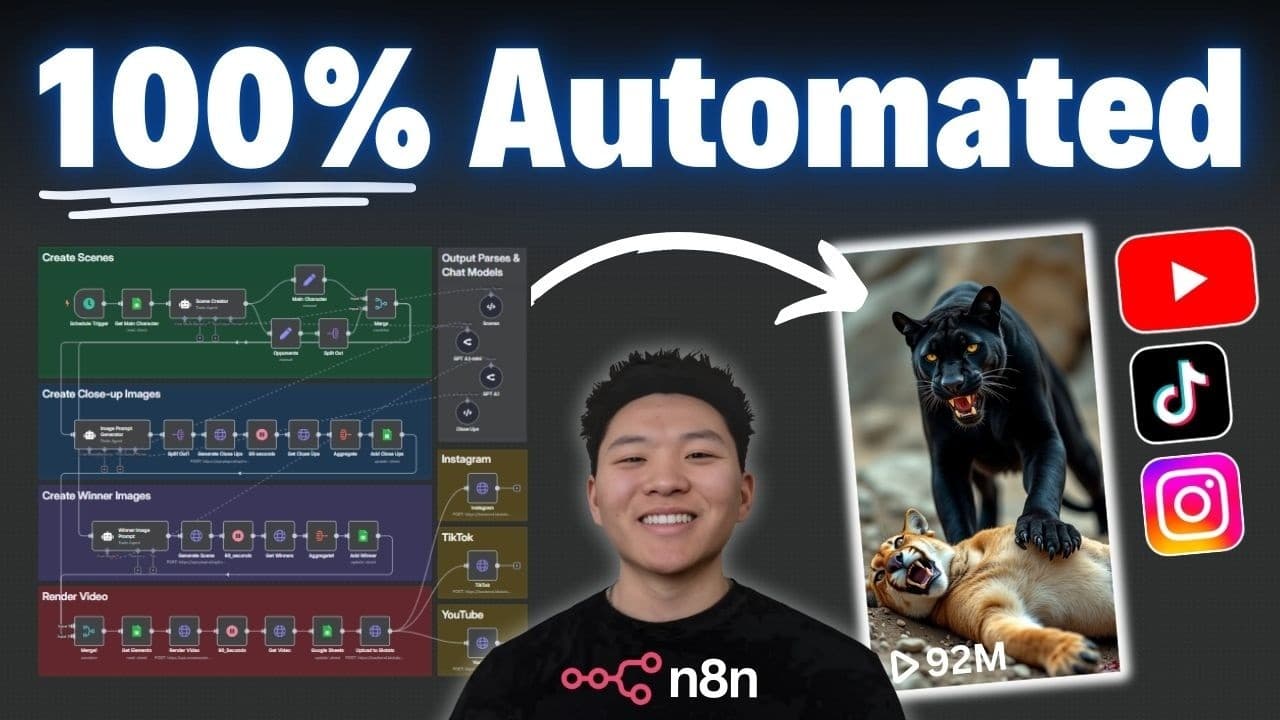
A free n8n workflow can create, render, and post faceless AI-generated Shorts to YouTube, Instagram, and TikTok automatically, with each full run costing less than $1. It reads a Google Sheet marked 'to-do', generates fight-matchup scenes and photorealistic close-up images via PiAPI's Flux model, then stitches and publishes the video end-to-end without code.
Transcript
So, this YouTube channel right here got over 680,000 subscribers and almost 221 million views. And the craziest part is they've only uploaded 11 YouTube shorts that have been completely generated by AI. And it's not only them. I've seen other YouTube accounts, Instagram, Tik Tok accounts that are doing similar things, which proves there's an audien... Read More
Key Insights
- The inspiration channel gained over 680,000 subscribers and almost 221 million views from only 11 completely AI-generated YouTube Shorts, with its most viewed video reaching 93 million views, proving strong audience demand for this content.
- The workflow is built in n8n, a no-code automation tool, and handles 100% of the process: creating elements, rendering them together, and posting to Instagram, TikTok, and YouTube without writing a single line of code.
- The build has five main blocks: creating the scenes, creating close-up images, creating winner images, pulling all pictures back to render the final video, then publishing across three platforms.
- A Google Sheet acts as the content machine; the workflow pulls only rows where the status column equals 'to-do' and processes just the first matching row, so a sheet can be pre-filled with weeks of content processed one at a time.
- A schedule trigger lets the workflow run automatically twice, three times, or however many times a day you want, enabling fully autonomous 24/7 posting.
- Prompts are the secret sauce: customizing the scene creator and image prompt agents lets you produce entirely different Short types, such as the creator's separate workflow that merged animals like a parrot with a cat.
- Images are generated through PiAPI, which works like an open router for different AI models, using Flux's text-to-image model; each image costs a little over 1 cent, keeping the run inexpensive.
- Close-up images are generated at a 1x1 square aspect ratio so two images can fit together vertically, with the main character on top and the opponent on the bottom, and a structured output parser splits each item into main-character and opponent close-up fields.
Install to Summarize YouTube Videos and Get Transcripts
Explore YouTube Video Summarizer or Get YouTube Transcript Extractor
Questions & Answers
Q: How much does each run of the AI Shorts workflow cost?
According to the video, each full run costs less than $1. The main image cost comes from PiAPI's Flux model, where each generated image costs a little over 1 cent. Since a run generates 16 images (two close-ups for each of eight opponents), plus rendering and posting, the creator states the total remains under a dollar per complete run, which they describe as pretty good value for fully automated content.
Q: What tool is used to build this automated Shorts workflow?
The workflow is built in n8n, described as a powerful no-code automation tool. The creator emphasizes the entire process of creating, rendering, and posting viral AI-generated Shorts across YouTube, Instagram, and TikTok runs end-to-end on autopilot without writing a single line of code. The template can be downloaded for free from the creator's Skool community and set up in your own n8n environment.
Q: How does the workflow decide which content to create?
The workflow is linked to a Google Sheet content machine. It pulls in rows from the viral shorts Google Sheet where the status column equals 'to-do', and only returns the first matching row. This lets you fill the sheet with weeks of content all marked 'to-do', while the workflow processes just one at a time. A schedule trigger can run it twice or three times a day, or however often you want.
Q: What does the scene creator agent do in the workflow?
The scene creator agent is given two things in the user message: the main character (for example, the ape) and the type of opponent (for example, big cats). Its job is to generate a list of eight different opponents from that category, producing eight fight-scene matchups the main character will face in the Short. The creator recommends customizing this prompt to change the content type the workflow produces.
Q: Why are close-up images generated at a 1x1 square aspect ratio?
The images are generated at a 1x1 square ratio because the final layout stacks two images together vertically, with one image on top and one on the bottom. For example, in the jaguar versus strong animals clip, the top half shows a bear and the bottom half shows a jaguar. The square ratio ensures the main character close-up and the opponent close-up fit together properly when combined.
Q: What is PiAPI and how is it used here?
PiAPI is described as being kind of like an open router for different AI models, offering image models, video models, audio models, and more. In this workflow, it is used to access Flux's text-to-image model through an HTTP POST request with a credential header. The body specifies the Flux model, a text-to-image task, the dragged-over image prompt, and a 1x1 aspect ratio. Each image costs a little over 1 cent.
Q: Can the same main character image be reused across all eight matchups?
Yes, you can. The creator notes that since the main animal is always the same, such as an ape, you could create that ape image once and reuse it across all eight parts. However, they chose to generate eight slightly different ape images instead, so that each looks a little different. This keeps the audience feeling fresh throughout the Short rather than seeing the identical main character repeated.
Q: How does the workflow split scenes into individual image generations?
After the scene creator produces eight scenes, data transformation splits them so each runs individually. The workflow sets the main character on one branch and lists all eight opponents on another, then merges them into eight items each pairing the main character with an opponent. The image prompt generator creates two close-up prompts per item, and a structured output parser outputs main-character and opponent close-up fields, splitting into 16 individual image generations.
Summary & Key Takeaways
-
The creator was inspired by a YouTube channel that earned over 680,000 subscribers and nearly 221 million views from just 11 AI-generated Shorts. To replicate this, they built an n8n workflow that fully automates creating, rendering, and posting faceless AI Shorts to YouTube, Instagram, and TikTok with no coding required.
-
The workflow reads a Google Sheet for rows marked 'to-do', passing a main character and opponent category to a scene creator agent that generates eight opponents. Data transformation splits these into individual items, then an image prompt generator produces two close-up prompts per matchup for photorealistic, cinematic AI images.
-
PiAPI's Flux model generates each square 1x1 image for a little over one cent apiece, later stacked so the main character and opponent fit together vertically. The workflow renders the final video and publishes it across platforms automatically, with the creator stating each full run costs less than one dollar.
Read in Other Languages (beta)
Share This Summary 📚
Summarize YouTube Videos and Get Video Transcripts with 1-Click
Try YouTube Summary with ChatGPT & Claude or YouTube Transcript Generator
Explore More Summaries from Nate Herk | AI Automation 📚






Summarize YouTube Videos and Get Video Transcripts with 1-Click
Try YouTube Summary with ChatGPT & Claude or YouTube Transcript Generator