Which Desk Light Is Best for YouTube Videos?
TL;DR
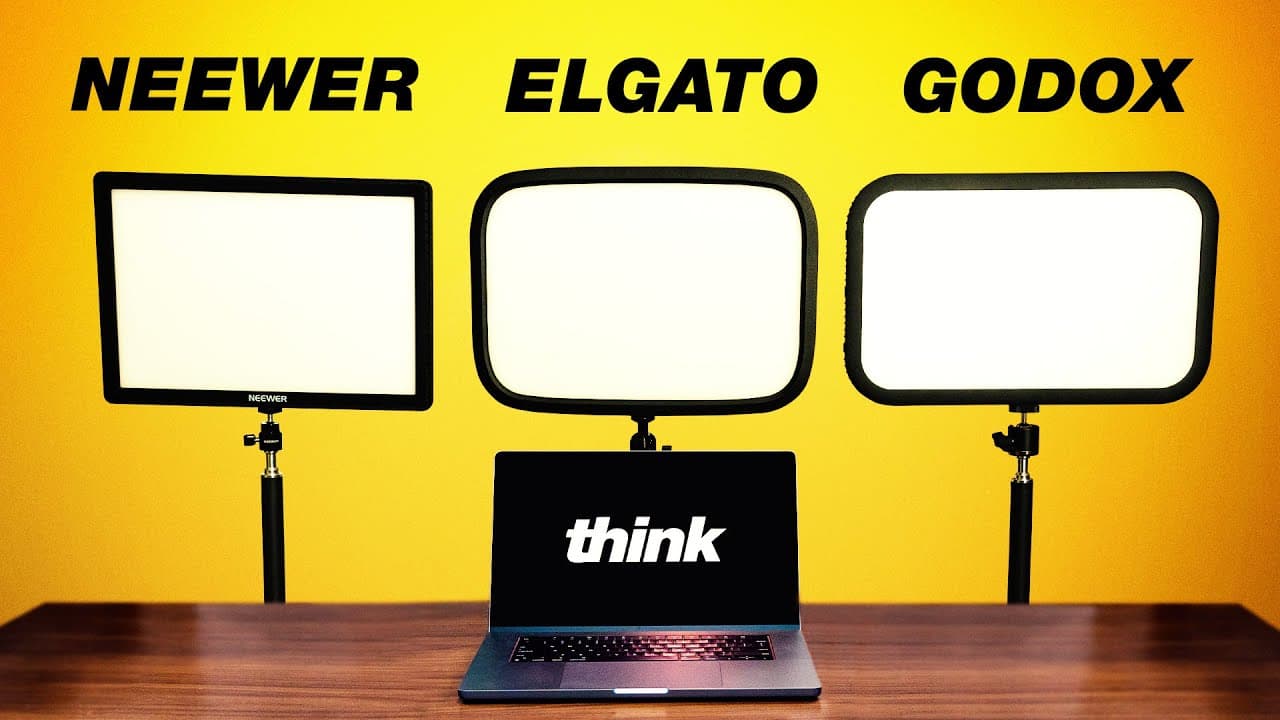
The Neewer GL1 Pro is the strongest value among the fully discussed options because it combines an affordable price with physical controls, phone and computer apps, a Wi-Fi-free USB transmitter, and Stream Deck compatibility. The Elgato Key Light produces soft, adjustable light in a thin body, but changing brightness or color temperature requires another device.
Transcript
there are so many different types of Lights to choose from to light your home studio but one of the simplest solutions for beginners are streaming lights these lights are designed to be mounted to your desk for live streaming for gaming video calls or even talking headstyle YouTube videos just like this one there are a bunch of different streaming ... Read More
Key Insights
- Streaming lights are compact, lightweight fixtures designed for desks, making them practical for live streaming, gaming, video calls, and talking-head YouTube videos. They are especially suitable for beginners and creators working in small home studios where conventional lighting equipment may consume too much space.
- COB lights are brighter and more modular than streaming lights because their chip-on-board design produces a powerful LED output. Choosing a streaming light means trading that intense brightness and modularity for easier operation, greater portability, and a compact form that fits conveniently around a desk.
- The Elgato Key Light is a thin, softly diffused panel containing 160 LEDs. Its color temperature can be adjusted from 2900K to 7000K, and its 35 mm thickness allows it to fit into home studios without occupying much room.
- The Elgato Key Light requires external controls for brightness and color temperature because its only onboard switch handles power and reset functions. Full adjustment is available through Elgato Control Center on a phone or computer, a Stream Deck, or the separately sold Elgato Light Remote.
- The Neewer GL1 Pro provides physical controls directly on the fixture, allowing brightness and color temperature changes without a phone, computer, internet connection, or separate controller. This onboard access is a significant practical advantage over the Elgato Key Light for simple studio operation.
- The Neewer GL1 Pro uses 192 LEDs and covers the same 2900K to 7000K color-temperature range as the Elgato model. Despite having more LEDs, it did not produce a noticeably different output level during the comparison, with both lights appearing broadly comparable in brightness.
- Color-temperature labels can differ from the light actually produced. During testing with the camera and all fixtures set to 5600K, the Neewer and Godox lights aligned closely in color, while the Elgato appeared warmer, showing that mixed models may require individual adjustment.
- The Neewer GL1 Pro supports several control methods, including physical buttons, a responsive phone app, computer software, and an included 2.4 GHz USB transmitter that does not require Wi-Fi. An Elgato Stream Deck plugin can also control its power, brightness, and color temperature.
Install to Summarize YouTube Videos and Get Transcripts
Explore YouTube Video Summarizer or Get YouTube Transcript Extractor
Questions & Answers
Q: How do I choose a desk light for YouTube videos?
Choose according to your available space, desired brightness, and preferred control method. Streaming lights are compact, lightweight, easy to use, and suitable for talking-head videos, live streams, gaming, and calls. COB lights offer more brightness and modularity. For direct onboard adjustments, the Neewer GL1 Pro has physical controls, while the Elgato Key Light depends on external devices for brightness and color changes.
Q: What are the benefits of using a streaming light?
A streaming light is easy for beginners to integrate into a home studio, provides a high-quality and relatively accurate light source, and occupies little space. Its lightweight, compact design also makes it portable. These benefits suit smaller rooms and desk-based setups, although users give up some of the intense brightness and modularity available from COB-style lighting fixtures.
Q: What is the difference between a streaming light and a COB light?
A COB, or chip-on-board, light uses a powerful LED source that produces substantially brighter output than a typical streaming light. COB fixtures also offer greater modularity. Streaming lights instead emphasize simplicity, low weight, portability, and compact desk mounting. The better option therefore depends on whether maximum output and modification or convenient operation and space efficiency matter more.
Q: How can the Elgato Key Light be controlled?
The Elgato Key Light can be adjusted through the Elgato Control Center application on a phone or computer after connecting the fixture to Wi-Fi. It can also be mapped to an Elgato Stream Deck for power, brightness, and color-temperature commands. A physical Elgato Light Remote is available separately, but the light itself only provides a power and reset switch.
Q: Does the Elgato Key Light have physical brightness controls?
The Elgato Key Light does not provide onboard brightness or color-temperature controls. Its single fixture switch is used for power and reset functions. Adjustments therefore require the Control Center phone or computer app, an Elgato Stream Deck, or a separate Elgato Light Remote. This dependence on additional equipment is its main operational drawback in the comparison.
Q: Why is the Neewer GL1 Pro convenient for computer setups?
The Neewer GL1 Pro includes a 2.4 GHz USB transmitter that lets its computer software communicate with the fixture without a Wi-Fi connection. It also provides physical controls, a phone app, computer presets, and compatibility with an Elgato Stream Deck through the Neewer Control Center plugin. These options make it adaptable to both simple and automated desk setups.
Q: Do the Elgato and Neewer lights produce the same color temperature?
Their stated range is the same, from 2900K to 7000K, but their visible output may not match at identical settings. The presenter initially described the Neewer as appearing cooler and adjusted it toward 5200K to resemble the Elgato at 5600K. In a locked 5600K comparison, however, Neewer and Godox aligned closely while Elgato appeared warmer.
Q: Is the Neewer GL1 Pro brighter than the Elgato Key Light?
The Neewer GL1 Pro contains 192 LEDs, compared with 160 LEDs in the Elgato Key Light, but the presenter did not observe a major output difference. Both appeared broadly comparable in brightness during testing. LED count alone therefore did not translate into a clearly stronger result, so controls, connectivity, price, and color behavior are more useful distinctions here.
Summary & Key Takeaways
-
Streaming lights are beginner-friendly tools for home studios, live streams, gaming, video calls, and talking-head YouTube videos. Compared with brighter and more modular COB lights, they prioritize simplicity, portability, compact dimensions, and accurate color. Their desk-mounted design is particularly useful when studio space is limited.
-
The Elgato Key Light uses 160 LEDs behind diffusion and supports color temperatures from 2900K to 7000K. Its 35 mm-thick panel creates surprisingly soft light, but the fixture lacks onboard brightness and color controls. Users must rely on the Control Center app, a Stream Deck, or a separately purchased remote.
-
The Neewer GL1 Pro offers 192 LEDs, a 2900K to 7000K range, onboard controls, mobile and computer software, and a 2.4 GHz USB transmitter that works without Wi-Fi. It can also integrate with an Elgato Stream Deck. Testing found similar output among Elgato and Neewer despite their different LED counts.
Read in Other Languages (beta)
Share This Summary 📚
Summarize YouTube Videos and Get Video Transcripts with 1-Click
Try YouTube Summary with ChatGPT & Claude or YouTube Transcript Generator
Explore More Summaries from Think Media 📚



Summarize YouTube Videos and Get Video Transcripts with 1-Click
Try YouTube Summary with ChatGPT & Claude or YouTube Transcript Generator