How to Optimize YouTube Descriptions for Views
TL;DR
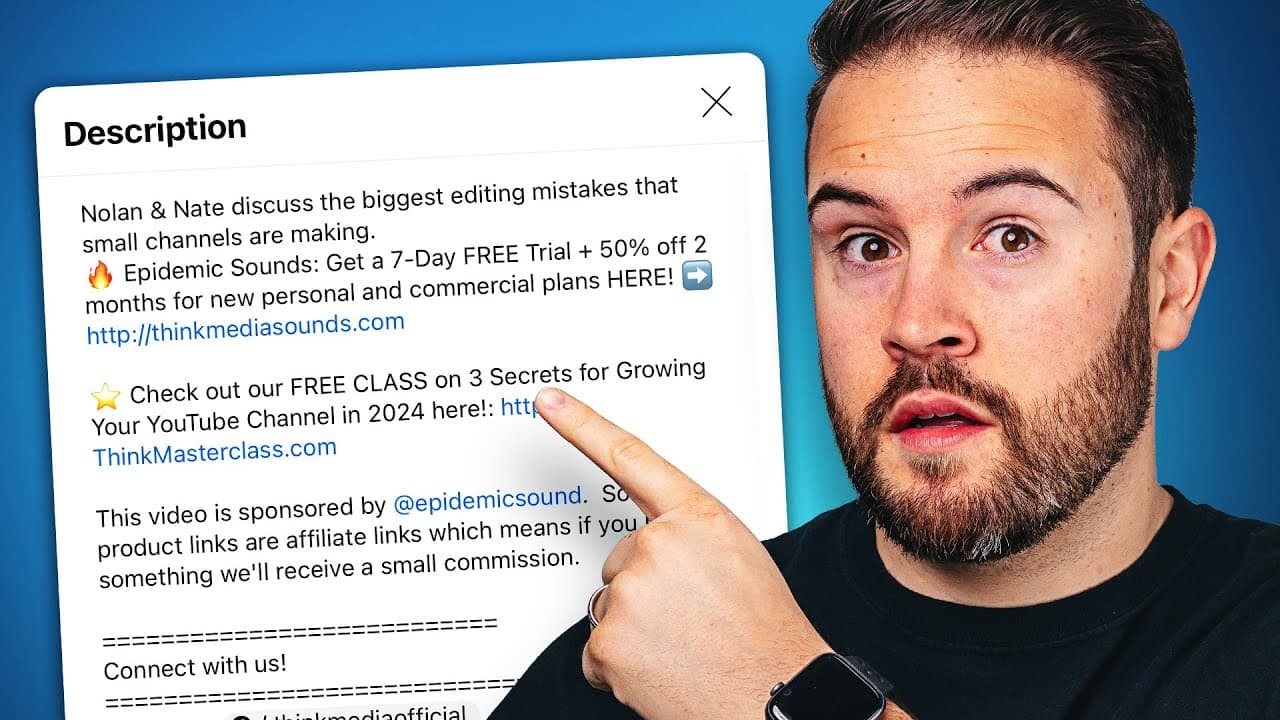
Use the first two lines of the description for searchable keywords and a clear CTA, then add links to next videos, affiliates, and other resources. Include a disclaimer for affiliate links and guide viewers to a template for faster uploads. This structure helps ranking, engagement, and monetization.
Transcript
I'm going to show you the best way to use your YouTube video descriptions to actually get more views on YouTube and make more money I'm also going to give you a template that you can use in your descriptions and later on in the video I'm going to show you how to set this up so every time that you upload a YouTube video it's going to be automaticall... Read More
Key Insights
- Top two description lines are crucial for ranking and should use keywords people search for
- The first line should describe the video in terms people search for on YouTube and Google
- The second line is where monetization or a strong call to action belongs
- Affiliate links should be disclosed to comply with guidelines
- Include a recommended next video link to keep viewers watching
- Link to the gear and resources you mention, using a single landing page when possible
- Timecodes belong at the bottom and help viewers navigate while supporting SEO
- Upload defaults and a template save time by auto populating descriptions on new videos
Install to Summarize YouTube Videos and Get Transcripts
Explore YouTube Video Summarizer or Get YouTube Transcript Extractor
Questions & Answers
Q: How can I improve my YouTube video description for search ranking?
To improve ranking, write the first line as a concise description of the video using keywords people search for on YouTube and Google. The second line should clearly present a monetization option or primary call to action since it is visible without expanding the description. Use variations of keywords while staying accurate to the video content.
Q: What should the second line of my description contain?
The second line should present the monetization plan or main CTA. This line is visible when viewers click to expand the description, so place affiliate links, funnels, or a specific offer here to maximize visibility and potential conversions.
Q: Why add a link to the next video in the description?
Adding a link to the next video helps guide viewers to continue watching. Since not all viewers will reach the end screen, providing an easily accessible next video increases watch time and engagement, contributing to better channel health and discovery.
Q: How do I manage affiliate links in my YouTube descriptions?
Include affiliate links with proper disclosure stating that the video is not sponsored but contains affiliate links. This transparency helps comply with guidelines and protects audience trust while still enabling affiliate revenue through the description.
Q: What is the purpose of listing products and gear in the description?
Listing products and gear provides viewers with direct access to tools used in the video. A single landing page for all links simplifies the description, reduces clutter, and improves click-through rates by offering a clear path to purchase or learn more.
Q: Why are timecodes placed at the bottom of the description?
Timecodes at the bottom help users quickly find specific sections of the video, and they support YouTube chapters. This navigation aid improves user experience and can contribute to better engagement signals for the video.
Q: How can I automate description templates for new uploads?
Use YouTube Studio upload defaults to automatically populate the description. After downloading a template, paste it into the upload defaults so most of the description is pre-filled, and you only replace a few lines for each new video, saving time and ensuring consistency.
Q: What other elements should I include in a YouTube description for growth?
Beyond the top lines and links, include a brief about section with additional context, hashtags for discoverability, and a disclaimer for affiliates. Also promote social channels, a podcast, or a free class to expand touchpoints with viewers and build community.
Q: How does a well structured description impact viewer behavior?
A well structured description makes it easy for viewers to understand what the video covers, discover related content, and find ways to engage or purchase. Clear CTAs and accessible links reduce friction, increase click-throughs, and encourage ongoing viewing and interaction with the channel.
Summary & Key Takeaways
-
This video explains how to craft YouTube descriptions to increase views and earnings by using the top two lines for search keywords and CTAs, and then guiding viewers to a next video and affiliate links. It also covers a simple template and how to automate descriptions with YouTube Studio upload defaults. The aim is to boost discovery and revenue.
-
The method emphasizes keyword variety, strategic linking, and a visible CTA to funnel viewers through your content and monetization pathways, while respecting disclosure requirements for affiliate links and providing a scalable description workflow.
-
The guidance includes practical steps for organizing sections, linking to videos, products, podcasts, and social channels, plus timecodes and hashtags to improve search and viewer flow, all implemented via a reusable template.
Read in Other Languages (beta)
Share This Summary 📚
Summarize YouTube Videos and Get Video Transcripts with 1-Click
Try YouTube Summary with ChatGPT & Claude or YouTube Transcript Generator
Explore More Summaries from Think Media 📚

Summarize YouTube Videos and Get Video Transcripts with 1-Click
Try YouTube Summary with ChatGPT & Claude or YouTube Transcript Generator