How to Build an Automated Media Agent Team in n8n
TL;DR
Build an n8n media system by routing Telegram requests to specialized agents for Drive, contacts, creative production, social research, and publishing. The demonstrated setup can edit images, generate videos, email shared files, research TikTok, Instagram, and YouTube, create Google Docs, and log actions, errors, inputs, outputs, and token usage for visibility.
Transcript
Today, I'm super excited to share with you guys the ultimate media agent. Not only does this agent have access to personal assistant functions like email, Google Drive, and calendar, but can also do so much on the creative side of things like creating an image, editing an image, creating a video, or turning an image into video. And then finally, it... Read More
Key Insights
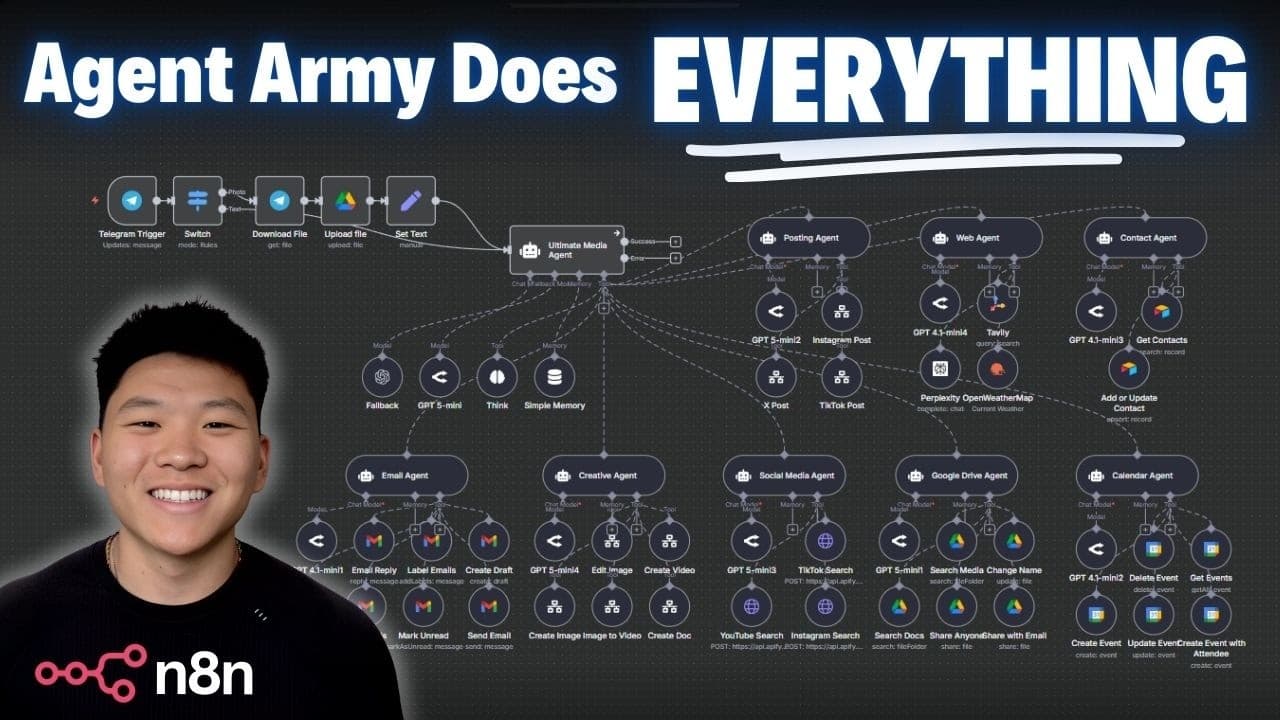
- The system is organized as a team of specialized agents, with a main agent interpreting requests and selecting agents for Google Drive, contacts, creative work, and social media tasks. This structure lets one Telegram conversation coordinate multiple tools and workflows.
- Telegram is the conversational interface for the automation. An uploaded image is first processed into Google Drive, after which the agent asks for a filename and optional sharing changes before delegating the rename operation to the Google Drive agent.
- The creative agent can edit images, create videos from text, and turn existing images into videos. In the demonstration, it produces three 1024 x 1024 preview edits and requests confirmation before rendering final 2048 deliverables.
- The main agent uses GPT5 Mini to decide which specialized agents and tools should handle a request. A think tool supports requests involving many possible actions, while the creative workflow uses GPT1 for image generation and V3 fast for video generation.
- The image-to-video workflow can create a VFX advertisement from a selected Drive image. The demonstration asks for music and lights synchronized to the beat, while the creative agent independently generates an additional text-to-video clip that could serve as B-roll.
- The email workflow coordinates multiple agents and permissions. It finds a recipient through the contact agent, locates the requested video in Google Drive, changes the file to anyone-with-the-link access, and sends an email containing the resulting link.
- The social media agent searches TikTok, Instagram, and YouTube simultaneously through Apify. It returns links, creators, statistics, captions, and related details for high-performing videos selected by a search term or hashtag and a requested result count.
- Activity logging provides visibility into the system's behavior by recording actions even when errors occur. The description states that logs include full input, output, and token usage details, allowing users to inspect what the media agent attempted and produced.
- More videos from this channel:
- More from this channel: Nate Herk | AI Automation
Install to Summarize YouTube Videos and Get Transcripts
Explore YouTube Video Summarizer or Get YouTube Transcript Extractor
Questions & Answers
Q: How do you build a media agent team in n8n?
Build the system around a main conversational agent that receives Telegram requests and delegates work to specialized agents. The demonstrated setup includes agents for Google Drive, contacts, creative media, and social research, plus separate workflows for document creation and publishing. Each agent receives only the tools needed for its role, while the main agent decides which workflows should handle each request.
Q: What can the n8n media agent system do?
The system can manage email, calendars, contacts, and Google Drive while also creating and editing images, generating videos, turning images into videos, and posting media to X, TikTok, or Instagram. It can search social platforms for research, compile findings into Google Docs, perform web searches, and log actions, errors, inputs, outputs, and token usage.
Q: How does the media agent process an uploaded image?
The user sends an image through Telegram, and the agent processes it into the Google Drive environment. It then asks what the file should be called and whether its sharing settings should change. After receiving a name, the main agent routes the task to the Google Drive agent, which uses its rename tool and returns a link to the stored file.
Q: How does the n8n agent edit images and create videos?
The main agent interprets the creative request and sends it to a creative agent with image-editing and video-generation tools. In the demonstration, the creative agent creates three 1024 x 1024 image previews, saves them to Google Drive, and asks for confirmation before final 2048 renders. A selected preview is then converted into a VFX advertisement with music and synchronized lights.
Q: Which AI models are used for media generation?
GPT5 Mini serves as the main agent's brain and decides which specialized agents and tools should process a request. The demonstrated creative workflow uses GPT1 for image generation and V3 fast for both image-to-video and text-to-video generation. The presenter describes V3 fast as cheaper and faster than V3 and notes that the prompts can be customized further for specific use cases.
Q: How does the agent email a generated media file?
The agent first identifies the requested file in Google Drive and asks the contact agent to retrieve the recipient's email address. It then adjusts the Drive file's permissions, either for a specific email address or for anyone with the link. In the demonstration, it enables link viewing and sends an email containing the generated JBL speaker video.
Q: How does the agent research content on social media?
The social media agent searches TikTok, Instagram, and YouTube simultaneously through Apify. The user can provide a search term or hashtag and specify how many videos to retrieve from each platform. The returned research can include video links, creator names, performance statistics, captions, and other details, which the agent can subsequently organize into a Google Doc.
Q: Why does the media agent log every action?
Logging gives the user visibility into what the media agent is doing, including operations that fail. According to the description, the system records actions along with full inputs, outputs, and token usage details. This makes it possible to inspect how requests moved through the workflows, confirm what files or messages were produced, and identify errors during multi-step automation.
Summary & Key Takeaways
-
The system uses Telegram as its conversational interface and GPT5 Mini as the main agent's brain. Requests are routed to specialized agents with tools for Google Drive, contacts, creative production, and social media research, while a separate workflow lets the main agent create documents from gathered information.
-
The creative workflow accepts an uploaded image, stores and renames it in Google Drive, produces multiple edited previews, and turns a selected preview into a video. The demonstration uses GPT1 for image generation and V3 fast for image-to-video and text-to-video production, including generated audio and visual effects.
-
The agent coordinates tasks across services instead of handling each action in isolation. It locates files, retrieves contact information, changes Drive sharing permissions, sends email links, searches social platforms concurrently, saves research to Google Docs, and logs its actions so users can inspect successful operations and errors.
Read in Other Languages (beta)
Share This Summary 📚
Summarize YouTube Videos and Get Video Transcripts with 1-Click
Try YouTube Summary with ChatGPT & Claude or YouTube Transcript Generator
Explore More Summaries from Nate Herk | AI Automation 📚






Summarize YouTube Videos and Get Video Transcripts with 1-Click
Try YouTube Summary with ChatGPT & Claude or YouTube Transcript Generator