How to Build an AI Resume Screening Agent in n8n
TL;DR
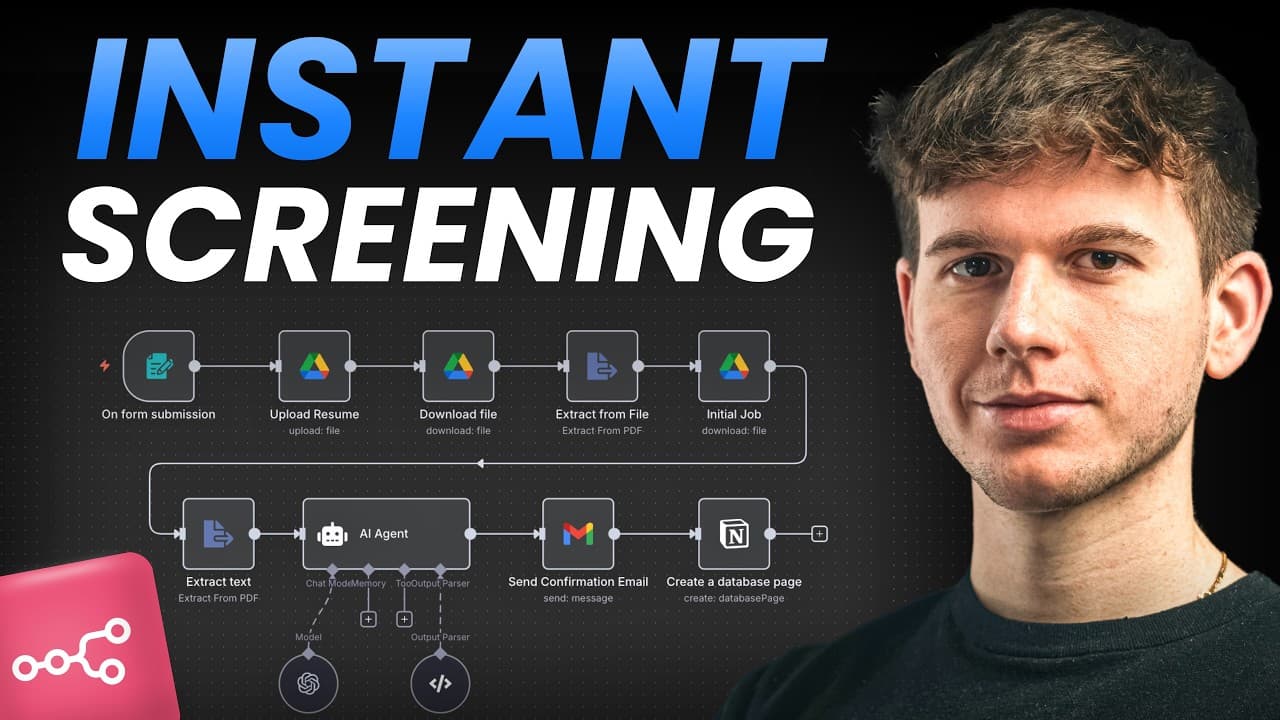
An AI resume screening workflow in n8n takes an applicant's uploaded CV, extracts its text, and matches it against a separate PDF describing what a strong candidate looks like for the job. An AI agent then scores the applicant, sends a confirmation email, and logs the results to a Notion database.
Transcript
Hey, I'm about to show you how I built an AI resume screening agent in Anen that allows applicants to put their CVs and apply for a job. What it does is that it then extracts the text from that CV. It then matches the text of that CV to another PDF which contains the requirements of what a good applicant looks like for that specific job. Then it us... Read More
Key Insights
- The system follows five core steps: collect the application, extract resume text, match it against job qualifications, use an AI agent to score the applicant, then email the applicant and add results to Notion.
- Structuring an automation starts with inputs and outputs: the input is the applicant's CV, and the output is scored data comparing that CV to the job's qualification document.
- The n8n native form captures full name, email, phone number, and resume, with the resume field set to element type 'file' and restricted to PDF so text can be reliably extracted.
- Because an AI agent cannot be given two files directly, the resume is uploaded to Google Drive, downloaded as binary, and passed through an 'extract from file' PDF node to turn it into text.
- Job qualifications are stored as a separate PDF in a Google Drive folder rather than hardcoded in the prompt, so new jobs can be added without rewriting the AI agent prompt, keeping it dynamic.
- The AI agent receives two pieces of text, the CV and the job's 'what good looks like' document, then compares them to qualify the applicant and produce results.
- The scored output includes strengths, weaknesses, a risk factor, a reward factor, and an overall score (for example eight out of ten), so reviewers can see why an applicant ranks high, medium, or low.
- The workflow sends an automated confirmation email to every applicant and stores the resume link plus the full AI analysis in a Notion database, effectively creating a custom applicant tracking system.
Install to Summarize YouTube Videos and Get Transcripts
Explore YouTube Video Summarizer or Get YouTube Transcript Extractor
Questions & Answers
Q: How does an AI resume screening agent in n8n work?
The n8n agent lets applicants submit their CV through a form, then extracts the text from that CV and matches it against a separate PDF containing the requirements of a good applicant for the specific job. An AI agent scores the applicant against the different criteria, sends a confirmation email to the applicant, and adds the results to a Notion database. The whole flow runs automatically once the form is submitted.
Q: What are the five core steps of the resume screening automation?
The five steps are: first, collect the job application through a form; second, extract the text from the applicant's uploaded CV; third, match that text against the job's qualification document; fourth, use an AI agent to score the applicant based on the criteria; and fifth, send the applicant a confirmation email and add the complete analysis to a Notion database. This sequential order is how the system is structured from input to output.
Q: Why does the resume have to be uploaded and downloaded before extracting text?
The AI agent cannot be given two files directly, so the resume must first be uploaded to Google Drive and then downloaded back as binary data. When a file is uploaded and downloaded it is in binary format. That binary is passed to an 'extract from file' node using the 'extract from PDF' operation, which turns it into plain text. Only after both the CV and the qualification document are converted to text can they be handed to the AI agent.
Q: How does the system match a CV against job qualifications?
The workflow stores the job's qualifications as a separate PDF in a Google Drive folder, for example an investment banking intern PDF describing what a good applicant looks like. The system downloads that document, extracts its text, and pairs it with the extracted CV text. These two pieces of text, the CV and the job description of what good looks like, are then sent together to the AI agent, which compares them to qualify the applicant.
Q: Why store job qualifications in a Google Drive folder instead of the AI prompt?
You can either add the qualifications or rules directly inside the AI agent, or keep them as a separate document that can be as long as you want. The creator uses a Google Drive folder because you can then add more files without having to change the prompt. The prompt stays dynamic and pulls from whichever document is in the folder, so different jobs can be screened without rewriting the AI agent each time.
Q: What information does the AI agent output for each applicant?
The AI agent produces a structured analysis including the applicant's strengths, weaknesses, a risk factor, and a reward factor, along with an overall score such as eight out of ten. This data lets a reviewer go in and see exactly why an applicant received their score and whether they are a high, medium, or low ranking applicant. It reveals the specific thing that differentiates a candidate, giving decision-makers data to act on.
Q: How is the applicant notified and tracked after scoring?
After the AI scores the applicant, the workflow automatically sends a confirmation email thanking them for applying and saying the team will review the application and get back to them with next steps. The applicant's data is then added to a Notion database, which stores the resume link, strengths, weaknesses, risk factor, reward factor, and score. This creates a ranked tracker functioning as a custom applicant tracking system.
Q: What file type should applicants use for their resume in the form?
The n8n form's resume field is set with an element type of 'file' because a file is needed from the applicant. The accepted file types can be left empty to allow all formats such as PNG, JPG, or HEIC, but the creator restricts it to PDF. A PDF is the best format for reliably extracting the text and comparing it against the job qualification document. The form is also configured so only one CV is submitted per applicant.
Summary & Key Takeaways
-
The creator, Mikuel, demonstrates an n8n workflow that screens resumes automatically. An applicant fills out a native form with name, email, phone, and a PDF resume, which kicks off the automation. The resume uploads to Google Drive, downloads, and has its text extracted before analysis.
-
The system matches the applicant's CV against a job qualification PDF stored in a Google Drive folder. Both documents are converted to text and fed to an AI agent, which scores the applicant on multiple criteria and outputs strengths, weaknesses, risk, and reward factors.
-
After scoring, the workflow emails the applicant a confirmation that their application was received, then adds the full analysis and resume link to a Notion database. This produces a ranked applicant tracker showing why each candidate scored as they did, functioning as a custom ATS.
Read in Other Languages (beta)
Share This Summary 📚
Summarize YouTube Videos and Get Video Transcripts with 1-Click
Try YouTube Summary with ChatGPT & Claude or YouTube Transcript Generator
Explore More Summaries from Michele Torti 📚


Summarize YouTube Videos and Get Video Transcripts with 1-Click
Try YouTube Summary with ChatGPT & Claude or YouTube Transcript Generator