How to Build an AI Facebook Ad Spy in n8n
TL;DR
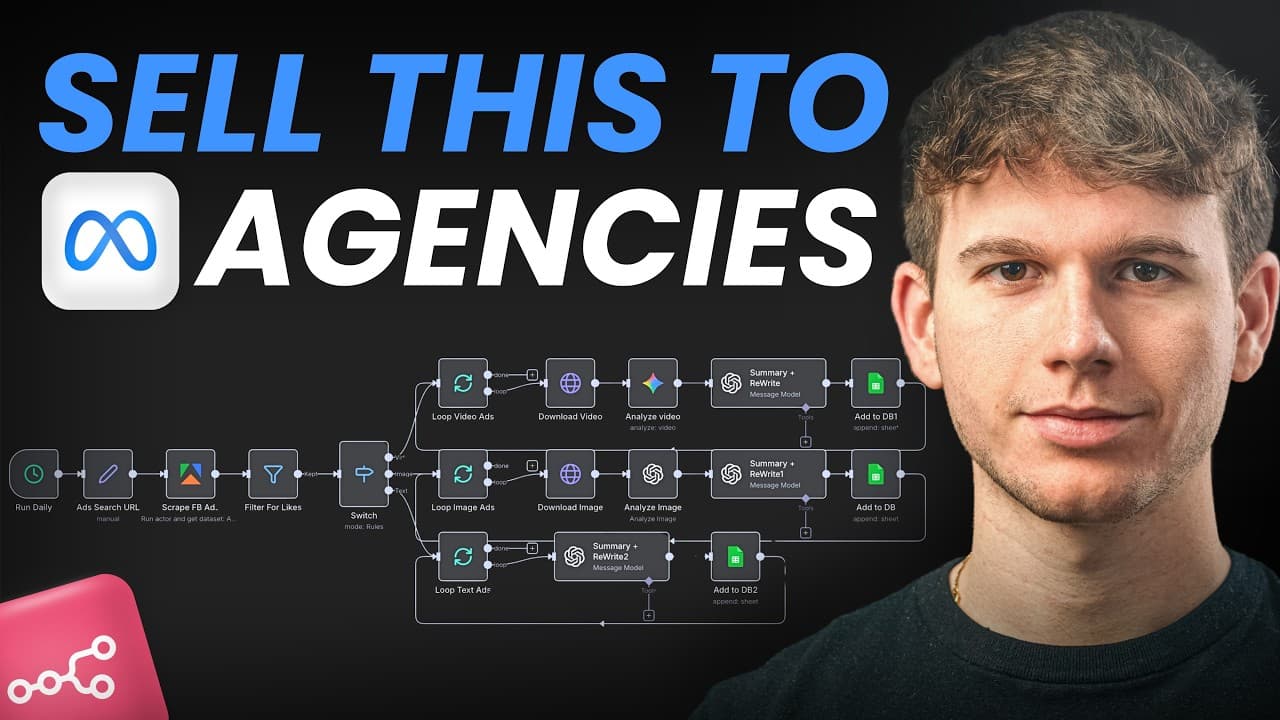
Build the system by sending a Meta Ads Library search URL to Apify, filtering the results by popularity, and routing video, image, and text ads through separate AI analysis paths in n8n. The workflow summarizes each selected ad, rewrites its copy for inspiration, and saves the source details, analysis, and rewritten version in Google Sheets.
Transcript
In this video, I'm going to build a full AI Facebook ads parasite system right in front [music] of you that allows us to be able to search through thousands of ads just by giving a single keyword in the ads library. It then scrapes all these ads using Apify before running through each ad individually, summarizing, but also rewriting the ad before a... Read More
Key Insights
- The automation is structured as an input-to-output system: a keyword or Meta Ads Library search URL enters the workflow, several extraction and AI processing steps run, and a database of source ads, summaries, and rewritten copy is produced.
- Apify is the workflow's scraping layer, using a Facebook Ads Library actor to extract ad information such as text, images, videos, advertiser names, page details, dates, and identifiers from the search results supplied to the automation.
- Popularity filtering reduces the scraped collection before AI processing. The demonstration keeps ads with at least 1,000 likes, based on the creator's assumption that ads with very little engagement are less useful as models for inspiration.
- Creative format determines the processing route because video, image, and text ads require different inputs. An n8n Switch node separates the records so each format can be handled by a dedicated analysis path before the results return to the database.
- Video analysis works by downloading the advertising video and sending it to Gemini. The requested analysis identifies what the creative contains, including its hook, body, call to action, and other elements needed to understand the structure of the advertisement.
- AI rewriting creates an alternative hook or script from the analyzed advertisement. The generated copy is intended as inspiration or as a version adjusted to the user's company and tone of voice, rather than merely storing the competitor's original wording.
- Google Sheets serves as the demonstrated database for the processed records. Its columns can include archive ID, page ID, ad type, date added, page name, page URL, AI-generated summary, and rewritten advertising copy.
- The sample run scraped 50 ads and retained 19 after applying the 1,000-like threshold. Those selected results consisted of nine video ads, seven image ads, and three text ads, illustrating why the workflow needs format-specific branches.
Install to Summarize YouTube Videos and Get Transcripts
Explore YouTube Video Summarizer or Get YouTube Transcript Extractor
Questions & Answers
Q: How do you build an AI Facebook ad spy tool in n8n?
Start with a manual or scheduled trigger in n8n and provide a Meta Ads Library search URL generated from a target keyword. Send that URL to an Apify Facebook Ads Library scraper, retrieve the ad records, filter them by popularity, and route video, image, and text ads through separate branches. Use AI to analyze and rewrite each selected ad, then save the metadata and generated output in Google Sheets.
Q: How does Apify scrape ads from the Meta Ads Library?
Apify provides scraper products called actors, including actors designed for the Facebook Ads Library. The n8n workflow sends the selected Ads Library search URL to one of these actors. The actor extracts available information from the results, including ad text, images or videos, advertiser and page information, publication dates, and identifiers, then returns the records to n8n for filtering and analysis.
Q: How can n8n filter Facebook ads by popularity?
After receiving scraped records from Apify, n8n applies a popularity condition before sending ads to the AI stages. The demonstration uses a threshold of at least 1,000 likes. In its sample of 50 scraped ads, only 19 passed that condition. Filtering early limits later analysis to the examples the creator considers more useful based on their visible engagement.
Q: Why should video, image, and text ads use separate n8n branches?
Video, image, and text advertisements contain different kinds of input, so they cannot all be processed identically. The workflow uses a Switch node to identify the ad type and route it to the appropriate branch. Videos must be downloaded before Gemini analyzes them, while images can be sent to OpenAI for visual analysis, and text ads can be handled through their written content.
Q: How does Gemini analyze Facebook video ads in this workflow?
The video branch first downloads the advertising video extracted through Apify. It then sends that video to Gemini with instructions to determine what the creative contains. The analysis can describe the hook, body, call to action, and other elements. That structured understanding is subsequently used to summarize the advertisement and produce a rewritten hook, script, or advertising concept.
Q: What information is saved to Google Sheets by the ad spy workflow?
Google Sheets stores both source metadata and AI-generated material for each selected advertisement. The demonstrated fields include archive ID, page ID, ad type, date added, page name, page URL, a summary of the advertisement, and rewritten advertising copy. This produces a searchable archive of competitor or industry ads that an agency can review later for creative inspiration.
Q: Can the Facebook ad analysis workflow run automatically on a schedule?
Yes. The creator initially uses a manual trigger so the workflow can be tested and demonstrated from scratch. For production use, the trigger can be changed to a schedule. The proposed frequencies include every day, every other day, or every week, allowing the system to collect and process new Ads Library results without requiring a manual start each time.
Q: How can agencies use the rewritten Facebook ad copy?
Marketing and advertising agencies can use the stored summaries and rewritten copy to study what competitors or other advertisers are doing in the same market. The workflow can rewrite a hook, script, or complete ad in a different form or in the agency's company tone of voice. The output is positioned as inspiration for developing related advertising ideas and identifying possible improvements.
Summary & Key Takeaways
-
The workflow begins with a keyword search in the Meta Ads Library, such as AI automation, marketing, or e-commerce. It passes the resulting search URL to an Apify Facebook Ads Library scraper, which extracts available information such as the creative, text, advertiser, page details, publication date, and archive identifiers.
-
After Apify returns the ads, n8n filters them by popularity so that only stronger examples continue. In the demonstration, the threshold is 1,000 likes. A Switch node then separates the remaining results into video, image, and text branches because each creative format requires a different processing and analysis method.
-
Video creatives are downloaded and analyzed with Gemini, while image ads can be analyzed with OpenAI. AI identifies elements such as the hook, body, and call to action, produces a concise summary, and rewrites the advertising copy. Google Sheets stores the original metadata, summaries, and rewritten versions for later inspiration.
Read in Other Languages (beta)
Share This Summary 📚
Summarize YouTube Videos and Get Video Transcripts with 1-Click
Try YouTube Summary with ChatGPT & Claude or YouTube Transcript Generator
Explore More Summaries from Michele Torti 📚
Summarize YouTube Videos and Get Video Transcripts with 1-Click
Try YouTube Summary with ChatGPT & Claude or YouTube Transcript Generator