How Do Multiprogramming and Multitasking Work in Operating System Structure?
TL;DR
Multiprogramming and multitasking keep computing resources productive by moving CPU time among multiple jobs, but multitasking also enables direct user interaction. In the multiprogramming example, a 512-megabyte RAM holds the operating system and jobs one through four while other jobs remain in the job pool. Read on to understand job selection, CPU reassignment, time sharing, and the distinction between a program and a process.
Transcript
In the previous lectures we have studied about the basics of the operating system and we have seen about computer system organizations and computer system architecture. Now, as we have the idea of computer system organizations and architecture, We are now ready to talk about operating system structure. So, in this lecture we will study the operatin... Read More
Key Insights
- Common capabilities unite systems: Windows, Ubuntu, and other operating systems may be built differently internally, yet they share important responsibilities. The lecture identifies multiprogramming and multitasking as two such capabilities. Studying them through operating system structure reveals both the resource-management role of the system and the interaction model it provides to users.
- Jobs combine code and data: A job is a unit of work that must be executed and may contain both code and data. This definition matters because multiprogramming manages jobs rather than treating processor activity as an undifferentiated stream. Each incoming job first joins the job pool, where it waits for selection and placement in main memory.
- The job pool exceeds memory: The job pool contains all jobs that have entered the system, but RAM has limited capacity. Consequently, the operating system loads only a subset of those jobs into memory. The lecture's layout uses 512 megabytes of RAM and shows jobs one through four loaded together with the operating system.
- Loaded jobs create alternatives: Keeping several jobs in main memory gives the operating system another executable choice whenever the current job stops using the CPU. If only one job were available, an I/O request could leave the processor idle. Multiple loaded jobs allow useful computation to continue while another job waits for a resource.
- Waiting triggers CPU reassignment: The operating system releases the CPU from a job when that job begins an I/O operation or temporarily needs another resource. It can then assign the processor to a different loaded job. This reassignment is the mechanism that turns otherwise idle processor time into productive execution time for another job.
- Execution can continue in sequence: Job one may use the CPU and then leave it for an I/O operation. Job two can execute during that interval, and job three can take over if job two later waits for another resource. This continuing sequence illustrates how multiprogramming keeps the CPU active without requiring every job to use it continuously.
- Utilization is the central objective: Multiprogramming primarily seeks to increase CPU utilization, but its benefits extend to memory and peripheral devices. Jobs can use different resources at different moments instead of forcing the complete system to wait for one job. The result is a more effective arrangement of available computing resources during execution.
- The lawyer analogy explains efficiency: A lawyer does not necessarily wait for one client's trial or paperwork before helping anyone else. During that delay, the lawyer can work for another client and use available time effectively. Multiprogramming applies the same pattern by letting another job use the CPU while the first job waits for I/O or another resource.
- Multiprogramming lacks direct interaction: Effective resource use does not automatically create an interactive computing environment. A multiprogrammed system can coordinate the CPU, memory, and peripheral devices while still offering no direct interaction between users and running programs. This limitation separates basic multiprogramming from the time-sharing model introduced afterward.
- Multitasking means time sharing: The lecture uses multitasking and time sharing as names for the same operating system capability. It builds on multiprogramming by switching the CPU among jobs frequently enough to support interaction. The key change is not merely having several jobs available, but revisiting them rapidly while users communicate with their programs.
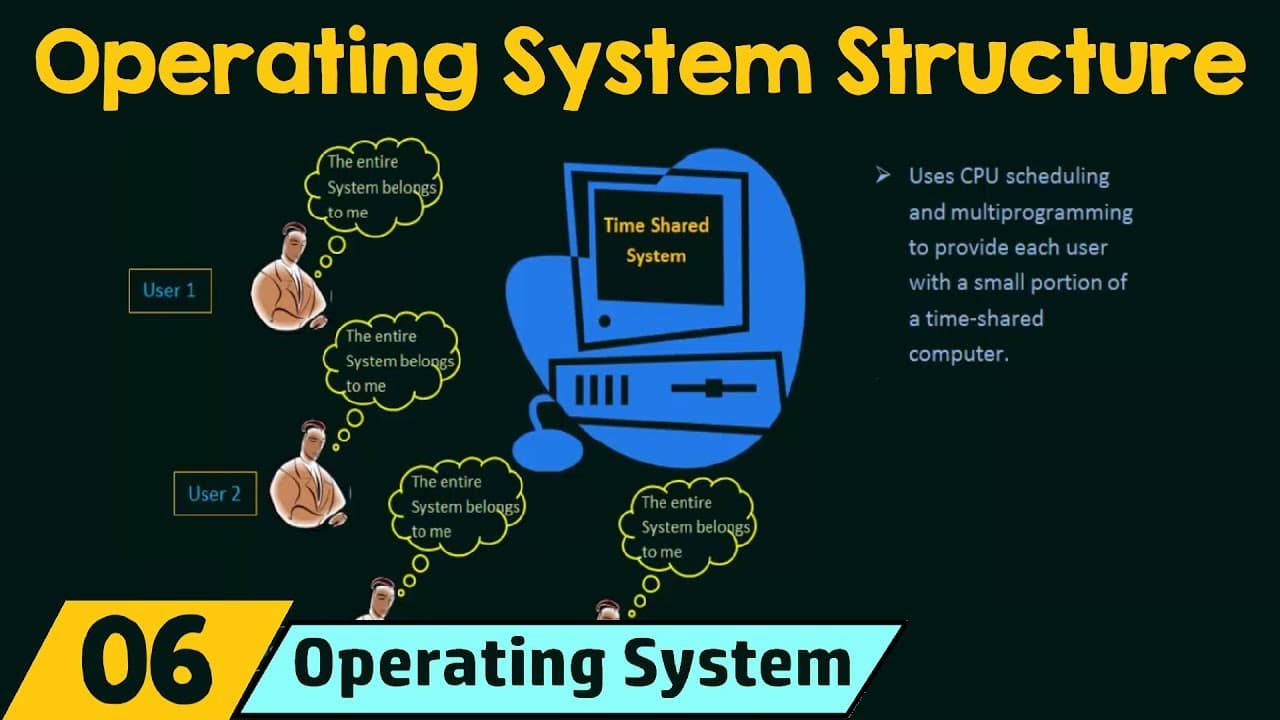
- Scheduling divides processor time: CPU scheduling and multiprogramming give each user a small portion of computer time. Because job switching happens rapidly, multiple users can share the computer simultaneously without experiencing the system as a single uninterrupted queue. Each user can feel that the complete computer system is available individually, even though processor time is shared.
- Execution creates a process: A program becomes a process when it has been loaded into memory and is currently executing. In a time-sharing environment, each user has at least one separate program in memory that can receive processor time. This distinction connects stored program content with the active execution that CPU scheduling must manage.
Install to Summarize YouTube Videos and Get Transcripts
Explore YouTube Video Summarizer or Get YouTube Transcript Extractor
Questions & Answers
Q: How do multiprogramming and multitasking work in operating system structure?
Multiprogramming organizes several jobs so the CPU has another job available whenever the current one waits for I/O or another resource. The operating system loads a subset of the job pool into limited main memory and assigns the CPU among those loaded jobs. Multitasking, also called time sharing, switches among jobs frequently enough to support direct interaction. Together, these capabilities improve resource use while allowing multiple users to work with running programs.
Q: What is multiprogramming in an operating system?
Multiprogramming is the capability to organize and execute multiple programs so the CPU always has a job available. Jobs containing code and data enter a job pool, and selected jobs are loaded into main memory. When one loaded job stops using the CPU, the operating system assigns it to another. This arrangement increases CPU utilization because the processor need not remain idle during a job's resource wait.
Q: How does multiprogramming prevent the CPU from remaining idle?
Suppose job one is executing and then starts an I/O operation. The operating system releases the CPU from job one and assigns it to job two while job one uses the I/O device. If job two later waits for another resource, job three can receive the processor. The CPU therefore continues useful execution because another loaded job is ready during each wait.
Q: What is the job pool, and why are only some jobs loaded?
The job pool contains all jobs that have entered the system and need to be executed. Each job may include code and data, but main memory cannot hold the entire pool because its capacity is limited. The operating system therefore selects a subset and loads those jobs into RAM. The example uses 512 megabytes of RAM and shows jobs one through four loaded with the operating system.
Q: What is the difference between multiprogramming and multitasking?
Multiprogramming focuses on keeping resources effective by assigning the CPU to another job when the current job waits. It improves use of the CPU, memory, and peripheral devices, but does not itself provide direct user interaction. Multitasking, or time sharing, switches the CPU among jobs frequently enough for users to interact with running programs. The difference is therefore efficient resource sharing versus rapid sharing that also supports interaction.
Q: How does time sharing support multiple users?
Time sharing combines multiprogramming with CPU scheduling to distribute processor time among users. Each user receives a small portion of computer time while the CPU switches frequently among jobs. The switching lets users interact with their programs as those programs run. Because it happens rapidly, each user can feel that the complete computer system is individually available even though many users share it.
Q: Why does the operating system load multiple jobs into memory?
Multiple loaded jobs give the operating system alternatives when the current job cannot use the CPU. If job one waits for I/O, job two can execute without first being drawn from an entirely unloaded pool. This keeps processor time from being wasted during resource operations. The operating system selects only a subset because RAM is limited, then manages CPU assignment among the jobs already in memory.
Q: What is a process in a time-sharing operating system?
A process is a program that has been loaded into memory and is currently executing. In the described time-sharing environment, each user has at least one separate program in memory. CPU scheduling determines when each of those programs receives processor time. Calling an executing program a process distinguishes active execution from a job or program that is merely stored or waiting in the job pool.
Summary & Key Takeaways
-
Introducing operating system structure: Operating systems such as Windows and Ubuntu can differ greatly in their internal makeup while still sharing essential capabilities. The lecture focuses on two common capabilities that operating systems must support: multiprogramming and multitasking. Multitasking is also called time sharing. The discussion begins with multiprogramming, explaining why a system needs to organize several programs rather than allow one user or job to occupy computing resources throughout its entire execution.
-
Defining the multiprogramming goal: Multiprogramming is the CPU's capability to run multiple programs through organized job execution. A single user generally cannot keep both the CPU and I/O devices busy continuously. Multiprogramming therefore arranges jobs, which contain code and data, so the CPU always has something available to execute. Its central purpose is to raise CPU utilization and prevent the processor from remaining unused merely because the current job has temporarily moved to another resource.
-
Organizing jobs in memory: Every job entering the system is placed in a job pool, but limited main memory means the entire pool cannot be loaded at once. In the illustrated layout, the computer has 512 megabytes of RAM. The operating system occupies part of that memory, while jobs one, two, three, and four are loaded beside it. The operating system then helps execute the loaded jobs by deciding which one receives the CPU.
-
Reassigning an idle CPU: Without multiprogramming, job one could retain control until its execution finished, even while it was using an I/O device and leaving the CPU idle. With multiprogramming, the CPU is released when job one begins I/O or needs another resource. Job two can use the processor during that wait. If job two also stops needing the CPU, job three can execute, keeping the processor productively occupied.
-
Extending into time sharing: Multiprogramming uses the CPU, memory, and peripheral devices effectively, but it does not itself provide direct user interaction. Multitasking, or time sharing, adds frequent switching among jobs so users can interact with programs while they run. CPU scheduling distributes small portions of processor time among users, creating the feeling that each has the complete system. Once a program is loaded into memory and executing, the operating system identifies it as a process.
Read in Other Languages (beta)
Share This Summary 📚
Summarize YouTube Videos and Get Video Transcripts with 1-Click
Try YouTube Summary with ChatGPT & Claude or YouTube Transcript Generator
Explore More Summaries from Neso Academy 📚




Summarize YouTube Videos and Get Video Transcripts with 1-Click
Try YouTube Summary with ChatGPT & Claude or YouTube Transcript Generator