Products
Features
YouTube Video Summarizer
Summarize YouTube videos
Web & PDF Highlighter
Highlight web pages & PDFs
Chat with PDF
Ask any PDF questions with AI
Ask AI Clone
Chat with your highlights & memories
Audio Transcriber
Transcribe audio files to text
Glasp Reader
Read and highlight articles
Kindle Highlight Export
Export your Kindle highlights
Idea Hatch
Hatch ideas from your highlights
Integrations
Obsidian Plugin
Notion Integration
Pocket Integration
Instapaper Integration
Medium Integration
Readwise Integration
Snipd Integration
Hypothesis Integration
Apps & Extensions
Chrome Extension
Safari Extension
Edge Add-ons
Firefox Add-ons
iOS App
Android App
Discover
Discover
Ideas
Discover new ideas and insights
Articles
Curated articles and insights
Books
Book recommendations by great minds
Posts
Essays and notes from readers
Quotes
Inspiring quotes collection
Videos
Curated videos and summaries
Explore Glasp
Glasp Story
How we grew from 0 to 3 million users
Glasp Newsletter
Weekly insights and updates
Glasp Talk
Interview series with great minds
Glasp Blog
Latest news and articles
Glasp Use Cases
Learn how others use Glasp
Build & Support
Glasp API
Access Glasp's API for developers
MCP Connector
Connect Glasp to Claude & ChatGPT
Community
Glasp Reddit Community
Students
Student discount and benefits
FAQs
Frequently Asked Questions
AboutPricing
DashboardLog inSign up

LabChart Reader Mac re calibration of respiratory data and analysis (part 2)
750 views
•
October 25, 2013
by
Dory Video
YouTube video player
LabChart Reader Mac re calibration of respiratory data and analysis (part 2)

TL;DR

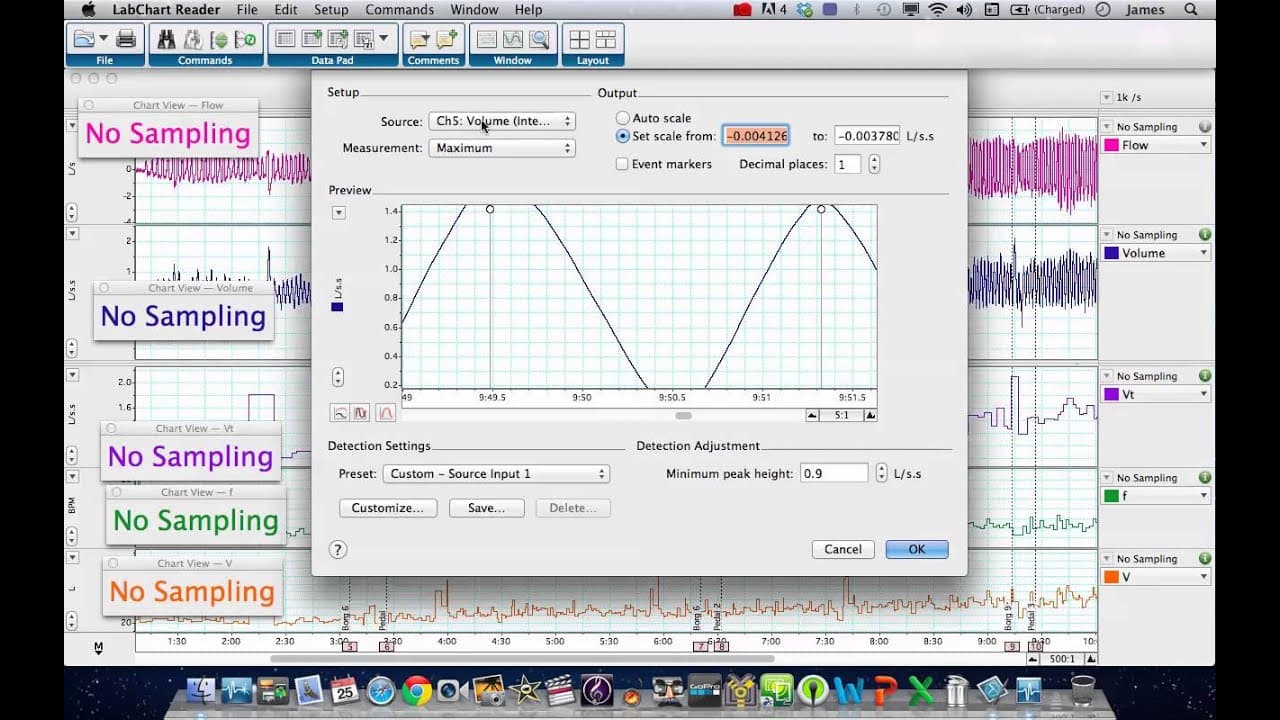
This tutorial explains how to interpret and analyze flow and volume data recorded on a PC using Lab Chart Reader.

Transcript

hello it's dr clark here again we're back on lab chart reader for the mac and this is part two of the um tutorial looking at the conversion of um flow and volume recorded on the spirit report on a pc in the lab but now we're using lab chart reader which doesn't have the module or the pod so we're trying to interpret some data from these and this is... Read More

Key Insights

  • 👻 Lab Chart Reader allows for the conversion and analysis of flow and volume data recorded on a PC.
  • ☠️ Cyclic measurements and arithmetic calculations can be used to determine tidal volume, respiratory rate, and minute ventilation.
  • 🏃 Real-time readouts provide valuable insights into physiological changes during exercise.
  • 🐛 Lab Chart Reader may have some software bugs that require reconfiguring settings.

Install to Summarize YouTube Videos and Get Transcripts

Explore YouTube Video Summarizer or Get YouTube Transcript Extractor

Questions & Answers

Q: How is tidal volume calculated in Lab Chart Reader?

Tidal volume is calculated by using a cyclic measurement where the volume channel is analyzed to determine the maximum value at each respiratory cycle.

Q: How can we determine the respiratory rate in Lab Chart Reader?

The respiratory rate can be easily calculated using the cyclic measurements window and the flow data, which identifies every peak and measures the rate in breaths per minute (bpm).

Q: What is minute ventilation, and how is it calculated in Lab Chart Reader?

Minute ventilation is the product of tidal volume and respiratory rate. In Lab Chart Reader, it can be calculated by creating an arithmetic channel that multiplies the tidal volume (channel 8) by the respiratory rate (channel 9).

Q: How can real-time readouts be obtained for tidal volume, respiratory rate, and minute ventilation?

By adding the appropriate channels and utilizing the arithmetic functions in Lab Chart Reader, real-time readouts for tidal volume, respiratory rate, and minute ventilation can be displayed on the left-hand side.

Summary & Key Takeaways

  • The tutorial focuses on the conversion of flow and volume data recorded on the Spirit report on a PC using Lab Chart Reader.

  • Three new channels, including tidal volume (VT), respiratory rate (f), and minute ventilation (V), are added and analyzed.

  • The tutorial demonstrates how to calculate tidal volume, respiratory rate, and minute ventilation using the added channels and arithmetic functions in Lab Chart Reader.


Read in Other Languages (beta)

English

Share This Summary 📚

Summarize YouTube Videos and Get Video Transcripts with 1-Click

Download browser extensions on:

Try YouTube Summary with ChatGPT & Claude or YouTube Transcript Generator

Explore More Summaries from Dory Video 📚

WavesFactory MERCURY Piano for Kontakt thumbnail
WavesFactory MERCURY Piano for Kontakt
Dory Video
What Are UVI Workstation String Machines and Their Features? thumbnail
What Are UVI Workstation String Machines and Their Features?
Dory Video
How to Set Up Multi-Instrument Layers in Kontakt 5 thumbnail
How to Set Up Multi-Instrument Layers in Kontakt 5
Dory Video
Graphpad Prism - using the layout tool to publish your data thumbnail
Graphpad Prism - using the layout tool to publish your data
Dory Video
How to Perform Linear Regression in GraphPad Prism thumbnail
How to Perform Linear Regression in GraphPad Prism
Dory Video
Roland Cloud Anthology 1987 - Sampled D50 LA synth thumbnail
Roland Cloud Anthology 1987 - Sampled D50 LA synth
Dory Video

Summarize YouTube Videos and Get Video Transcripts with 1-Click

Download browser extensions on:

Try YouTube Summary with ChatGPT & Claude or YouTube Transcript Generator

Apps & Extensions

  • Chrome Extension
  • Safari Extension
  • Edge Add-ons
  • Firefox Add-ons
  • iOS App
  • Android App

Key Features

  • YouTube Video Summarizer
  • Web & PDF Summarizer
  • Web & PDF Highlighter
  • Chat with PDF
  • Ask AI Clone
  • Audio Transcriber
  • Glasp Reader
  • Kindle Highlight Export
  • Idea Hatch

Integrations

  • Obsidian Plugin
  • Notion Integration
  • Pocket Integration
  • Instapaper Integration
  • Medium Integration
  • Readwise Integration
  • Snipd Integration
  • Hypothesis Integration

More Features

  • APIs
  • MCP Connector
  • Blog & Post
  • Embed Links
  • Image Highlight
  • Personality Test
  • Quote Shots
  • Open Graph Checker

Company

  • About us
  • Our Story
  • Blog
  • Community
  • FAQs
  • Job Board
  • Newsletter
  • Pricing
Terms

•

Privacy

•

Guidelines

© 2026 Glasp Inc. All rights reserved.


