How to Create Match Cuts in Premiere Pro
TL;DR
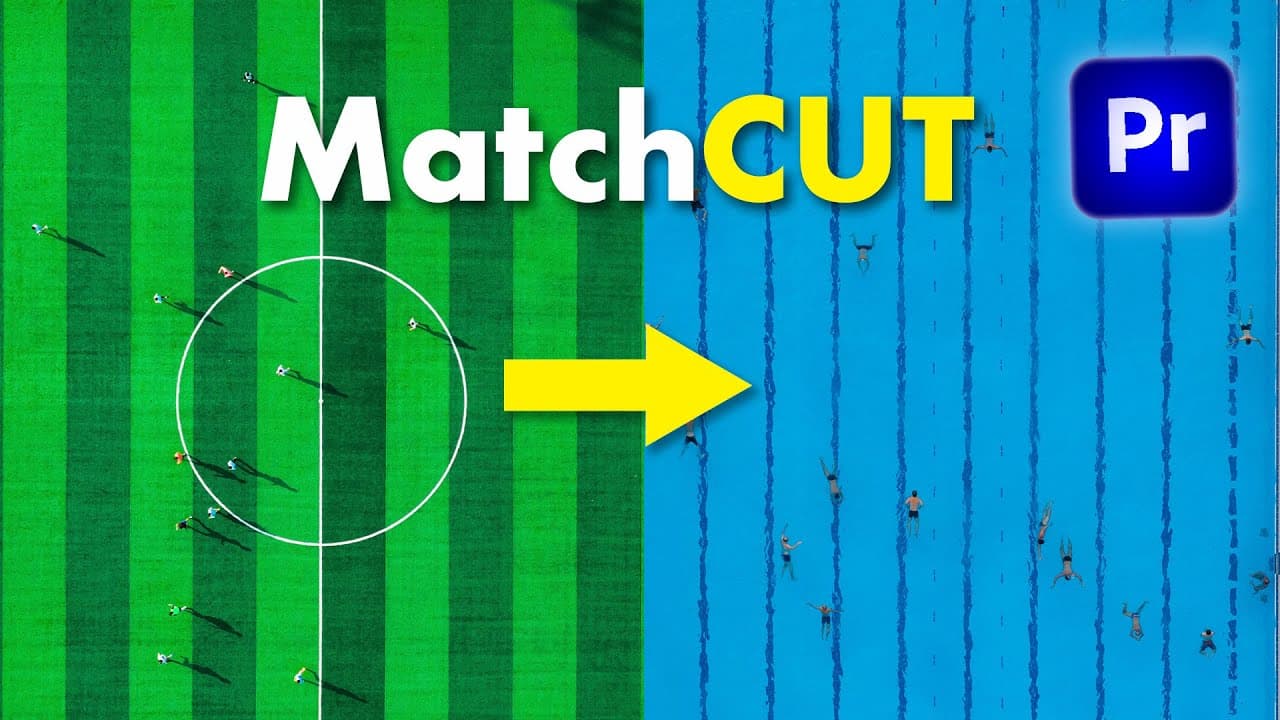
Match cuts connect different scenes by aligning shapes, actions, dialogue, or the completion of a movement. In Premiere Pro, arrange cuts on musical beats, overlay clips at 50% opacity to align subjects, then refine the transition with cropping, keyframed transforms, motion blur, adjustment layers, and consistent styling.
Transcript
so a match cut is when you connect together two different scenes by matching the shapes in the scene or the action and here are four examples of match cuts the first one is matching geometric shapes like in this commercial where the shots move and follow the same vertical lines and the second most common type of match cut is when you match the acti... Read More
Key Insights
- A match cut is a transition that connects two different scenes by matching their shapes, actions, dialogue, or continuous movement. The shared element creates visual or narrative continuity, helping the audience perceive a deliberate relationship between shots that would otherwise appear unrelated.
- Geometric match cuts are created by aligning comparable shapes or lines across consecutive shots. The commercial example follows the same vertical lines as the images change, demonstrating how consistent composition and camera movement can visually connect separate environments or subjects.
- Action match cuts work by joining movements with similar direction, posture, or rhythm. A bicycle movement can transform into a skateboard movement, while a high jumper's arched body can align with an underwater swimmer who forms a comparable shape.
- Verbal match cuts connect dialogue across different shots so that one person or scene begins a phrase and another completes it. The Austin Powers example uses this structure for comedy, showing that matching can operate through spoken language rather than visual composition alone.
- Footage selection is central to creating a convincing match cut. The demonstrated workflow searches for clips with comparable actions, examines related footage from each shoot, and saves possible matches in a collection before arranging high jumping, swimming, and gymnastics shots.
- Musical beats provide clear timing points for match-cut sequences. The clips are initially cut so that each transition coincides with a major beat visible in the audio waveform, then the footage is transformed and aligned without changing the established rhythmic structure.
- Reduced opacity is a practical alignment method in Premiere Pro. Placing one clip above another and setting the upper clip to 50% opacity makes both images visible simultaneously, allowing torsos, legs, positions, scales, and orientations to be matched more accurately.
- Motion and styling effects can strengthen the final transition sequence. Keyframed position, scale, and rotation animate clips into alignment, a 180-degree shutter angle introduces motion blur, and adjustment layers add a brief beat impact and a consistent cinematic treatment.
Install to Summarize YouTube Videos and Get Transcripts
Explore YouTube Video Summarizer or Get YouTube Transcript Extractor
Questions & Answers
Q: What is a match cut in video editing?
A match cut connects two different scenes by preserving a shared visual, physical, or verbal element across the edit. The connection can come from matching geometric shapes, comparable actions, continued dialogue, or an action that begins in one shot and finishes in another. This technique makes the transition feel intentional and can turn an abrupt jump between scenes into a pleasing edit.
Q: What types of match cuts are shown in the tutorial?
The tutorial presents four broad approaches. Geometric match cuts align shapes or lines between shots. Action match cuts connect similar movements, such as a bicycle action changing into a skateboard action. Verbal match cuts divide a sentence between scenes or speakers. A subtler form lets the second shot complete an action that was started in the first shot.
Q: How do you find footage that works for a match cut?
Look for clips containing similar body positions, movement directions, shapes, or actions. The demonstrated process begins with a high jumper and searches for another subject with a comparable arched posture, leading to an underwater swimmer. Promising footage is added to a collection, and related shots from the same shoot are reviewed when multiple angles or additional coverage may be useful.
Q: How do you align two shots for a match cut in Premiere Pro?
Place the second clip on a higher video layer, extend the clips so they overlap, and reduce the upper clip's opacity to 50%. With both images visible, use the Motion or Transform controls to adjust position, scale, rotation, and orientation until the important body parts or shapes overlap. Restore full opacity afterward and play the transition to evaluate the alignment.
Q: How do you fix footage facing the wrong direction for a match cut?
Use rotation and the Horizontal Flip effect to make the subjects face or move in compatible directions. In the swimmer example, the clip is rotated to 180 degrees and flipped from left to right before its scale and position are adjusted. These orientation changes allow the swimmer's torso and arched posture to line up with the high jumper in the preceding shot.
Q: How can cropping create a split-screen match cut?
Nest the transformed clip first so its transform tools return to normal proportions, then apply the Crop effect to the nested clip. Setting the crop to 50 places its edge on the midpoint ruler, creating a precise split between the overlapping shots. The split screen can end on the next musical beat by cutting the clips and disabling or removing the cropped section afterward.
Q: How do you add motion blur to a match cut in Premiere Pro?
Apply the Transform effect to the clip and keyframe its position, scale, and rotation across the transition. After adjusting the keyframe timing to control the speed of the movement, set the Transform effect's shutter angle to 180. This produces visible motion blur as the clip changes position and scale, helping the animated movement flow through the cut more naturally.
Q: How do you create a beat impact for a match-cut sequence?
Create a short adjustment layer centered on the musical beat and place a marker at that center point. The demonstrated layer lasts two frames. Add position, scale, and rotation keyframes at the beginning, change those properties at the center, then paste the original values at the end. Adding motion blur creates a brief visual impact synchronized with the beat.
Summary & Key Takeaways
-
Match cuts connect separate scenes through shared visual or narrative elements. The tutorial identifies geometric matches, action matches, verbal matches, and transitions where the second shot completes an action begun in the first. Examples show that matching composition or movement can make an otherwise abrupt cut feel intentional and visually pleasing.
-
Effective match cuts begin with footage selection and timing. The workflow searches stock footage for actions with similar body shapes, organizes promising clips into a collection, and places the chosen shots on major musical beats. Related footage from the same shoot can also provide multiple angles of one actor when additional coverage is required.
-
Premiere Pro provides the tools needed to refine each match. Clips can be flipped, rotated, scaled, repositioned, nested, cropped, and overlaid at reduced opacity for alignment. Keyframed transforms and a 180-degree shutter angle create motion blur, while short adjustment layers, cinematic effects, text, and dip-to-black transitions complete the sequence.
Read in Other Languages (beta)
Share This Summary 📚
Summarize YouTube Videos and Get Video Transcripts with 1-Click
Try YouTube Summary with ChatGPT & Claude or YouTube Transcript Generator
Explore More Summaries from Premiere Gal 📚
Summarize YouTube Videos and Get Video Transcripts with 1-Click
Try YouTube Summary with ChatGPT & Claude or YouTube Transcript Generator