How to use AI for personal tutoring and reports
TL;DR
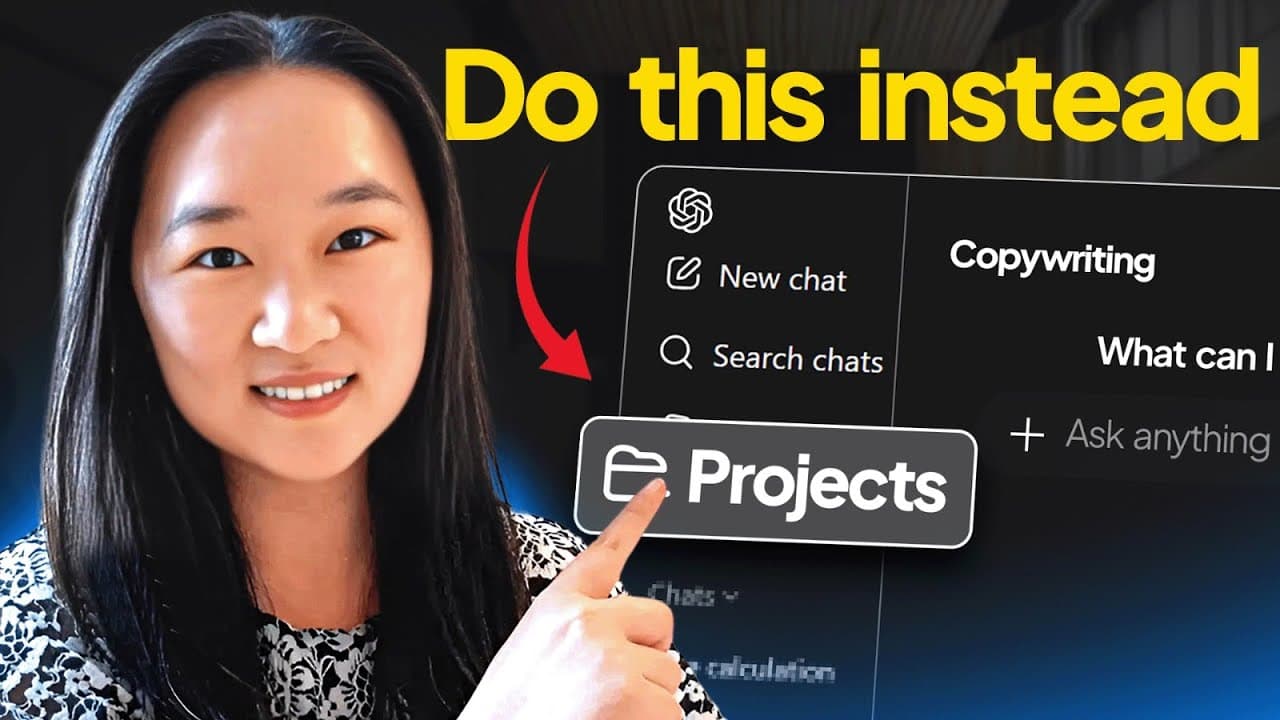
AI can teach you any topic by generating custom video lectures from resources and letting you train an AI to lecture. It can turn complex financial data into professional reports, websites, and infographics with no coding. Finally, you can deep research topics and train a dedicated AI project for consistent results.
Transcript
Today I'm going to show you three severely underutilized ways that you can use AI to boost your productivity. Now, if you're new to my channel, hi, my name is Helena and on this channel I talk about everything AI, agents, automations, you name it. So, if you want to be in the know on the latest tech breakthroughs, please make sure you like and subs... Read More
Key Insights
- X is the method to create a custom AI lecture from a set of online resources, using Perplexity to gather the top pages and Notebook LM to train a lecture. The process yields a tailored education experience without manual note taking.
- The key to professional reports with AI is to start with a detailed prompt that analyzes specific sections of a document or filings, and to switch to visual tools like Google Gemini Canvas for infographics and webpages.
- Y is the technique to visualize and share research quickly by pasting data into Gemini Canvas and choosing transforms such as website or infographic, which produces polished, presentable outputs in minutes.
- The ability to create an entire curriculum with AI comes from combining resource gathering, curriculum design in Notebook LM, and the studio feature for targeted lecture generation.
- The third technique emphasizes deep research first instead of prompting AI to act as an expert, which creates a rich knowledge base that can be organized into projects for consistent results.
- Training a dedicated AI project with a downloaded PDF or a compiled document allows future chats to reference the same knowledge, improving reliability and reducing drift over time.
- The overall approach is to combine research, structured automation, and curated prompts to turn AI into a repeatable productivity tool rather than a one off assist.
- The examples shown include stock analysis, SEC filings, and copywriting research, illustrating a broad applicability across learning, analysis, and content creation
- More videos from this channel:
- More from this channel: Helena Liu
Install to Summarize YouTube Videos and Get Transcripts
Explore YouTube Video Summarizer or Get YouTube Transcript Extractor
Questions & Answers
Q: What is the first technique shown for learning a new topic with AI?
The first technique is to have AI create a custom video lecture for any topic. It involves using Perplexity to gather top resources, then moving those links into Notebook LM to train a lecture model. The result is a personal AI tutor that can produce slides and a lecture tailored to your learning goals, making self study more efficient.
Q: How can Perplexity and Notebook LM be used together for learning?
Perplexity is used to research and list the top online resources for a topic. Notebook LM is then fed those resources to create and train a custom lecture. This combination yields a structured, topic specific lesson with voiceovers and slides, helping different types of learners process information more effectively.
Q: What is shown as a way to impress your boss with AI reports?
The video demonstrates turning SEC filings into a detailed report, then using Google Gemini Canvas to transform that data into a professional website or infographic. This approach produces polished deliverables quickly, enabling you to present data visually in board meetings and impress stakeholders with minimal manual design work.
Q: What role does Gemini Canvas play in technique two?
Gemini Canvas is used to transform pasted research into a canvas where you can convert it into a website or an infographic. It allows pulling the data into visually compelling formats without needing design or coding skills, making complex financial information accessible and easy to share.
Q: How does the third technique differ from prompting ChatGPT to act as an expert?
Instead of asking ChatGPT to act as an expert, you conduct deep research on the topic first and then train a dedicated AI project with that material. This creates a knowledge base that remains consistent across prompts, improving accuracy and enabling organized, repeatable outputs.
Q: What is meant by training a ‘Project’ in ChatGPT as described?
Training a Project means creating a dedicated workspace where you add files like PDFs or research notes. When you start new chats in that project, the AI already has the latest research on the topic, ensuring continuity, organization, and easier retrieval of related insights.
Q: Can this approach be applied to topics beyond finance or copywriting?
Yes. The video demonstrates applying the techniques to learning Python, analyzing stocks, creating dashboards, and generating copywriting research. The core idea is combining resource gathering, tailored lectures, and project based AI work to adapt to any topic that benefits from structured AI assisted learning and presentation.
Q: What is the overall benefit of using AI as described in the video?
The overall benefit is significantly increasing productivity by teaching yourself with AI generated lectures, producing professional looking reports and infographics in minutes, and maintaining an organized knowledge base for continuous, high quality outputs across topics and tasks. This approach reduces time, effort, and friction in learning and reporting.
Summary & Key Takeaways
-
The video explains three techniques to boost learning and work output using AI tools. It shows how to gather resources with Perplexity, create a custom lecture in Notebook LM, and generate tailored professional reports and visuals with Gemini Canvas. It emphasizes practical steps over theory.
-
It demonstrates turning research into deliverables, such as a website or infographic, by pasting data into an AI canvas and using built in transformations. It also covers organizing AI work into projects so future prompts start from a solid knowledge base.
-
The closing segment rephrases the core idea: do deep research first, then train a project to retain that knowledge for ongoing use, enabling repeatable, high quality outputs across topics and tasks.
Read in Other Languages (beta)
Share This Summary 📚
Summarize YouTube Videos and Get Video Transcripts with 1-Click
Try YouTube Summary with ChatGPT & Claude or YouTube Transcript Generator
Explore More Summaries from Helena Liu 📚



Summarize YouTube Videos and Get Video Transcripts with 1-Click
Try YouTube Summary with ChatGPT & Claude or YouTube Transcript Generator