How to use DOTS and ChatGPT Space after OpenAI Dev Day
TL;DR
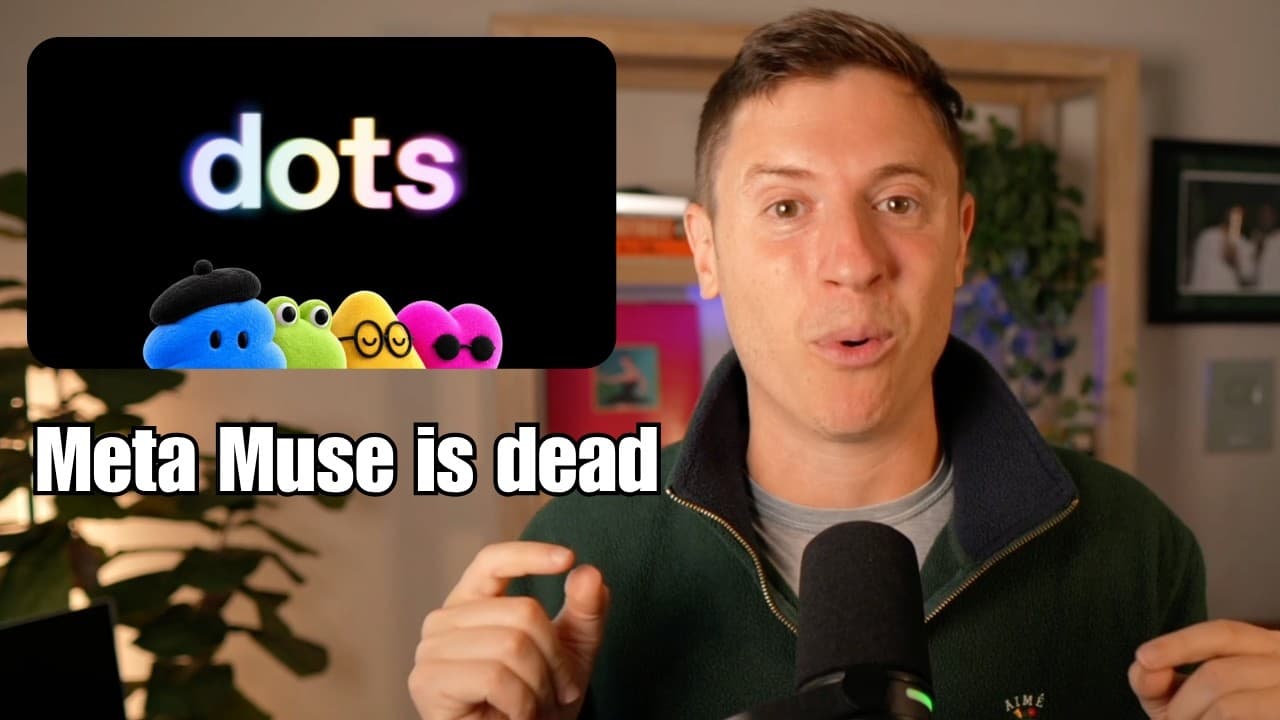
DOTS is an AI agent that centralizes control of conversations, memories, and tools across devices, reducing thread clutter. ChatGPT Space adds interactive, multiplayer artifacts for collaborative work, sharing, and live editing. Together they push more tasks into ChatGPT for productivity across devices and teams.
Transcript
I just got back from OpenAI Dev Day. It was incredible. So many amazing announcements. I've been using a lot of those amazing announcements for a few weeks now. I was very lucky to have early access to a lot of them. I'm going to cover all the news. I'm going to cover everything announced, give you my initial reaction, tell you what it's been like ... Read More
Key Insights
- DOTS is presented as a front door to ChatGPT that consolidates threads, memories, data, and plugins to reduce manual management.
- DOTS out of the box includes memories of user conversations, giving it a starting context that rivals other agents.
- DOTS is described as the best agent harness because it can operate across cloud and local devices via ChatGPT’s tools.
- ChatGPT Space is described as a multiplayer, collaborative workspace that supports sharing and joint editing of spaces.
- Space artifacts can be visualized and edited interactively, including charts and calendars generated from user data.
- Spaces aim to replace traditional documents and collaboration tools by integrating into ChatGPT with social and multi-agent features.
- GPT 6.1 Soul is introduced as a new OpenAI model released very soon after Opus 55, highlighting rapid iteration in the model lineup.
- The video frames the Dev Day announcements as practical tools to boost productivity and streamline workflows through DOTS and Space.
Install to Summarize YouTube Videos and Get Transcripts
Explore YouTube Video Summarizer or Get YouTube Transcript Extractor
Questions & Answers
Q: What is DOTS and how does it differ from other AI agents?
DOTS is an AI agent that acts as a front door to ChatGPT, consolidating chats, memories, and plugins to manage tasks without creating and tracking many separate threads. It differs from other agents by carrying context and memories from the outset, which reduces onboarding and repetitive setup. It can operate across cloud and local environments and leverages the ChatGPT desktop app for tools and integration. This combination is positioned as a stronger, more integrated experience for power users who want seamless context and multi-device access.
Q: How does ChatGPT Space enhance collaboration according to the video?
ChatGPT Space is described as multiplayer and collaborative, allowing multiple people and agents to work on a shared artifact in real time. It enables interactive elements like charts, calendars, and notes to be created, edited, and shared within the space. Users can invite others to view or edit, and even tag other dots to contribute, creating a collaborative environment that could rival traditional Google Docs or Notion workflows while living inside ChatGPT.
Q: What is the significance of the visual and interactive features in Space?
The visual and interactive features in Space enable generating and editing content directly within the artifact, such as turning calendar data into charts or adding notes and announcements from events like Dev Day. This interactivity allows users to experiment with data representations on the fly, refine their plans, and see updates reflected immediately, which helps with planning and communication among team members.
Q: What is GPT 6.1 Soul and why is it notable in the video?
GPT 6.1 Soul is a newly introduced version of the OpenAI model, released shortly after Opus 55. The video notes that this rapid turnaround is unusual and signals OpenAI’s response to a strong competitor’s move, with Soul aimed at maintaining competitiveness in terms of intelligence, speed, and cost across different use cases.
Q: Why is there a comparison to Opus 55 in the video?
The video compares GPT 6.1 Soul to Opus 55 to illustrate a competitive landscape where Opus 55’s capabilities are seen as a benchmark. It explains that Opus 55 prompted OpenAI to respond quickly with Soul, highlighting the dynamics of rapid model advancement and OpenAI’s strategic adjustments to retain relevance in a fast-changing field.
Q: What are the practical implications of DOTS having memories at setup?
Having memories at setup means DOTS can immediately recognize and reference past conversations and context without lengthy onboarding. This accelerates workflows, as users do not have to reintroduce themselves or reconfigure context for common tasks. It also strengthens the agent’s ability to maintain continuity across sessions and devices, improving efficiency for power users.
Q: How does DOTS leverage the ChatGPT desktop app according to the video?
DOTS leverages the ChatGPT desktop app as its core agent harness, enabling access to voice mode, plugins, and existing tools while allowing the agent to perform tasks across cloud and local environments. This integration creates a powerful, centralized workflow where the user can instruct the DOTS to perform actions like coding tasks, scheduling, or resource management directly from the desktop app.
Q: What is the broader goal of OpenAI’s new features like DOTS and Space?
The broader goal is to keep users inside ChatGPT for as many workflows as possible by offering a robust, integrated environment where agents, memories, artifacts, and collaboration are seamless. DOTS reduces thread clutter and context switching, while Space provides collaborative, interactive documents, both designed to boost productivity and potentially replace some traditional collaboration tools.
Summary & Key Takeaways
-
DOTS serves as a front door to ChatGPT, consolidating threads, memories, and tools so power users can manage tasks without building and switching across many threads.
-
ChatGPT Space introduces interactive, multiplayer artifacts that can be edited and shared in real time, enabling team collaboration inside ChatGPT rather than external apps.
-
OpenAI released GPT 6.1 Soul soon after Opus 55, signaling rapid model iteration and increased capabilities for enterprise and developer workflows.
Read in Other Languages (beta)
Share This Summary 📚
Summarize YouTube Videos and Get Video Transcripts with 1-Click
Try YouTube Summary with ChatGPT & Claude or YouTube Transcript Generator
Explore More Summaries from Alex Finn 📚


Summarize YouTube Videos and Get Video Transcripts with 1-Click
Try YouTube Summary with ChatGPT & Claude or YouTube Transcript Generator