How Do You Build a Personal Prompt Engineer Agent in n8n for Any LLM?
TL;DR
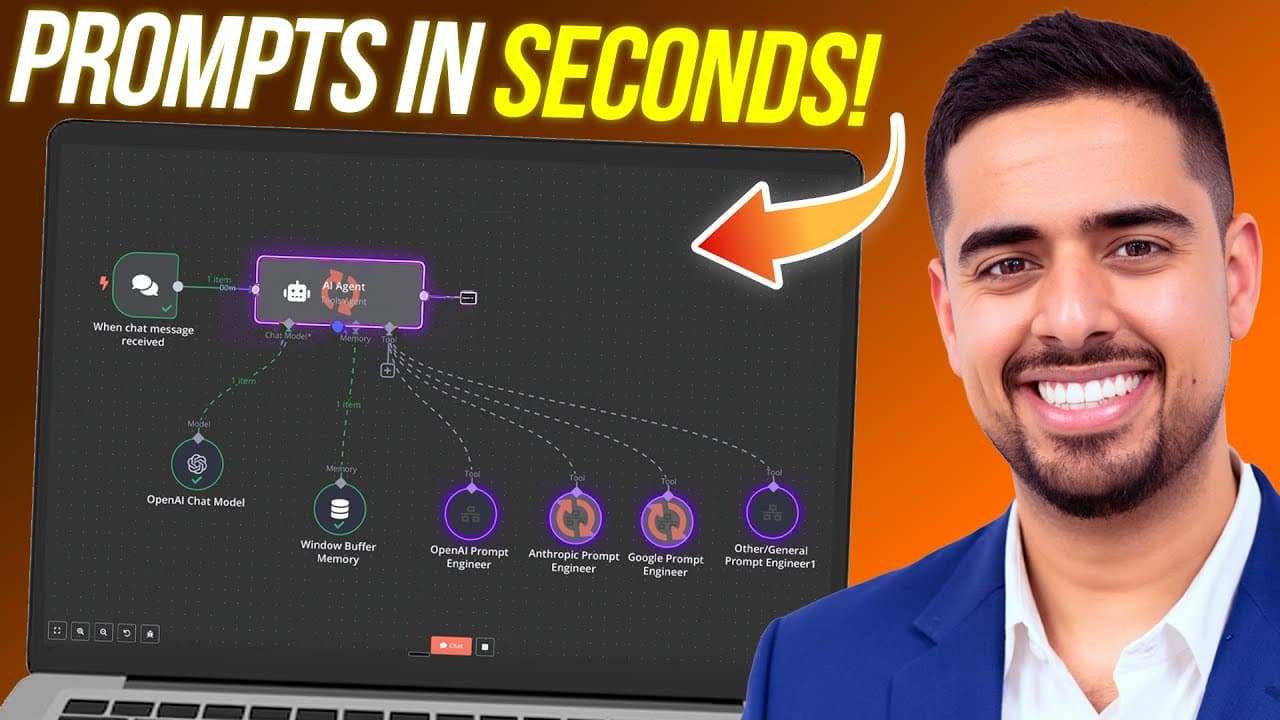
Build a personal prompt engineer agent in n8n by connecting a central AI agent to model-specific subworkflows for OpenAI, Anthropic, Gemini, and another LLM. The agent identifies the task and target model, routes the request, checks and refines the resulting prompt, and uses window buffer memory for follow-up changes. Read on for the workflow structure and model-specific prompting guidance.
Transcript
I just built a mini prompt engineer in n8n that can create the perfect prompt for you whether it's open AI Gemini anthropic or any LM you can think of just tell it what you want the prompt for and the LM you want to use and voila it's a super simple workflow that anyone can use edit and definitely improve on in this video I'm going to show you how ... Read More
Key Insights
- The central AI agent is the workflow router, receiving a chat request, determining the intended task and target language model, and selecting the corresponding prompt-engineering subworkflow instead of applying one generic prompting method to every model.
- The workflow includes four prompt-engineering routes: specialized subworkflows for OpenAI, Anthropic, and Gemini, plus a customizable route with a vanilla prompt that can be adapted for DeepSeek, Qwen, or another model selected by the user.
- Each specialized subworkflow uses the same structural pattern, beginning with a workflow input trigger and continuing through model-specific prompt instructions, prompt generation, quality checking, proofreading, refinement, and delivery back to the original parent workflow.
- Google Gemini 2.0 Flash is used for its long context capacity and inexpensive operation, giving the prompt engineer room to process extensive instructions about task structure, model behavior, and language-model-specific prompting nuances while still producing results the creator considers satisfactory.
- OpenAI non-reasoning models benefit from explicit guidance, clearly separated markdown sections, and one to three examples for writing, style, or copy tasks. The workflow also aims to limit these prompts to one or two primary output tasks.
- OpenAI reasoning models require less leading material when the supplied context is concise and valuable. The recommended approach is to define the goal, relevant nuances, and important exclusions, then allow the model to work through multiple tasks with less spoon-feeding.
- Conversation memory enables iterative prompt development, because the window buffer memory module retains the thread. Users can ask for fewer agentic instructions, add variable placeholders, request markdown formatting, or switch target models without fully restating the original task.
- Model switching preserves the core request while changing the optimization strategy. In the demonstration, one business AI roadmap requirement is converted into separate prompts for Claude 3.7 Sonnet, Gemini 2.0 Flash, and OpenAI o3-mini through different specialized routes.
Install to Summarize YouTube Videos and Get Transcripts
Explore YouTube Video Summarizer or Get YouTube Transcript Extractor
Questions & Answers
Q: How do you build a personal prompt engineer agent in n8n for any LLM?
Create a parent workflow with a chat input, a central AI agent, a chat model, conversation memory, and callable prompt-engineering subworkflows. Instruct the agent to determine the request’s core scope and target language model, invoke the appropriate subworkflow, and return its checked and refined prompt.
Q: How does the n8n agent choose the correct prompt-engineering workflow?
The central AI agent examines the request and asks which target model the prompt should be optimized for if that information is missing. It then routes the request to the OpenAI, Anthropic, Gemini, or customizable subworkflow.
Q: What is inside each n8n prompt-engineering subworkflow?
Each subworkflow begins with a workflow input trigger that runs when the central agent invokes it. A model-specific prompt engineer generates the prompt, and another node double-checks its quality, proofreads it, and refines it before returning it to the parent workflow.
Q: Why does the workflow use separate prompt engineers for OpenAI, Anthropic, and Gemini?
The underlying instructions account for prompting nuances among OpenAI, Anthropic, and Gemini models. Although the subworkflows have identical structures, each one creates prompts optimized for its respective language-model family.
Q: How should prompts differ for OpenAI reasoning and non-reasoning models?
For non-reasoning models, the workflow recommends explicit guidance, clearly separated markdown sections, and one to three examples for writing, copy, or style tasks. It also favors one or two primary output tasks, while reasoning models need less leading material when given a concise goal, relevant nuances, and important exclusions.
Q: Why does the workflow use Gemini 2.0 Flash?
Gemini 2.0 Flash provides room for long, detailed prompt-engineering instructions while operating inexpensively. The creator wanted a context window of around a million tokens and found that the standard Gemini 2.0 Flash model produced decent results, though Gemini 2.0 Thinking could also be used.
Q: How can users refine a generated prompt without starting over?
A window buffer memory module preserves the conversation, so the agent can retain the original request during follow-up changes. Users can request fewer agentic instructions, add variable placeholders, change the formatting to markdown, or switch target models without fully restating the task.
Q: How can the n8n workflow support LLMs beyond OpenAI, Anthropic, and Gemini?
The fourth subworkflow is a customizable route that begins with a vanilla prompt rather than provider-specific instructions. Users can adapt its underlying prompt for DeepSeek, Qwen, or another model and let the central agent route suitable requests to it.
Summary & Key Takeaways
-
The n8n workflow places a central AI agent between a chat interface and several model-specific subworkflows. After receiving a prompt request, the agent asks which language model should be targeted, then invokes the appropriate OpenAI, Anthropic, Gemini, or customizable prompt engineer to generate a tailored result.
-
Each specialized subworkflow follows the same basic structure but contains instructions adapted to its target language model. A workflow input trigger receives the request, a model-specific prompt engineer creates the prompt, and another node proofreads and refines the output before returning it to the parent workflow and chat interface.
-
A window buffer memory module preserves the conversation, allowing users to request changes without repeating the original requirements. The demonstration refines a business AI roadmap prompt, adds placeholders and markdown formatting, then carries the same scope across Claude 3.7 Sonnet, Gemini 2.0 Flash, and OpenAI o3-mini versions.
Read in Other Languages (beta)
Share This Summary 📚
Summarize YouTube Videos and Get Video Transcripts with 1-Click
Try YouTube Summary with ChatGPT & Claude or YouTube Transcript Generator
Explore More Summaries from Mark Kashef 📚
Summarize YouTube Videos and Get Video Transcripts with 1-Click
Try YouTube Summary with ChatGPT & Claude or YouTube Transcript Generator