How Does Python's Bitwise Right Shift Work?
TL;DR
Python’s bitwise right shift operator moves an integer’s binary bits to the right by the specified number of positions. It is written with two greater-than symbols, and shifting 12 right by 1 produces 6. The demonstrated positive and negative examples also show how the sign bit is preserved and how shifts relate to division by powers of 2, so read on for the full calculation process.
Transcript
foreign tations we have understood bitwise operators in details we have understood four different operators and or not and xor now from this presentation onwards we will understand bitwise shift operators and in this presentation we will understand bitwise right shift operator which is one of the bitwise shift operators so let's get started with th... Read More
Key Insights
- Operations occur on binary digits: Although a Python operand can be entered as a decimal integer, the lesson explains the shift by converting that value to binary. This reveals the individual bits that move and makes the resulting decimal value traceable. For the example using 12, its displayed binary form provides the starting point for both right shifts.
- Operator symbols indicate direction: Python’s right shift operator uses two greater-than symbols, visually indicating movement toward the right. The left shift operator uses two less-than symbols to indicate movement toward the left. Both are introduced as bitwise shift operators, but the lesson concentrates on the right shift operator and its results.
- Shift magnitude controls movement: The number written after the right shift operator specifies how many positions the operand’s bits must move. A magnitude of 1 moves every bit one position to the right. A magnitude of 2 requires two rightward movements, which the lesson demonstrates by continuing from the result of the first shift.
- The operand comes first: In the demonstrated expression, a appears before the two greater-than symbols and is identified as the operand. The shift magnitude appears after the operator. Reading the expression in those roles clarifies both what binary value is being changed and exactly how many rightward movements must be applied to its bits.
- Positive signs stay positive: The shown representation of 12 begins with a sign bit of 0, identifying the number as positive. When the remaining bits move right, the sign bit is kept at 0. The resulting patterns therefore continue to represent positive values, producing 6 after one shift and 3 after two shifts.
- One shift halves twelve: Right shifting 12 by 1 changes the displayed binary pattern from 0 1 1 0 0 to 0 0 1 1 0. That result represents 6. The arithmetic explanation matches the bit movement because the shift magnitude is 1, 2 to the power 1 equals 2, and 12 divided by 2 equals 6.
- Two shifts quarter twelve: Right shifting 12 by 2 produces the displayed pattern 0 0 0 1 1, representing 3. The corresponding divisor is 2 to the power 2, which equals 4. Dividing the original value 12 by 4 also gives 3, so the binary demonstration and arithmetic check agree.
- Division uses the original number: For the arithmetic check, the lesson divides the original operand by 2 raised to the shift magnitude. With a magnitude of 2, it calculates 12 divided by 4, rather than treating the shift merely as a repeated decimal notation change. This relationship explains the final value obtained from the moved binary bits.
- The shell confirms calculations: Python’s interactive shell provides a direct check of the binary explanation. After assigning 12 to a, evaluating a shifted right by 1 returns 6, and shifting it right by 2 returns 3. These outputs match both the displayed binary patterns and the division-by-powers-of-2 calculations.
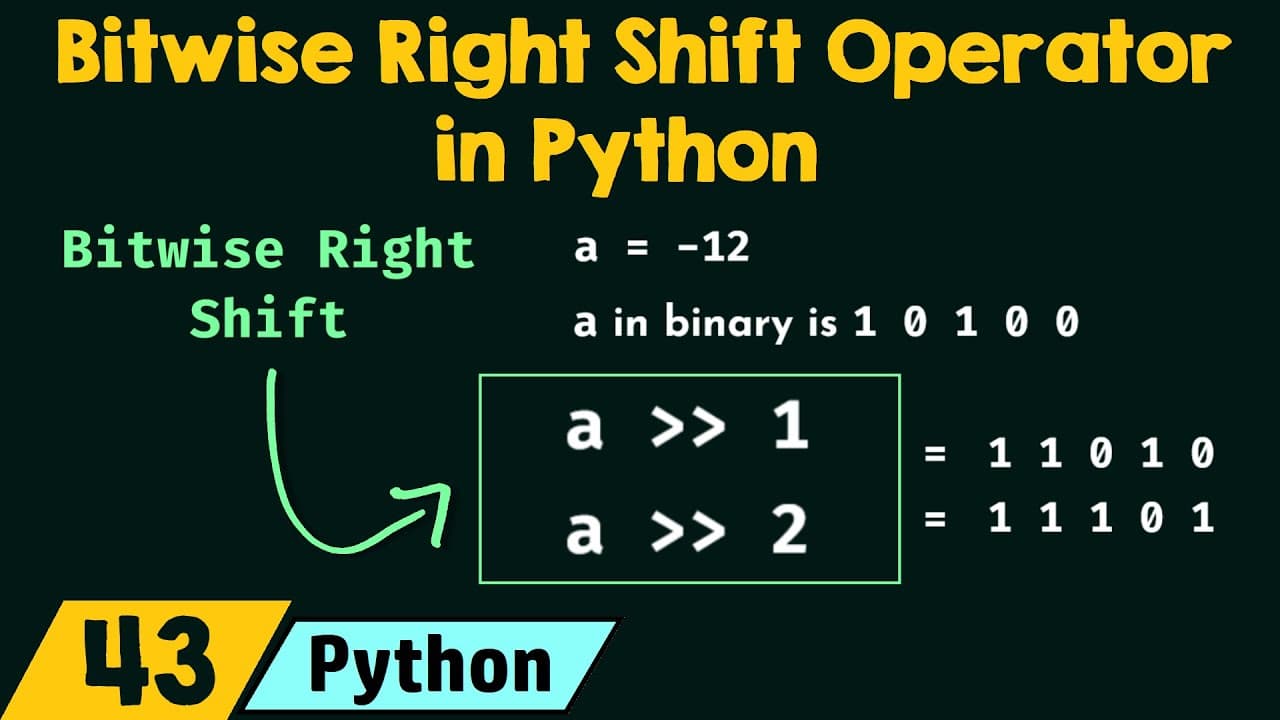
- Negative representation has two steps: The lesson constructs the shown representation of -12 from the binary form of positive 12. First, it takes the ones’ complement, flipping every 0 to 1 and every 1 to 0. Second, it adds 1 to the complemented pattern, creating the binary value used for the negative example.
- Negative signs remain negative: When the bits of -12 are shifted toward the right, the demonstrated sign bit remains 1. This preservation keeps the shifted results negative rather than allowing the sign to change. Consequently, the lesson obtains -6 after a shift of 1 and -3 after a shift of 2.
- Positive and negative examples align: The shifts applied to 12 and -12 produce results with matching magnitudes but different signs. A one-position shift gives 6 and -6, while a two-position shift gives 3 and -3. In each case, the lesson connects the result to division by 2 or 4 and verifies it through Python.
Install to Summarize YouTube Videos and Get Transcripts
Explore YouTube Video Summarizer or Get YouTube Transcript Extractor
Questions & Answers
Q: How does Python’s bitwise right shift operator work?
Python’s bitwise right shift operator moves an integer’s binary bits toward the right by a specified number of positions. It is written with two greater-than symbols, with the operand on the left and the shift magnitude on the right. The lesson explains the movement by converting the operand from decimal to binary and preserving its sign bit during the shift. In the demonstrated cases, shifting right by n also corresponds to dividing the original number by 2 to the power n.
Q: What is the bitwise right shift operator in Python?
The bitwise right shift operator is one of Python’s two bitwise shift operators. It is represented by two greater-than symbols and moves the bits of a binary number toward the right. The number before the operator is the operand, and the number after it states the magnitude of the shift. This magnitude determines both how far the bits move and the power of 2 used in the lesson’s division check.
Q: Why does a Python right shift correspond to division?
The lesson states that a right shift by n divides the original number by 2 to the power n in the demonstrated cases. When 12 is shifted right by 1, the divisor is 2 to the power 1, or 2, so the result is 6. When the shift magnitude is 2, the divisor is 2 to the power 2, or 4, so the result is 3. The binary patterns produced by moving the bits agree with both calculations.
Q: What is the result of shifting 12 right by 1?
Shifting 12 right by 1 produces 6. The lesson first displays 12 in binary as 0 1 1 0 0, then moves all its bits one position toward the right. This produces 0 0 1 1 0 while preserving the positive sign bit of 0. The arithmetic check gives the same answer because 12 divided by 2 to the power 1 equals 6.
Q: What is the result of shifting 12 right by 2?
Shifting 12 right by 2 produces 3. The bits move two positions toward the right, resulting in the displayed pattern 0 0 0 1 1. Its sign bit remains 0, so the result is still positive. The matching arithmetic calculation is 12 divided by 2 to the power 2, which is 12 divided by 4.
Q: How does the lesson represent -12 in binary?
The lesson begins with its displayed binary representation of positive 12, which is 0 1 1 0 0. It then takes the ones’ complement by changing every 0 to 1 and every 1 to 0. After this bit flip, it adds 1 to the complemented number. The resulting pattern is used as the binary representation of -12 for the negative right-shift example.
Q: What happens when -12 is right shifted in Python?
Right shifting -12 by 1 produces -6, while shifting it by 2 produces -3. In the lesson’s binary explanation, the sign bit remains 1 during each right shift. Preserving that bit keeps the results negative while the other bits move toward the right. The resulting values also match division by 2 for the first shift and division by 4 for the second.
Q: How can Python right shift results be verified?
The lesson verifies the calculations in Python’s interactive shell. It assigns the value 12 to a variable and evaluates right shifts with magnitudes of 1 and 2, receiving 6 and 3. It then uses -12 and obtains -6 and -3 for the same shift magnitudes. These shell outputs confirm the values previously derived from binary movement and division by powers of 2.
Summary & Key Takeaways
-
Introducing bitwise shift operators: Bitwise shift operators move the bits of a binary number either left or right. Because they are bitwise operators, their operations are performed on bits or binary digits. Python provides two such operators: the right shift operator, written with two greater-than symbols, and the left shift operator, written with two less-than symbols. The presentation focuses specifically on the bitwise right shift operator and how it changes a number’s binary representation.
-
Defining the right shift: The bitwise right shift operator moves the bits of a binary number toward the right. The value before the operator is the operand, while the value after it is the magnitude of the shift. The presentation also states that shifting a number right by n corresponds to dividing the original number by 2 to the power n. The examples use binary conversion to show why the resulting decimal values change.
-
Shifting positive value 12: The decimal number 12 is represented in the lesson as the binary pattern 0 1 1 0 0, with 0 serving as its sign bit. Moving all bits one position right produces 0 0 1 1 0, which represents 6. The sign bit remains 0, so the result stays positive. This agrees with the division relationship because 2 to the power 1 is 2, and 12 divided by 2 is 6.
-
Extending and verifying shifts: Shifting 12 right by 2 moves its bits two positions and produces 0 0 0 1 1, which represents 3. The sign bit again remains 0. The division check reaches the same result because 2 to the power 2 is 4, and 12 divided by 4 is 3. Python’s interactive shell then verifies both examples, returning 6 for the first shift and 3 for the second.
-
Applying shifts to negative 12: To represent -12, the lesson begins with the displayed binary form of positive 12, takes its ones’ complement by flipping every bit, and adds 1. During right shifts of this negative value, the sign bit remains 1, keeping the results negative. The demonstrated calculations produce -6 when -12 is shifted right by 1 and -3 when it is shifted right by 2, results that are also confirmed in Python’s interactive shell.
Read in Other Languages (beta)
Share This Summary 📚
Summarize YouTube Videos and Get Video Transcripts with 1-Click
Try YouTube Summary with ChatGPT & Claude or YouTube Transcript Generator
Explore More Summaries from Neso Academy 📚



Summarize YouTube Videos and Get Video Transcripts with 1-Click
Try YouTube Summary with ChatGPT & Claude or YouTube Transcript Generator