Raspberry Pi Camera Module Review: Is It Worth the Hype?
TL;DR
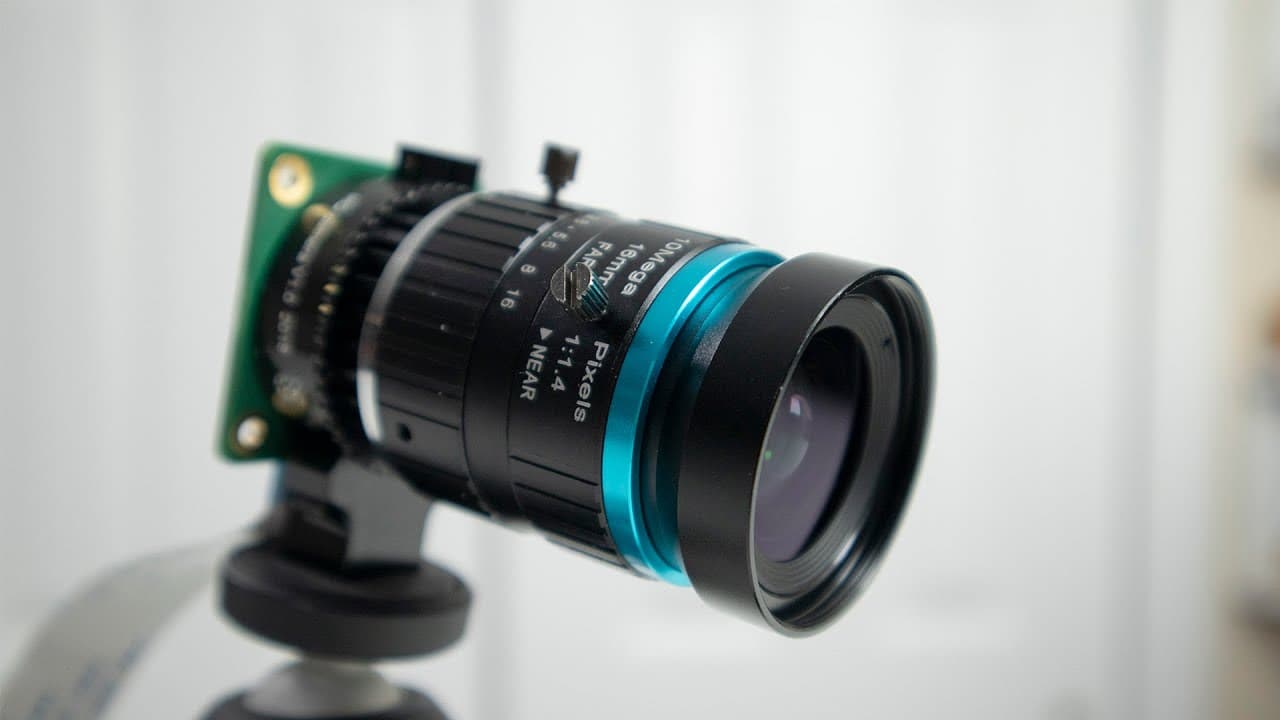
The Raspberry Pi Camera Module features a 12-megapixel sensor with improved low-light performance, making it comparable to a GoPro. With a CS mount for versatile lens options, it's suitable for both casual photography and serious filmmaking. However, setup requires manual software configurations, which may challenge beginners.
Transcript
hey guys what's going on it's down here from Nova spirit Tech and welcome back to our Channel and today we will be taking a look at the high quality camera module from Raspberry Pi so let's get started so before we begin I do want to give a huge shout out to Micro Center they're the one that actually sent me over the camera module and the two lense... Read More
Key Insights
- 🙂 The Raspberry Pi Camera Module has a 12-megapixel sensor that enhances image clarity and detail, particularly in low-light situations.
- 👻 It allows manual settings adjustment for ISO, exposure, and focus, providing advanced users with control over their photography.
- ☠️ Users can capture high-definition video at various frame rates, making it suitable for slow-motion effects.
- 😑 The CS mount enables users to experiment with numerous lens options, widening the scope for creative expression.
- 🪡 The module is ideal for both hobbyist projects and more serious filmmaking needs, providing a cost-effective alternative to professional cameras.
- 😫 Setting up the camera requires a few software commands, which can be intimidating for beginners but is essential for functionality.
- 🎮 The quality of video and photography produced by the module is sufficient for content creators, particularly for platforms like YouTube.
Install to Summarize YouTube Videos and Get Transcripts
Explore YouTube Video Summarizer or Get YouTube Transcript Extractor
Questions & Answers
Q: What are the key features of the new Raspberry Pi Camera Module?
The new Raspberry Pi Camera Module features a 12-megapixel sensor, which is larger than its predecessor, allowing for better light capture and image quality. It supports video recording at various resolutions and frame rates, including 1080p at 30fps and 720p at 60fps. Additionally, it has a CS lens mount for compatibility with a variety of lens types, enhancing its versatility for creative projects.
Q: How do users set up the Raspberry Pi Camera Module for the first time?
To set up the Raspberry Pi Camera Module, users need to ensure their Raspberry Pi is updated by running the command "sudo apt-get update" followed by "sudo rpi-update" to get the latest kernel. They should then verify camera support using the command "vcgencmd get_camera". This allows the software to recognize the camera and prepares it for use with applications like Raspberry Pi still and video commands.
Q: What types of lenses are compatible with the Raspberry Pi Camera Module?
The camera module is compatible with CS mount lenses, which means users can use a wide variety of lenses, including different focal lengths and types. Additionally, with an appropriate adapter, EF mount lenses can also be utilized. This compatibility allows for significant flexibility in capturing photos and videos, catering to different user needs.
Q: How does the image quality of the new camera compare to that of a GoPro?
The image quality of the new Raspberry Pi Camera Module is notably comparable to that of a GoPro, thanks to its similar sensor size and resolution specifications. Users can expect excellent video quality, especially for 1080p recordings, along with improved low-light performance due to the larger sensor size, reducing artifacts commonly associated with higher ISO levels in dim conditions.
Summary & Key Takeaways
-
The Raspberry Pi Camera Module boasts a larger 12-megapixel sensor with improved light capture, comparable to GoPro.
-
Users can utilize various lenses thanks to the CS mount, enhancing versatility for photography and videography projects.
-
Setup involves ensuring software updates are applied, with manual adjustments needed for optimal photo and video quality.
Read in Other Languages (beta)
Share This Summary 📚
Summarize YouTube Videos and Get Video Transcripts with 1-Click
Try YouTube Summary with ChatGPT & Claude or YouTube Transcript Generator
Explore More Summaries from Novaspirit Tech 📚






Summarize YouTube Videos and Get Video Transcripts with 1-Click
Try YouTube Summary with ChatGPT & Claude or YouTube Transcript Generator