How to Split Python Strings with split and rsplit
TL;DR
Use split() to divide a Python string from the left and rsplit() to divide it from the right, with each substring stored as an item in a list. Both methods accept a separator and maxsplit argument; whitespace is the default separator, while a maxsplit value of -1 means the number of splits is unlimited.
Transcript
foreign we have understood l-strip and R strip methods now in this presentation we will continue our discussion on string Methods and we will understand few more methods so without any further delay let's get started the first topic of this presentation is split method the second topic is our split method and after discussing these two topics we wi... Read More
Key Insights
- The split() method is used to divide a string into substrings and store those substrings as individual items in a list. It is applied to a string with the dot operator and can receive separator and maxsplit arguments.
- The separator argument identifies the positions where split() should divide a string. When no separator is supplied, any whitespace character serves as the separator, allowing a space-separated string to become a list containing its individual words or sections.
- The maxsplit argument controls the maximum number of divisions that split() may perform. Its default value is -1, which means there is no limit on the number of splits performed at matching separator positions.
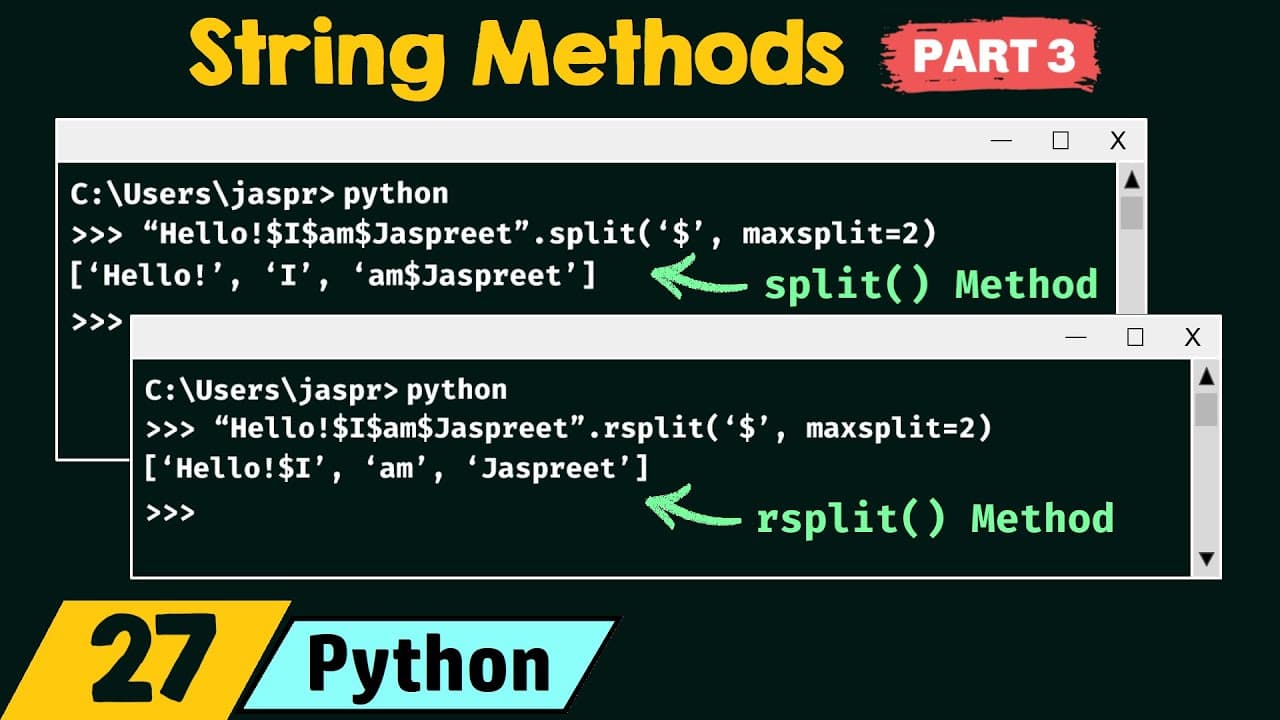
- The split() method begins reading a string from the left. With '$' as the separator and maxsplit=2, it performs the first two eligible divisions and preserves the remaining separator and text together within the final list item.
- The result of split('$', maxsplit=2) on the demonstrated string is a three-item list containing 'Hello!', 'I', and 'am$Just Preet'. The third dollar symbol remains because the permitted two splits have already occurred.
- The rsplit() method divides a string from the right rather than from the left. The letter 'r' refers to right, and the method supports the same separator and maxsplit arguments demonstrated for split().
- The result of rsplit('$', maxsplit=2) on the example is a list containing 'Hello!$I', 'am', and 'Just Preet'. Although processing starts on the right, the substrings retain their original order within the returned list.
- The difference between split() and rsplit() becomes visible when maxsplit restricts the number of divisions. split() preserves the unsplit remainder on the right, while rsplit() preserves the unsplit remainder on the left.
Install to Summarize YouTube Videos and Get Transcripts
Explore YouTube Video Summarizer or Get YouTube Transcript Extractor
Questions & Answers
Q: What does the split() method do in Python?
The split() method divides a string into substrings and stores those substrings as individual items in a list. It is called on a string with the dot operator. The method can receive a separator that identifies division points and a maxsplit value that limits how many divisions may occur while the string is read from the left.
Q: What arguments can Python split() receive?
The split() method can receive two arguments: separator and maxsplit. The separator specifies the positions where the string should be divided. The maxsplit argument states the maximum number of allowed divisions. In the lecture, these arguments are demonstrated with a dollar symbol as the separator and a maxsplit value of two.
Q: What are the default separator and maxsplit values?
When split() receives no arguments, any whitespace character acts as the separator. The default maxsplit value is -1, which means there is no limit on the number of splits. In the demonstrated whitespace-separated string, calling split() without arguments produces four list items: 'Hello!', 'I', 'am', and 'Just Preet'.
Q: How does split() behave when maxsplit is two?
When maxsplit is set to two, split() performs no more than two divisions, even if the separator appears again later. It begins reading from the left, creates items at the first two matching separators, and places the entire remaining substring into the final list item, including any later separator characters that were not processed.
Q: What result does split('$', maxsplit=2) produce in the example?
For the demonstrated string 'Hello!$I$am$Just Preet', split('$', maxsplit=2) produces a list with three items: 'Hello!', 'I', and 'am$Just Preet'. The method divides at the first two dollar symbols from the left. It does not divide at the third dollar symbol because the maximum of two splits has already been reached.
Q: What is the difference between split() and rsplit()?
The difference is the direction from which splitting begins. split() reads and divides the string from the left, while rsplit() reads and divides it from the right. This directional difference changes which portion remains unsplit when maxsplit limits the number of divisions, even though both methods return the substrings in their original list order.
Q: What result does rsplit('$', maxsplit=2) produce in the example?
For the demonstrated string 'Hello!$I$am$Just Preet', rsplit('$', maxsplit=2) produces a list containing 'Hello!$I', 'am', and 'Just Preet'. It performs two divisions beginning from the right. The earlier dollar symbol remains inside the first item because the permitted two splits have already been completed.
Q: Why does rsplit() not place the rightmost substring first?
Although rsplit() begins reading and dividing from the right, it does not reverse the order of the returned substrings. In the example, 'Just Preet' is identified from the right but becomes the last list item because it appears last in the original string. The earlier substrings likewise retain their original relative positions.
Summary & Key Takeaways
-
The split() method divides a string into substrings and stores them as separate items in a list. It accepts separator and maxsplit arguments. The separator identifies where divisions occur, while maxsplit limits their number. Without arguments, whitespace becomes the separator and the number of allowed splits has no limit.
-
When split('$', maxsplit=2) processes 'Hello!$I$am$Just Preet', it reads from the left and stops after two divisions. The resulting list contains 'Hello!' first, 'I' second, and the unsplit remainder 'am$Just Preet' third because another dollar-symbol division would exceed the stated maximum of two splits.
-
The rsplit() method accepts the same separator and maxsplit arguments but begins splitting from the right. With a dollar separator and maxsplit set to two, the example produces 'Hello!$I' as the first list item, followed by 'am' and 'Just Preet'. The lecture ends with an rsplit() homework problem.
Read in Other Languages (beta)
Share This Summary 📚
Summarize YouTube Videos and Get Video Transcripts with 1-Click
Try YouTube Summary with ChatGPT & Claude or YouTube Transcript Generator
Explore More Summaries from Neso Academy 📚

Summarize YouTube Videos and Get Video Transcripts with 1-Click
Try YouTube Summary with ChatGPT & Claude or YouTube Transcript Generator