How to Create a Personal AI Assistant with n8n
TL;DR
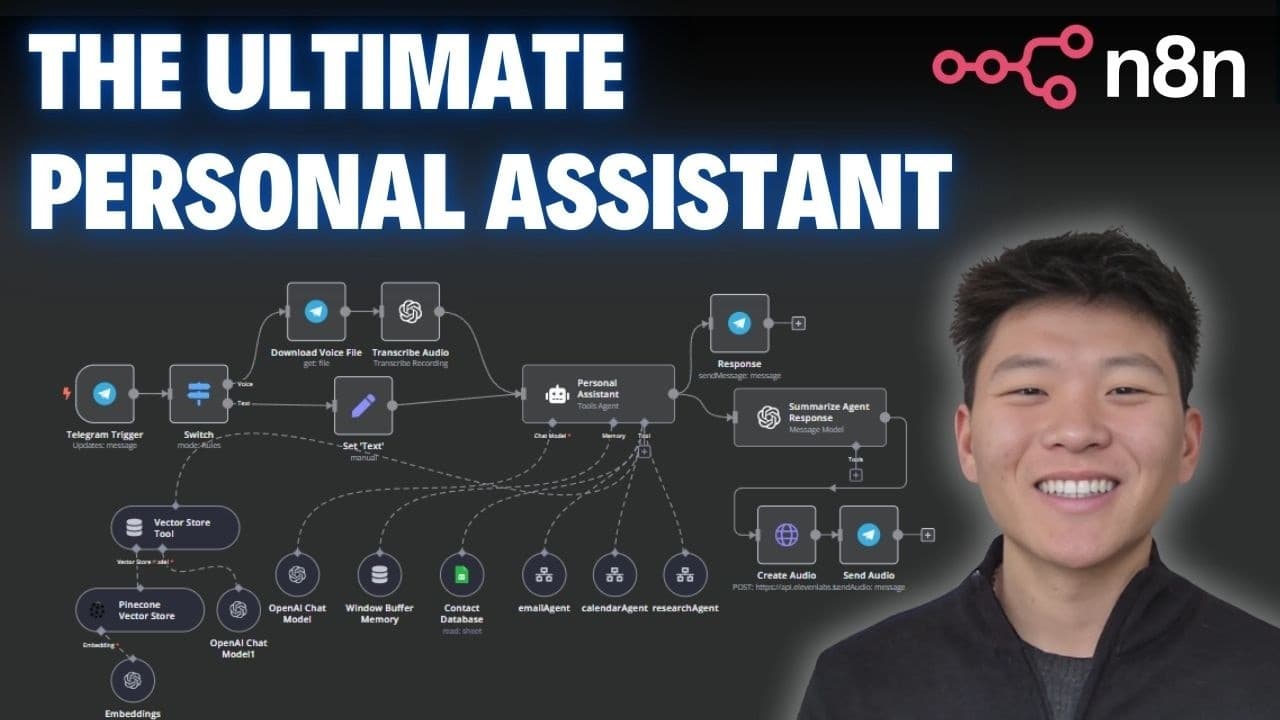
Build a personal AI assistant using n8n to manage emails, calendar events, and more. This no-code tutorial guides you through setting up AI agents that interact via text or voice, streamlining your workflow with automation. Enhance productivity by integrating tools like email, calendar, and research agents, and communicate through Telegram.
Transcript
hey personal assistant can you please create a calendar event for tomorrow with Michael Scott at noon for a meeting and then can you email him to confirm if that time works and then finally can you grab all of my calendar events for the rest of today thanks okay so we just sent that off to telegram it's transcribing that audio it's now hitting the ... Read More
Key Insights
- n8n allows for building a personal assistant without coding, using various AI agents.
- The assistant can manage emails, schedule calendar events, and perform research tasks.
- Agents can communicate via text or voice, providing flexibility in interaction.
- Integrating tools like Google Sheets and Telegram enhances the assistant's capabilities.
- Voice files can be transcribed and processed to interact with the assistant.
- Using 11 Labs, text responses can be converted to audio for voice interaction.
- The assistant can be expanded with additional tools like vector stores for more complex tasks.
- Prompting and configuring AI agents correctly is crucial for accurate task execution.
Install to Summarize YouTube Videos and Get Transcripts
Explore YouTube Video Summarizer or Get YouTube Transcript Extractor
Questions & Answers
Q: How to build a personal AI assistant using n8n?
To build a personal AI assistant using n8n, you need to set up various AI agents that manage tasks like emails and calendar events. Use tools like Google Sheets and Telegram for integration, and configure agents to communicate via text or voice. Follow the step-by-step tutorial to streamline your workflow with automation.
Q: What tools are integrated into the n8n personal assistant?
The n8n personal assistant integrates tools such as Google Sheets for contact management, Telegram for communication, and 11 Labs for converting text to speech. It also uses AI agents for managing emails, scheduling calendar events, and performing research tasks, enhancing its capabilities and user interaction.
Q: How does the AI assistant handle voice interactions?
The AI assistant handles voice interactions by transcribing voice files into text using OpenAI. It processes the text to execute tasks and can convert text responses back into audio using 11 Labs. This allows for flexible communication, enabling users to interact with the assistant via voice commands and receive voice responses.
Q: What is the role of AI agents in the n8n assistant?
AI agents in the n8n assistant are responsible for executing specific tasks such as managing emails, scheduling calendar events, and conducting research. Each agent is configured with tools and prompts to perform its role efficiently, ensuring accurate task execution and enhancing the assistant's overall functionality.
Q: How can I expand the capabilities of the n8n assistant?
To expand the capabilities of the n8n assistant, you can integrate additional tools and agents, such as vector stores for data retrieval or more complex task execution. Continuously refine the prompting and configuration of existing agents to ensure they handle tasks accurately and add new functionalities as needed.
Q: Why is prompting important for AI agents?
Prompting is crucial for AI agents because it guides their behavior and decision-making processes. Properly configured prompts ensure that agents understand tasks correctly, choose the appropriate tools, and execute actions accurately. This leads to more reliable and efficient task management within the AI assistant.
Q: What are the benefits of using n8n for automation?
Using n8n for automation offers several benefits, including the ability to create complex workflows without coding, integrate multiple tools and services, and customize AI agents for specific tasks. It enhances productivity by automating repetitive tasks and provides flexible communication options through text and voice interactions.
Q: How does the n8n assistant improve productivity?
The n8n assistant improves productivity by automating routine tasks such as managing emails and scheduling calendar events. It streamlines workflows by integrating various tools, enabling seamless communication through text and voice, and allowing users to focus on more critical tasks. This automation reduces manual effort and increases efficiency.
Summary & Key Takeaways
-
This tutorial demonstrates how to build a personal AI assistant using n8n, a no-code automation tool. The assistant can manage emails, schedule calendar events, and perform research tasks by integrating tools like Google Sheets, Telegram, and 11 Labs. It communicates via text and voice, offering flexible interaction options.
-
The assistant uses AI agents to execute complex tasks, such as sending emails and creating calendar events. It can transcribe voice files and convert text responses to audio, enhancing user interaction. Prompting and configuring these agents correctly ensures accurate task execution and streamlined workflows.
-
By following this step-by-step guide, users can create an AI-powered assistant that automates tasks and responds interactively. The tutorial covers integrating various tools and agents, making it ideal for those interested in no-code AI automations. Enhance productivity and streamline workflows with this intelligent assistant.
Read in Other Languages (beta)
Share This Summary 📚
Summarize YouTube Videos and Get Video Transcripts with 1-Click
Try YouTube Summary with ChatGPT & Claude or YouTube Transcript Generator
Explore More Summaries from Nate Herk | AI Automation 📚






Summarize YouTube Videos and Get Video Transcripts with 1-Click
Try YouTube Summary with ChatGPT & Claude or YouTube Transcript Generator