How to build a free AI video clipping tool with n8n
TL;DR
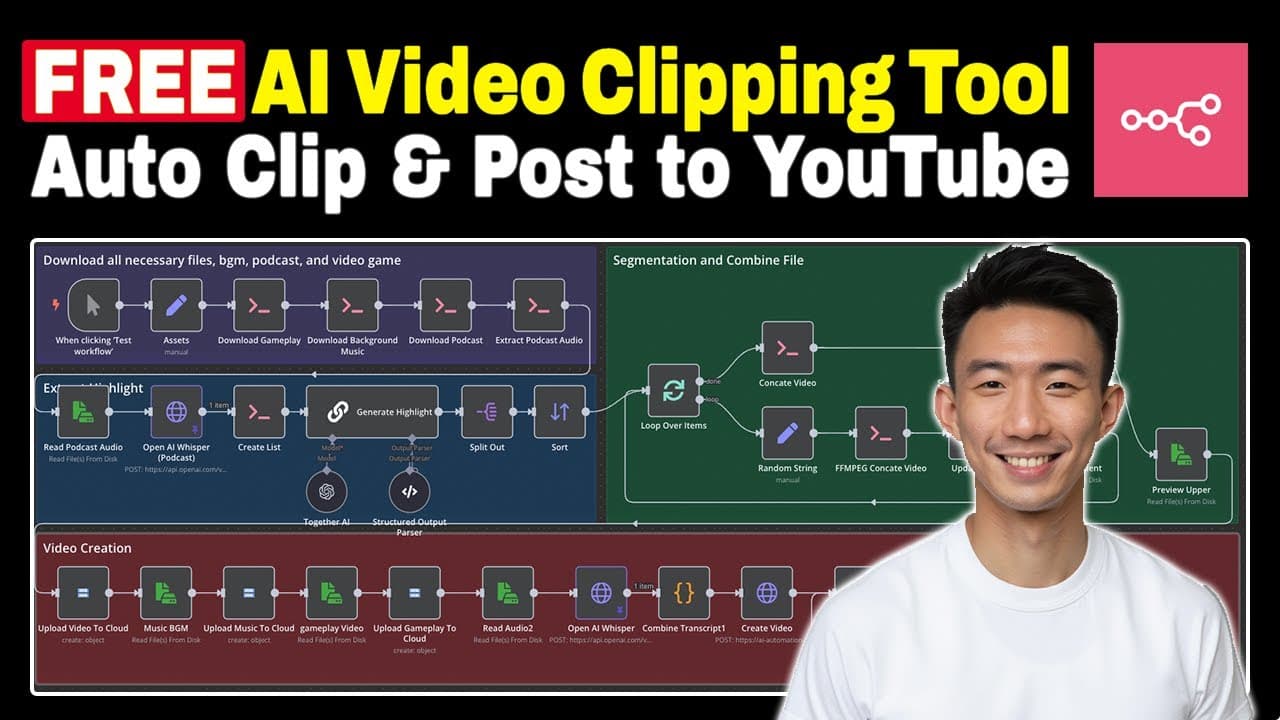
You can host n8n locally with Docker and wire a workflow that automatically clips video highlights using OpenAI Whisper and FFmpeg. The system analyzes transcripts, assembles clips, and can upload results to YouTube, providing a repeatable end-to-end automation for creating short form content.
Transcript
hi everyone this is Andy welcome back to the channel after watching this video you will know how to build your own Auto video clipping with AI agents let's take a look at the result first I have this sense that there are very powerful secret societies operating today and we don't really know or understand them and the conspiracy theories in spirit ... Read More
Key Insights
- n8n can be run locally with Docker to create a reproducible automation environment.
- The workflow relies on OpenAI Whisper to transcribe audio and identify highlight moments from transcripts.
- FFMPEG is used to cut, merge, and format video clips into ready to publish segments.
- The system can extract audio tracks separately for more flexible processing and re use in clip creation.
- Transcripts are parsed into structured data to define start and end times for segments.
- Video URLs and metadata are stored in a Google Sheets like structure to maintain traceability.
- The final clip generation is driven by an API that produces a ready to publish short form video.
- Uploading clips to YouTube can be automated as part of the end to end process.
Install to Summarize YouTube Videos and Get Transcripts
Explore YouTube Video Summarizer or Get YouTube Transcript Extractor
Questions & Answers
Q: What is required to run the local AI video clipping tool with n8n
To run the local AI video clipping tool you need Docker Desktop to host n8n and supporting containers, a configured n8n workflow, and access to OpenAI Whisper for transcription plus FFMPEG for video processing. The setup involves creating environment files, installing dependencies, and connecting Google Sheets style storage for metadata.
Q: How does the workflow identify key moments from transcripts
The workflow uses transcription data from Whisper and analyzes the transcript array with a dedicated node to determine promising segments. It assigns start and end times based on informational value and emotional impact, then compiles these segments into a sequence for video clipping. The process is designed to be deterministic and repeatable.
Q: What role does FFmpeg play in the clipping process
FFmpeg is the core tool for processing media; it concatenates multiple short clips, extracts audio when needed, and re mixes video streams to produce polished output. It supports the creation of short form clips by stitching together selected segments and exporting the final video in the correct format.
Q: Can the system upload clips automatically to YouTube
Yes, the system includes a workflow step to upload the generated clips to YouTube automatically. After clip generation and quality checks, the pipeline can push the final video to the selected channel, updating metadata like title, caption, and URL, thereby minimizing manual posting steps.
Q: What metadata is stored for each clip during processing
Metadata for each clip includes title, caption, and video URL, along with timestamps for each segment. This data is stored in a Google Sheets like structure and is used to map fields during the upload phase, ensuring consistent labeling and easy reference for each published clip.
Q: Is this setup suitable for multiple sources or only one channel
The setup is designed to scale to multiple sources by assigning different pipelines or workflows to distinct channels or feeds. Each source can have its own transcript, snippet rules, and clip generation preferences, while sharing the same underlying processing tools such as Whisper and FFmpeg.
Q: What are the prerequisites for self hosting the tool
Prerequisites include Docker Desktop, a host machine capable of running containers, and access to the necessary AI services. Users should also be prepared to configure n8n workflows, connect external storage for metadata, and ensure network access for uploading content to platforms like YouTube.
Q: What is the end to end flow from transcript to clip to upload
The end to end flow begins with obtaining transcripts via Whisper, followed by analyzing the transcript to select key moments. FFmpeg then clips and stitches the videos, producing a final short form video. The clip is uploaded to YouTube and metadata is recorded in a sheets style store for future reference.
Summary & Key Takeaways
-
This summary explains how to set up a local n8n environment using Docker, install the required tools, and construct a workflow that extracts key moments from transcripts, creates video clips, and automates uploads for social media channels.
-
The guide walks through notes, commands, and the logic for sequencing video segments, including audio extraction and cloud uploads, to enable a self contained clipping pipeline on a personal machine.
-
The result is a repeatable process that turns transcript data into shareable clips with minimized manual steps and scalable automation across multiple video sources.
Read in Other Languages (beta)
Share This Summary 📚
Summarize YouTube Videos and Get Video Transcripts with 1-Click
Try YouTube Summary with ChatGPT & Claude or YouTube Transcript Generator
Explore More Summaries from Andy Lo 📚



Summarize YouTube Videos and Get Video Transcripts with 1-Click
Try YouTube Summary with ChatGPT & Claude or YouTube Transcript Generator