What Is the Best iPad Pro Setup for Reading, Research, and Script Writing?
TL;DR
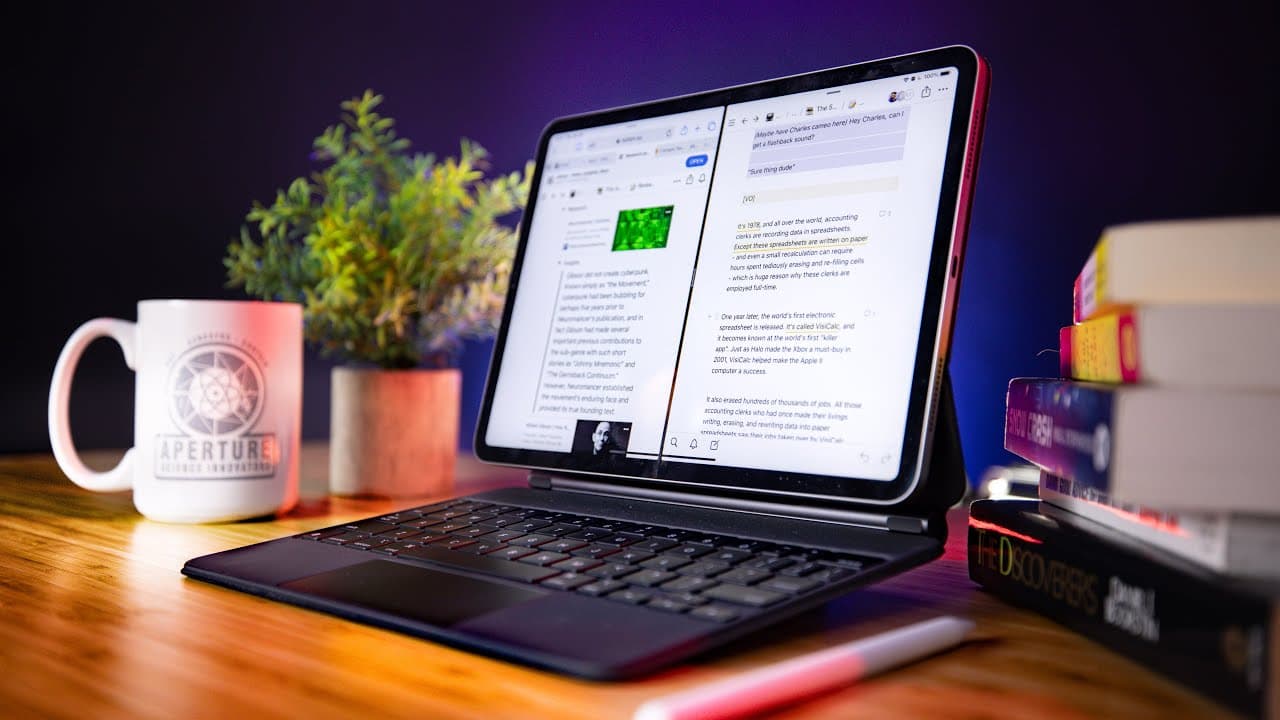
The speaker’s iPad Pro setup works best for reading, research, and initial script drafting, while a computer remains preferable for precise revision and final drafting. Kindle highlights flow through Readwise into a centralized Notion database, and Command adds low-friction highlighting for web research. Read on to see how the hardware, apps, integrations, and writing workaround connect into one creative process.
Transcript
- Thanks to Brilliant for sponsoring this video and supporting my channel. Hello. So if you clicked on this video, you are probably interested in this here hunk of metal, glass, and silicon which is a good thing because I have some thoughts and some experiences that I wanna share with you. For the past month or so, I have been doing a lot of my cre... Read More
Key Insights
- A narrower role works best: The iPad Pro is not presented as a complete computer replacement. Its strongest role is limited to reading, gathering research, and producing an initial draft. Detailed revision, editing, and final drafting stay on the computer because the speaker finds that environment more precise.
- The second attempt succeeded: A previous effort to use an iPad Pro for creative work ended in failure because the iPad experience left much to be desired. Trying again after encouragement from editor Tony produced a different result. After about a month, the device became a favorite for selected creative stages.
- First drafts benefit from immediacy: The speaker particularly likes the iPad for stream-of-consciousness writing. It provides a comfortable place to put an early version onto the virtual page before precision becomes the priority. This separates idea generation and initial drafting from the more exacting work later completed on a computer.
- Kindle highlights become reusable: Highlighted Kindle passages no longer remain isolated inside the individual book’s highlight collection. Readwise gathers them into its own system and then sends them to a Notion database. That makes passages easier to combine with ordinary book notes and reuse during research.
- The Pencil remains optional: Kindle passages can be highlighted with either an Apple Pencil or a thumb. The workflow therefore does not depend on purchasing the Pencil. Its essential value comes from capturing useful text and syncing it through Readwise, not from requiring a particular input accessory.
- Review extends beyond storage: Readwise is not used only as a transfer layer between Kindle and Notion. The speaker can inspect highlights each day, conduct daily reviews, and use spaced repetition-style memorization exercises. These options give previously captured passages another role before they become research material.
- Smaller hardware improves reading: The 11-inch iPad Pro is considerably smaller and lighter than the 12.9-inch model the speaker owned before. That reduction matters when holding and using the device for reading. The speaker considers the portability gain worthwhile and does not miss the larger screen area.
- Command reduces research friction: Safari can send selected passages to Readwise through its extension, but the process requires highlighting, opening the share menu, and selecting Readwise. Command shortens that sequence to highlighting text and tapping its highlight action. The passage then moves automatically through Readwise to Notion.
- Research sources converge centrally: The Notion database can contain highlights from Kindle books, notes from physical books, photographed physical pages processed through Readwise, and passages from online articles. Bringing these source types together creates one place for material that may later support a video or script.
- Tab groups separate projects: Command allows different sets of open tabs to be grouped by research project. This is valuable because the speaker often has several research projects underway simultaneously. Each set can remain associated with its subject instead of mixing every article into one undifferentiated collection.
- Persistent highlights restore context: A passage highlighted in Command remains visibly highlighted after the page is reloaded. When the speaker follows a Notion link back to an original article, the relevant text appears in yellow. That makes it easier to inspect the surrounding interview or article before using the passage.
- Safari supplies a Notion workaround: Notion on the iPad cannot place two instances of its own app side by side. The speaker works around that restriction by opening an additional Notion instance in Safari. Research can then remain visible while the main Notion workspace is used for drafting.
Install to Summarize YouTube Videos and Get Transcripts
Explore YouTube Video Summarizer or Get YouTube Transcript Extractor
Questions & Answers
Q: What is the best iPad Pro setup for reading, research, and script writing?
The speaker uses an 11-inch iPad Pro with Kindle, Readwise, Command, and Notion. Kindle provides book reading and highlighting, while Command captures passages from articles and interviews. Readwise moves those highlights into a centralized Notion database, where research can be linked to scripts. The setup works best for reading, research, and initial drafting because the speaker still finds a computer more precise for revision and final drafting.
Q: Why did the speaker return to the iPad Pro after an earlier failed attempt?
The first experiment, conducted a couple of years earlier, failed because the iPad working experience left a lot to be desired. Editor Tony, who performs substantial creative writing and other creative work on an iPad Pro, encouraged another attempt. After using it for about a month, the speaker found it especially effective for selected stages of the creative process. The change came from treating it as a focused tool for reading, research, and first drafts rather than every stage of production.
Q: How does Readwise connect Kindle highlights to Notion?
The speaker highlights passages inside Kindle with an Apple Pencil or a thumb. Readwise syncs those passages from Kindle into its own app and then uses its Notion integration to place them in a Notion database. Regular book notes can be kept alongside the imported highlights. This matters because the combined database turns reading notes into organized research that can later support scripts.
Q: What can the speaker do with highlights inside Readwise?
Readwise lets the speaker view collected highlights every day. It also supports daily review and spaced repetition-style memorization exercises. Beyond reviewing the material, the speaker can sync it into Notion and combine it with ordinary book notes. These functions make captured passages useful both for revisiting ideas and for building a research collection.
Q: Why does the speaker use the 11-inch iPad Pro for reading?
The 11-inch iPad Pro is lighter and smaller than the 12.9-inch model the speaker previously owned. That size and weight reduction feels especially helpful during reading. The speaker has not missed the extra screen space offered by the larger model. As a result, the smaller device provides a better balance between portability and usable display area for this workflow.
Q: How does Command improve web research compared with Safari?
Safari can send a passage to Readwise, but it requires selecting the text, opening the share menu, and choosing the Readwise action. Command lets the speaker select the text and tap highlight, after which the passage automatically syncs to Readwise. Readwise can then send it to Notion. The shorter sequence reduces friction when collecting many passages from articles and interviews.
Q: How does the setup organize multiple research projects and sources?
Command provides tab groupings, allowing the speaker to maintain different sets of open tabs for separate research projects. Captured passages flow through Readwise into a centralized Notion database. That database can combine material from Kindle books, physical-book notes, photographed pages, articles, and interviews. The structure helps because the speaker often conducts several research projects at the same time and needs one repository for potential video references.
Q: How does the speaker write in Notion while viewing research on the iPad?
Notion is the primary writing platform, with dedicated areas for content ideas, deep research, and scripting. The iPad app cannot display two instances of Notion in split screen. To work around that limitation, the speaker opens a second Notion instance in Safari. This keeps research available for reference while the initial script draft is written in the main workspace, with backlinks connecting the draft to its sources.
Summary & Key Takeaways
-
Reconsidering the iPad Pro: After a failed experiment a couple of years earlier, the speaker tried creative work on an iPad Pro again at the urging of editor Tony. Following roughly a month of use, it became a favorite device for three specific stages: reading, research, and initial script drafting. The speaker still prefers a computer for in-depth revision, editing, and final drafting because it feels more precise, but values the iPad for stream-of-consciousness writing and quickly getting a first draft onto the page.
-
Building the reading workflow: The speaker returned to Kindle because Readwise can collect highlighted passages and send them into Notion. Highlights can be made with an Apple Pencil or a thumb, so buying the Pencil is not required. Readwise also supports daily highlight review and spaced repetition-style memorization exercises. Its Notion integration places Kindle highlights in the same database as the speaker’s regular book notes, preparing those passages for later research and script development.
-
Choosing portable reading hardware: The setup uses the 11-inch iPad Pro rather than the 12.9-inch model previously owned with the first-generation iPad Pro. The smaller model is lighter and more compact, which the speaker finds noticeably better while reading. Despite the reduced dimensions, the speaker has not missed the additional screen space. This balance of portability and sufficient display area helps explain why the newer attempt feels more successful than the earlier iPad-based working experience.
-
Capturing article-based research: For articles and interviews, the speaker uses Command, an alternative browser to Safari available on iPad and iPhone. Highlighting text and selecting the highlight action automatically sends the passage to Readwise, which can then sync it into Notion. This removes the Safari process of highlighting text, opening the share menu, and choosing Readwise. The result is one repository containing material from Kindle books, physical books, articles, and interviews.
-
Drafting with centralized sources: Notion serves as the speaker’s primary writing platform, with areas for content ideas, deep research, and scripting. Backlinks connect draft material to stored research sources, while Command preserves webpage highlights in yellow after a page is reloaded so their original context remains visible. Because Notion cannot show two instances of its iPad app in split screen, the speaker opens another Notion instance in Safari to keep research visible while writing the initial script draft.
Read in Other Languages (beta)
Share This Summary 📚
Summarize YouTube Videos and Get Video Transcripts with 1-Click
Try YouTube Summary with ChatGPT & Claude or YouTube Transcript Generator
Explore More Summaries from Thomas Frank 📚



Summarize YouTube Videos and Get Video Transcripts with 1-Click
Try YouTube Summary with ChatGPT & Claude or YouTube Transcript Generator