How to Host a Private AI Server on Your Computer
TL;DR
Install Ollama on a Windows, Mac, or Linux computer, download a compatible model, and connect Open WebUI through Docker for a private browser-based chat system. A GPU improves performance, but specialized server hardware is not required. The setup can also support customized model behavior, image generation, multiple users, chat history, and integration with Obsidian.
Transcript
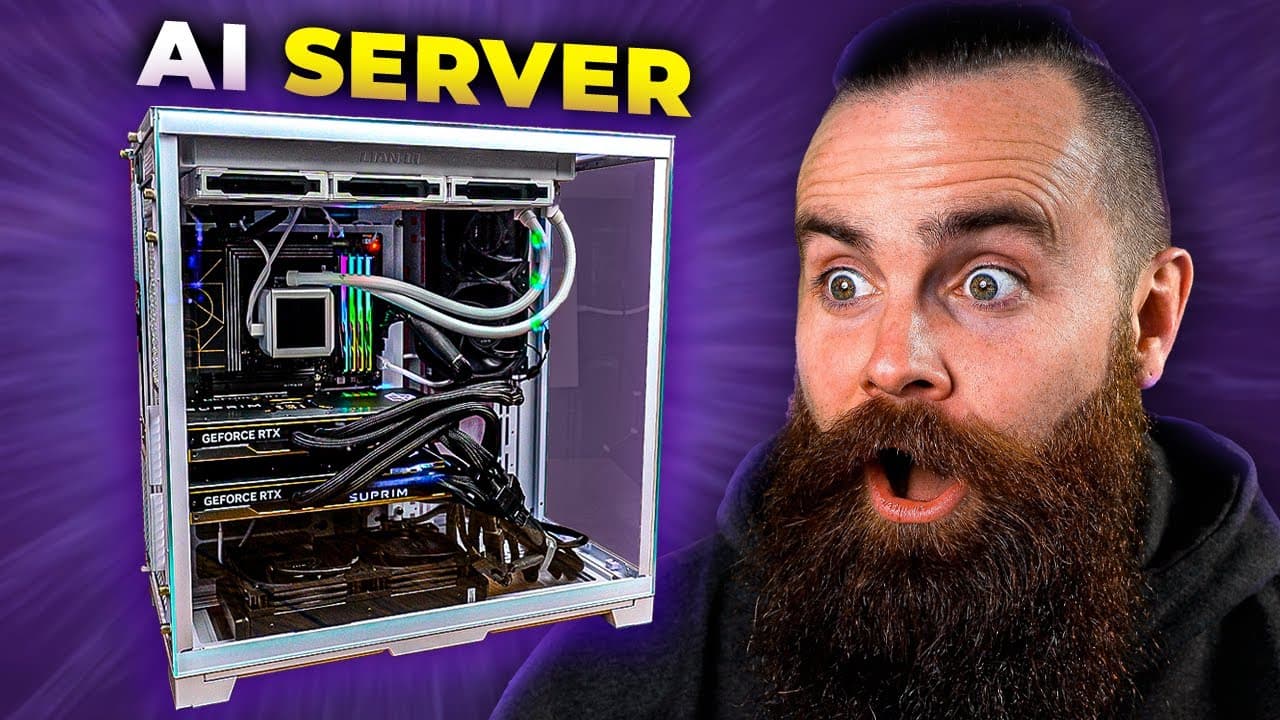
I built an AI server for my daughters. Well, first it was more for me. I wanted to run all of my AI locally. And I'm not just talking command line with alama. No, no, no. We have a gui, a beautiful chat interface and this thing's feature filled. It's got our back chat histories, multiple models, we can even add stable diffusion. And I was able to a... Read More
Key Insights
- Ollama is the foundation of the local AI system because it downloads and runs language models on the user's computer. It supports Windows, Mac, and Linux workflows, allowing the rest of the system to access locally hosted models through an API service.
- A powerful dedicated server is optional because the demonstrated software can run on an ordinary laptop. More capable hardware provides a better experience, and a supported GPU can accelerate model responses, but the basic setup only requires a compatible computer.
- Windows users can install the Linux version of Ollama through Windows Subsystem for Linux. The workflow includes enabling WSL, opening its Ubuntu environment, updating installed packages, and then running the Ollama installation command provided in the tutorial guide.
- Ollama exposes a local API service that other applications can use to reach the installed models. Visiting the local service address in a browser provides a simple installation check before the user downloads a model or connects a graphical interface.
- Downloaded models can operate without an internet connection because inference happens on the local computer. The presenter demonstrates this by running Llama two from the terminal, entering prompts, and watching the installed GPU process the requests.
- Open WebUI is a graphical chat interface for Ollama that adds conveniences beyond command-line conversations. Its highlighted capabilities include stored chat histories, access to multiple models, user accounts, image-generation integration, and a familiar browser-based interaction experience.
- Docker provides the container used to deploy Open WebUI. The deployment command connects the interface to the locally running Ollama service, uses the host network adapter, and makes the web application available through the computer's browser.
- Customized model files can place restrictions on how a locally hosted model behaves. The presenter values this control for providing AI access to his daughters while setting boundaries intended to support schoolwork and discourage cheating or other unwanted uses.
Install to Summarize YouTube Videos and Get Transcripts
Explore YouTube Video Summarizer or Get YouTube Transcript Extractor
Questions & Answers
Q: How do you host a private AI assistant locally?
Install Ollama on a Windows, Mac, or Linux computer, then use it to download and run a language model such as Llama two. Confirm that Ollama's local API service responds in a browser, install Docker, and deploy Open WebUI as a container connected to Ollama. This produces a browser-based chat interface whose model processing occurs on the local machine.
Q: What hardware is required to run a local AI server?
A compatible computer running Windows, Mac, or Linux is sufficient for the demonstrated setup, and the entire process can be completed on a laptop. A GPU provides a better experience by accelerating model processing, while more powerful hardware can improve response speed and model capacity. The elaborate server build shown by the presenter is an example, not a requirement.
Q: How can Windows users install Ollama for local AI?
Windows users can enable Windows Subsystem for Linux from the terminal and then work inside the installed Ubuntu environment. After choosing a username and password, they update and upgrade the Linux packages before running Ollama's Linux installation command. This approach avoids the Windows preview version mentioned by the presenter and aligns Windows users with the Linux installation path.
Q: How do you verify that Ollama is running correctly?
Open a web browser and visit the local address where Ollama exposes its API service. If the expected status message appears, the Ollama service is available for other local software. You can then pull a model and run it from the terminal, enter a test prompt, and confirm that the model generates a response on the computer.
Q: How does Open WebUI connect to Ollama?
Open WebUI runs inside a Docker container configured to use the computer's locally running Ollama service as its model backend. The deployment command points the interface toward the local Ollama base address and uses the host network adapter. Once the container is running, the user opens the web interface in a browser and interacts with Ollama through a graphical chat environment.
Q: What features does Open WebUI add to local AI?
Open WebUI replaces a terminal-only experience with a graphical chat interface. The features highlighted in the source include saved chat histories, support for multiple models, user access, and the ability to incorporate Stable Diffusion for image generation. It also provides a browser-based environment that can make a locally hosted AI system more approachable for family members or other users.
Q: Can a local AI assistant work without internet access?
The presenter demonstrates that a downloaded language model can answer prompts without an internet connection because the model runs on the local computer. Ollama manages the model, while the machine's processor or GPU performs the generation work. Internet access is still used during setup to obtain software, container images, and model files before local inference can take place.
Q: How can local AI behavior be restricted for children?
The local setup allows the administrator to use customized model files that restrict what users can ask or what the model will do. The presenter intends to use this control so his daughters can receive help with school while discouraging cheating and other unwanted behavior. Because the system is locally controlled, its model configuration and user access remain under the owner's administration.
Summary & Key Takeaways
-
The local AI setup begins with Ollama, which runs downloadable language models directly on a personal computer. Windows users can run the Linux version through Windows Subsystem for Linux, while Mac and Linux users can install Ollama directly. GPU support improves performance, but the tutorial does not require a dedicated server build.
-
After installation, Ollama can be checked through its local API address and tested from the command line with a downloaded model. The presenter also monitors GPU activity while generating responses, demonstrating that inference runs on local hardware without requiring an internet connection after the model is available.
-
Open WebUI adds a browser-based interface with chat histories, model selection, and user access. It runs inside a Docker container and connects to Ollama through the local machine. The broader setup can incorporate Stable Diffusion, customized model files for restricted behavior, and an AI chat interface within Obsidian.
Read in Other Languages (beta)
Share This Summary 📚
Summarize YouTube Videos and Get Video Transcripts with 1-Click
Try YouTube Summary with ChatGPT & Claude or YouTube Transcript Generator
Explore More Summaries from NetworkChuck 📚

Summarize YouTube Videos and Get Video Transcripts with 1-Click
Try YouTube Summary with ChatGPT & Claude or YouTube Transcript Generator