How to Perform a Two-Way ANOVA in SigmaPlot
TL;DR
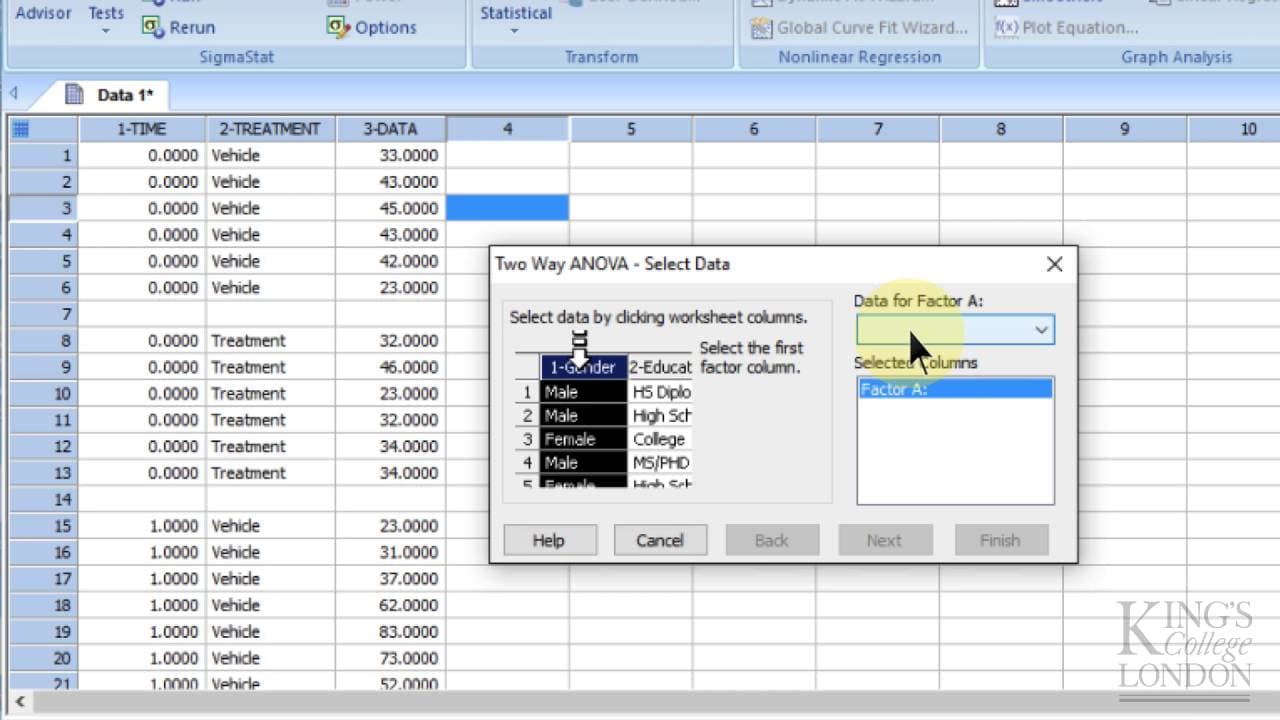
To perform a two-way ANOVA in SigmaPlot, enter your data in three columns: time, treatment, and numerical measurements. After selecting the appropriate factors and running the analysis, SigmaPlot will provide a detailed report highlighting significant differences and interactions. This method allows you to analyze the effects of different treatments over time effectively.
Transcript
so here we are in Sigma plot and we want to perform a two Innova so a two-way anova is when you are comparing two sets of data under multiple conditions so for instance you may be treating cells within without a drug over multiple time points in other words there are opportunities for the two data sets to be different either between drug treatment ... Read More
Key Insights
- 😥 Two-way ANOVA in Sigma Plot compares two sets of data under multiple conditions, such as different treatments over various time points.
- 💨 The data for two-way ANOVA needs to be entered in three columns: time, treatment, and numerical data.
- 💨 Sigma Plot can perform statistical analysis, and the step-by-step process simplifies carrying out a two-way ANOVA.
- ⌛ The analysis report in Sigma Plot indicates significant differences between treatments and possible time dependencies.
- 🧑🏭 Pairwise comparisons in Sigma Plot provide insights into how the factors interact and the numerical measurement changes over time.
- 📈 Sigma Plot can be used for both graph creation and statistical analysis.
- 💨 Two-way ANOVA helps in understanding the effects of two factors on the response variable, highlighting significant differences and interactions.
Install to Summarize YouTube Videos and Get Transcripts
Explore YouTube Video Summarizer or Get YouTube Transcript Extractor
Questions & Answers
Q: What is a two-way ANOVA?
A two-way ANOVA is a statistical analysis method used to compare two sets of data under multiple conditions. It examines the effects of two factors on the response variable.
Q: How should the data be entered in Sigma Plot for a two-way ANOVA?
In Sigma Plot, the data for a two-way ANOVA should be entered in three columns: time, treatment, and numerical data. Each block represents different conditions, and group sizes can be unequal.
Q: What does the analysis report in Sigma Plot indicate?
The analysis report in Sigma Plot indicates whether the treatments are significantly different and if there is a time dependence. It also provides a pairwise comparison of the factors.
Q: Can Sigma Plot be used only for making graphs?
No, Sigma Plot not only allows for graph creation but also has statistical analysis capabilities. It can perform various analyses, including two-way ANOVA.
Summary & Key Takeaways
-
Two-way ANOVA is used to compare two sets of data under multiple conditions, such as treating cells with or without a drug over various time points.
-
The data for two-way ANOVA in Sigma Plot needs to be entered in three columns: time, treatment, and numerical data. Group sizes do not have to be equal.
-
Sigma Plot allows for statistical analysis, including two-way ANOVA. By following a step-by-step process, the software provides a report with significant differences and pairwise comparisons.
Read in Other Languages (beta)
Share This Summary 📚
Summarize YouTube Videos and Get Video Transcripts with 1-Click
Try YouTube Summary with ChatGPT & Claude or YouTube Transcript Generator
Explore More Summaries from Dory Video 📚






Summarize YouTube Videos and Get Video Transcripts with 1-Click
Try YouTube Summary with ChatGPT & Claude or YouTube Transcript Generator