What Are System Programs and Their Categories?
TL;DR
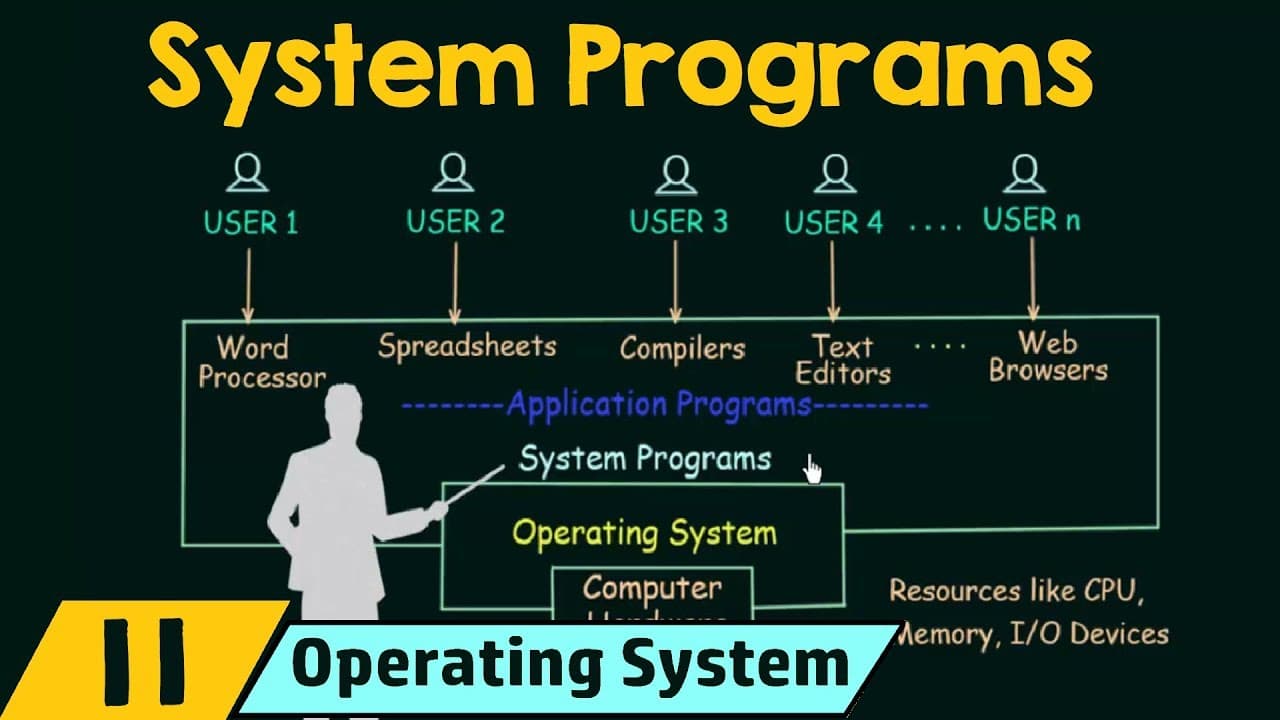
System programs sit between the operating system and applications, providing a convenient environment for development and execution. They are grouped into categories such as file management, status information, file modification, programming language support, program loading and execution, and communications, helping users manage resources and run programs efficiently.
Transcript
In this lecture we will be studying about system programs. In the previous lecture we studied about system calls and we saw how system calls work. Now, in this lecture we will be seeing what are the system programs and what are they use for. So, an important aspect of a modern system is the collection of system programs. So, in order to underst... Read More
Key Insights
- System programs are positioned above the operating system and below application programs in the system hierarchy.
- File management system programs help create, delete, copy, rename, print, dump, and list files and directories.
- Status information programs query system status such as date, time, memory, disk space, user counts, and logs.
- File modification programs alter the inner contents of files using editors and search or transformation tools.
- Programming language support programs provide compilers, assemblers, debuggers, and interpreters for various languages.
- Program loading and execution programs include loaders, link editors, overlays, and debuggers to run compiled code.
- Communications programs enable inter process and user communications, and tasks like web browsing, email, and remote login.
- The lecture ends by noting that operating systems also ship with non system programs like web browsers and office tools, which are applications rather than system programs.
Install to Summarize YouTube Videos and Get Transcripts
Explore YouTube Video Summarizer or Get YouTube Transcript Extractor
Questions & Answers
Q: What are system programs and where do they sit in the computer system hierarchy?
System programs are a set of tools that reside above the operating system and below application programs, providing a convenient environment for development and execution. They manage and facilitate tasks related to files, system status, code modification and execution, and inter process communications. This placement helps separate core OS duties from user applications while offering specialized utilities to support programming and running software.
Q: What is the difference between file management and file modification in system programs?
File management system programs handle outer file operations such as creating, deleting, copying, renaming, and listing files and directories. File modification programs deal with inner content changes, enabling editing, transforming, or searching within files. The distinction helps organize tools by whether they affect file structure or file content, clarifying which utilities to use for each task and ensuring efficient file handling workflows.
Q: What categories of system programs are discussed in the lecture?
The lecture categorizes system programs into six main groups: file management, status information, file modification, programming language support, program loading and execution, and communications. Each category covers specific kinds of utilities, such as editors for modification, compilers for language support, loaders for execution, and communication tools for messaging and remote access, illustrating a comprehensive view of system level tools.
Q: What kinds of tools fall under programming language support in system programs?
Programming language support tools include compilers, assemblers, debuggers, and interpreters for languages like C, C++, Java, and others. These programs enable the system to compile and run source code, support different programming environments, and ensure that development tasks can be performed within the operating system ecosystem. They are integral to enabling developers to transform code into executable programs.
Q: What is the purpose of program loading and execution system programs?
Program loading and execution system programs provide mechanisms to load compiled or assembled code into memory and execute it. They include loaders, relocatable loaders, linkage editors, overlay loaders, and potentially debugging tools. Their purpose is to prepare and run programs efficiently, managing memory placement and execution flow to ensure that software starts and runs correctly on hardware.
Q: What role do communications system programs play?
Communications system programs enable communication between processes, users, and computer systems. They support tasks like sending messages, browsing the web, emailing, logging in remotely, and file transfers. These tools establish virtual connections and facilitate interaction across devices and networks, forming a foundational layer for user and system communications.
Q: Are web browsers and office tools considered system programs?
Web browsers, word processors, spreadsheets, and databases are not system programs; they are application programs provided alongside the operating system. They support general user tasks and productivity but do not perform core OS or development functions. The lecture emphasizes this distinction to separate system level utilities from consumer applications.
Q: Why does the lecture emphasize categories of system programs?
The emphasis on categories helps students understand how system programs organize tasks to support development and execution. By grouping tools into file management, status information, modification, language support, loading and execution, and communications, it becomes easier to identify the right utility for each job, understand how these tools interact with the OS and hardware, and design or study system architectures more effectively.
Summary & Key Takeaways
-
System programs provide a bridge between the OS and applications, offering tools for file handling, status checks, and code execution. They organize tasks into distinct categories to simplify how users develop and run software. The lecture emphasizes the placement and purpose of system programs within the computer system hierarchy.
-
The categories covered include file management, status information, and file modification, plus programming language support and program loading and execution, and communications. The talk uses examples like editors and debuggers to illustrate how these programs assist development and operation.
-
The lecture also notes that operating systems include additional application programs like web browsers, word processors, and spreadsheets, which are not system programs but are provided alongside the OS for user tasks. It concludes with a quick recap of the six main system program categories.
-
Key takeaway is that system programs are essential for convenient development and execution, organized into logical groups to support different tasks when interacting with hardware and applications.
Read in Other Languages (beta)
Share This Summary 📚
Summarize YouTube Videos and Get Video Transcripts with 1-Click
Try YouTube Summary with ChatGPT & Claude or YouTube Transcript Generator
Explore More Summaries from Neso Academy 📚


Summarize YouTube Videos and Get Video Transcripts with 1-Click
Try YouTube Summary with ChatGPT & Claude or YouTube Transcript Generator