How to Install Vulkan on Raspberry Pi for Better Gaming
TL;DR
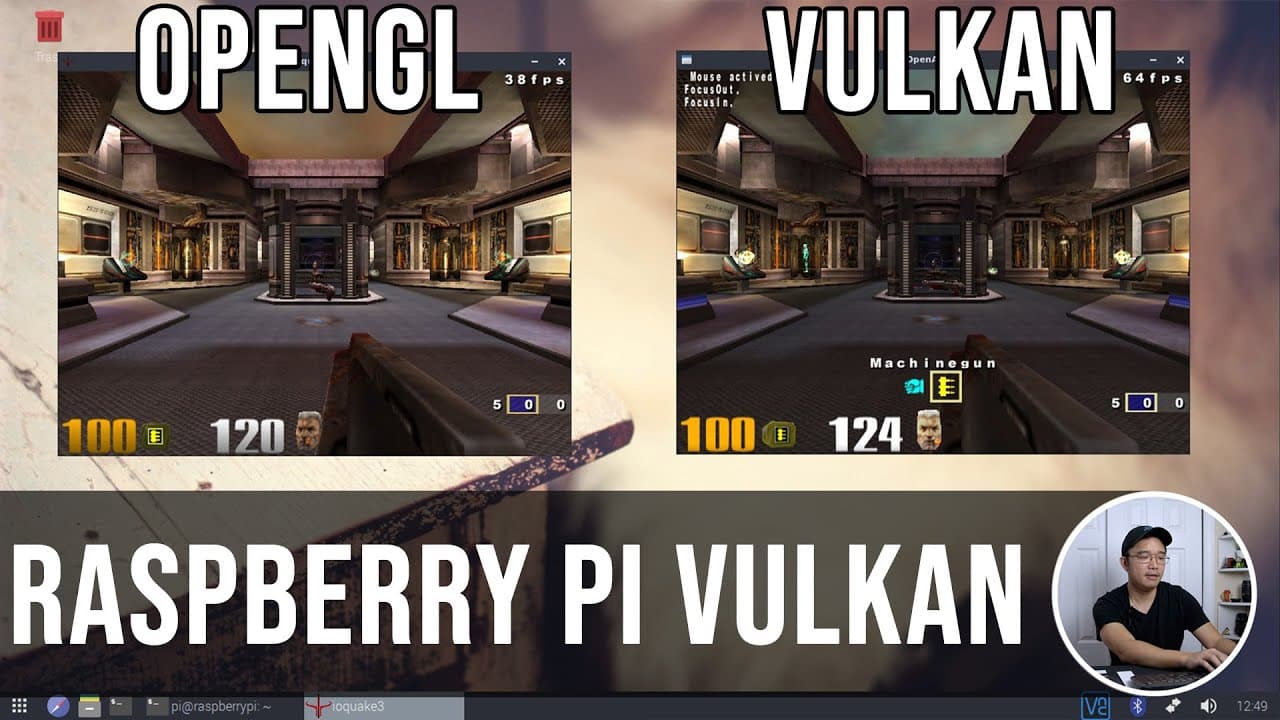
To install Vulkan on your Raspberry Pi, first update your system and install necessary dependencies using terminal commands. After obtaining the Vulkan library, compile it with the right tools, which can significantly improve gaming performance compared to OpenGL, as demonstrated in benchmark tests with titles like Quake 3.
Transcript
hey guys what's going on it's don here from nova spur tech and welcome back to my channel and today we are going to be installing vulcan onto our raspberry pi 4 so let's get started so you may or may not have known that recently the broadcom vulcan drivers has been upstream to misa which means one it's definitely easier to find when you want to ins... Read More
Key Insights
- 🧑🦽 Vulkan drivers have been upstreamed to Mesa, making installation easier and eliminating the need for manual compiling for future updates.
- ☠️ The video showcases a significant performance boost in rendering graphics, where Vulkan provided much higher frame rates than OpenGL.
- 🏛️ Installation procedures are outlined clearly, including necessary software dependencies and commands for building Vulkan on Raspberry Pi.
- 🎮 The speaker highlights the potential for using Vulkan with popular emulators, enhancing gameplay experiences for titles like PSP and Nintendo Switch.
- 👤 Users experiencing issues can troubleshoot by ensuring all necessary libraries are installed before compiling Vulkan.
- 🆕 A new 500 GB SSD was used for fresh installations, highlighting the importance of storage for better performance.
- 👾 Future game support is anticipated, promising an expanding library of Vulkan-compatible titles for Raspberry Pi users.
Install to Summarize YouTube Videos and Get Transcripts
Explore YouTube Video Summarizer or Get YouTube Transcript Extractor
Questions & Answers
Q: What are the advantages of Vulkan drivers compared to OpenGL on the Raspberry Pi?
Vulkan drivers offer significant performance improvements over OpenGL, as illustrated by the video where frame rates doubled in Quake 3. Vulkan allows for better hardware utilization, providing smoother gameplay and higher frame rates, crucial for demanding games and emulators on limited hardware like the Raspberry Pi.
Q: How can users prepare their Raspberry Pi for the Vulkan installation process?
Users should begin by updating their Raspberry Pi OS using the commands 'sudo apt update' and 'sudo apt upgrade' to ensure all libraries are current. This preparatory step is essential to avoid compatibility issues during the installation of Vulkan and its dependencies.
Q: What specific changes in the performance can users expect after installing Vulkan on their Raspberry Pi 4?
After Vulkan installation, users can expect an increase in frame rates, as demonstrated in the video where frame rates increased from around 20-30 FPS in OpenGL to 60-70 FPS in Vulkan. This improvement allows for a significantly better gaming experience and smoother graphics rendering.
Q: Are there any future prospects for Vulkan compatibility in games on Raspberry Pi?
Yes, with ongoing developments such as the implementation of Vulkan in various emulators and the potential support from projects like Box86, Raspberry Pi users can expect to run more demanding Linux games smoother, harnessing Vulkan’s advanced graphics capabilities.
Summary & Key Takeaways
-
The video explains the recent upstreaming of Broadcom Vulkan drivers to Mesa, simplifying installation and future updates significantly for Raspberry Pi users.
-
The speaker demonstrates the performance difference between OpenGL and Vulkan by comparing frame rates in games like Quake 3, showcasing Vulkan's increased efficiency.
-
Step-by-step instructions are provided on compiling Vulkan on Raspberry Pi, including updates, library dependencies, and installation procedures for enhanced gaming experience.
Read in Other Languages (beta)
Share This Summary 📚
Summarize YouTube Videos and Get Video Transcripts with 1-Click
Try YouTube Summary with ChatGPT & Claude or YouTube Transcript Generator
Explore More Summaries from Novaspirit Tech 📚






Summarize YouTube Videos and Get Video Transcripts with 1-Click
Try YouTube Summary with ChatGPT & Claude or YouTube Transcript Generator