What Is Unraid and How Easy Is It to Use?
TL;DR
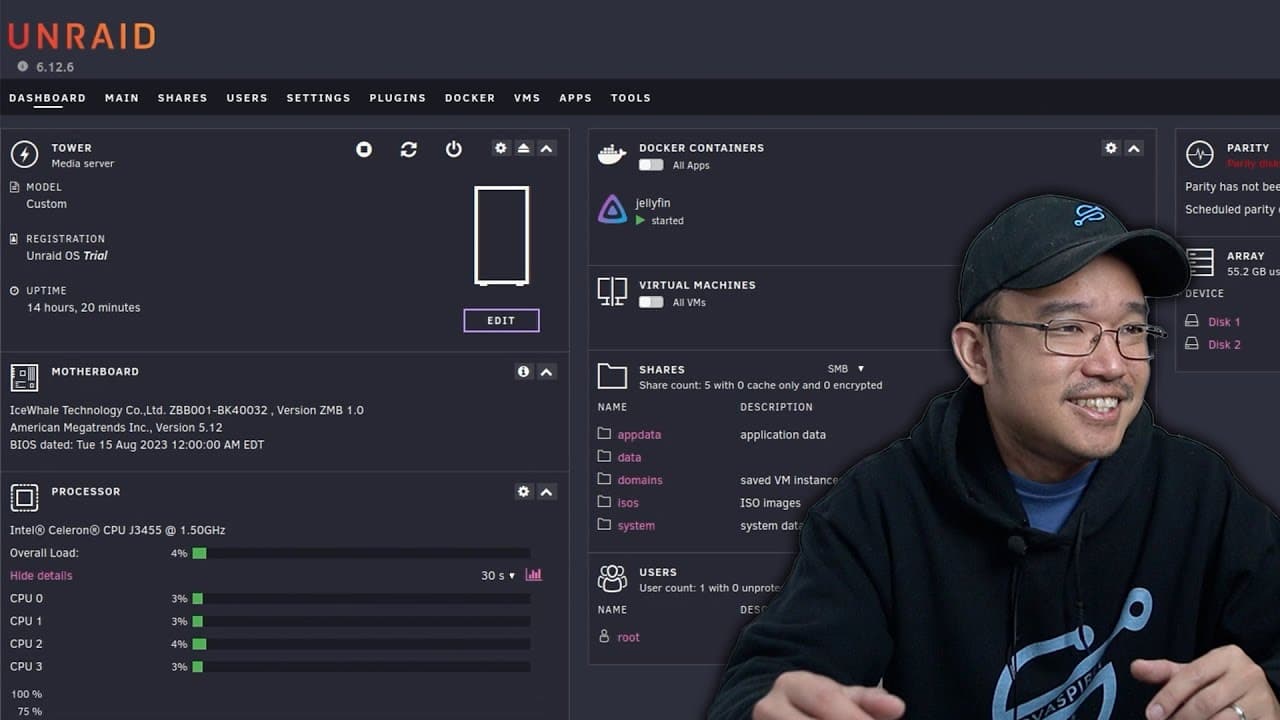
Unraid is an intuitive NAS operating system that stands out for its ease of use and strong community support. Users appreciate its user-friendly dashboard, extensive app integration, and customization options, like themes. However, initial setup can be challenging due to USB boot requirements and permissions management, making community resources essential for troubleshooting.
Transcript
hey guys what's going on it's Don here from Nova Spirit Tech and welcome back to the channel and today we're going to be checking out unraid so let's get started so this is my first impression of unraid I actually never used it before and I got to say it's really good now what first started as operating system for nases like free Nas or true Nas no... Read More
Key Insights
- 💪 Unraid has evolved from a simple NAS operating system into a powerful tool for home lab enthusiasts, supported by strong community resources and documentation.
- 💋 The requirement for booting from a USB stick can be a barrier for some users, influencing their initial experience with the software.
- 💄 Customizing the dashboard through themes adds personal flair and improved usability, making navigation more visually appealing.
- 👤 Effective management of shares and permissions is critical in Unraid, and users need to be aware of the necessary configurations to avoid access issues.
- 👶 The availability and integration of Docker applications within the Unraid system streamline the process of adding new functionalities for various purposes.
- 😘 Unraid's pricing structure encourages users to start with lower-level plans and upgrade as their storage and server needs grow, promoting affordability.
- ☢️ An active community provides a network of shared knowledge, which is a vital resource for troubleshooting and optimizing Unraid setups.
Install to Summarize YouTube Videos and Get Transcripts
Explore YouTube Video Summarizer or Get YouTube Transcript Extractor
Questions & Answers
Q: What makes Unraid stand out compared to other NAS operating systems?
Unraid is notable for its intuitive interface and strong community support, which makes navigation and setup easier compared to other NAS options like FreeNAS or TrueNAS. Users have reported fewer challenges finding solutions, as Unraid's forums and documentation are readily accessible. The ability to customize the dashboard and install relevant plugins further enhances its appeal to both novice and advanced users.
Q: What are the challenges faced during the initial setup of Unraid?
During the initial setup, the presenter faced issues with boot media requirements as Unraid necessitates a USB stick rather than an ISO for VM testing. Additionally, he encountered confusion surrounding the configuration of shared folders due to export settings, which initially hindered access until he enabled proper export options for visibility.
Q: How does the plugin system in Unraid benefit users?
Unraid's plugin system allows users to easily enhance their system's capabilities without needing extensive technical knowledge. With a variety of available plugins, users can add functionality such as themes and services, like Docker management and media server applications, through a centralized app store, simplifying the installation process.
Q: Can you explain the role of themes in Unraid?
Themes in Unraid, such as the Dracula theme, enhance user experience by customizing the visual interface of the dashboard. Users can install themes via the theme engine plugin, allowing for personalization of the environment. This not only improves aesthetics but also provides a more enjoyable and engaging user experience when managing system settings and resources.
Q: What are the pricing plans for Unraid and how do they work?
Unraid offers various pricing plans based on the number of attached storage devices. Users can begin with a free trial that allows for unlimited configurations before committing to a plan. The pricing is structured for upgrades from basic to advanced plans, allowing users to pay only the difference, which promotes budget-friendly choices without high upfront costs.
Q: How does Unraid's community support enhance the user experience?
The robust community support surrounding Unraid significantly enhances the user experience by providing a wealth of knowledge and troubleshooting resources. Users can access forums and community sections on platforms like Reddit for immediate assistance and shared experiences, fostering a sense of collaboration and shared learning among home lab enthusiasts.
Q: What did the presenter find challenging about setting up permissions in Unraid?
The presenter found setting up folder permissions in Unraid challenging because the interface lacks direct permission configuration options. He learned that to modify permissions, users must navigate to tools and utilize the "new permissions" feature. This process was not intuitive initially, leading to some initial frustration when he couldn't access created Docker folders.
Q: Why does the presenter recommend Unraid for new home lab users?
The presenter recommends Unraid for new home lab users due to its intuitive nature and ease of use. It offers a straightforward setup process, a variety of customizable options, and extensive community guidance. These features align well with users seeking a beginner-friendly platform that facilitates the management of home server resources without the steep learning curve typical of more complex systems.
Summary & Key Takeaways
-
The presenter shares his first impressions of Unraid, highlighting its intuitive interface and extensive community support that simplifies the user experience compared to other systems.
-
He discusses the initial setup process, noting challenges with boot media requirements and share permissions, while appreciating the availability of plugins and customization options like the Dracula theme.
-
Unraid’s dashboard and app installation features are praised for being user-friendly, with the presenter planning to explore additional functionalities, plugins, and potential upgrades.
Read in Other Languages (beta)
Share This Summary 📚
Summarize YouTube Videos and Get Video Transcripts with 1-Click
Try YouTube Summary with ChatGPT & Claude or YouTube Transcript Generator
Explore More Summaries from Novaspirit Tech 📚






Summarize YouTube Videos and Get Video Transcripts with 1-Click
Try YouTube Summary with ChatGPT & Claude or YouTube Transcript Generator