How to Avoid Common Python Indentation Errors (Part 2)
TL;DR
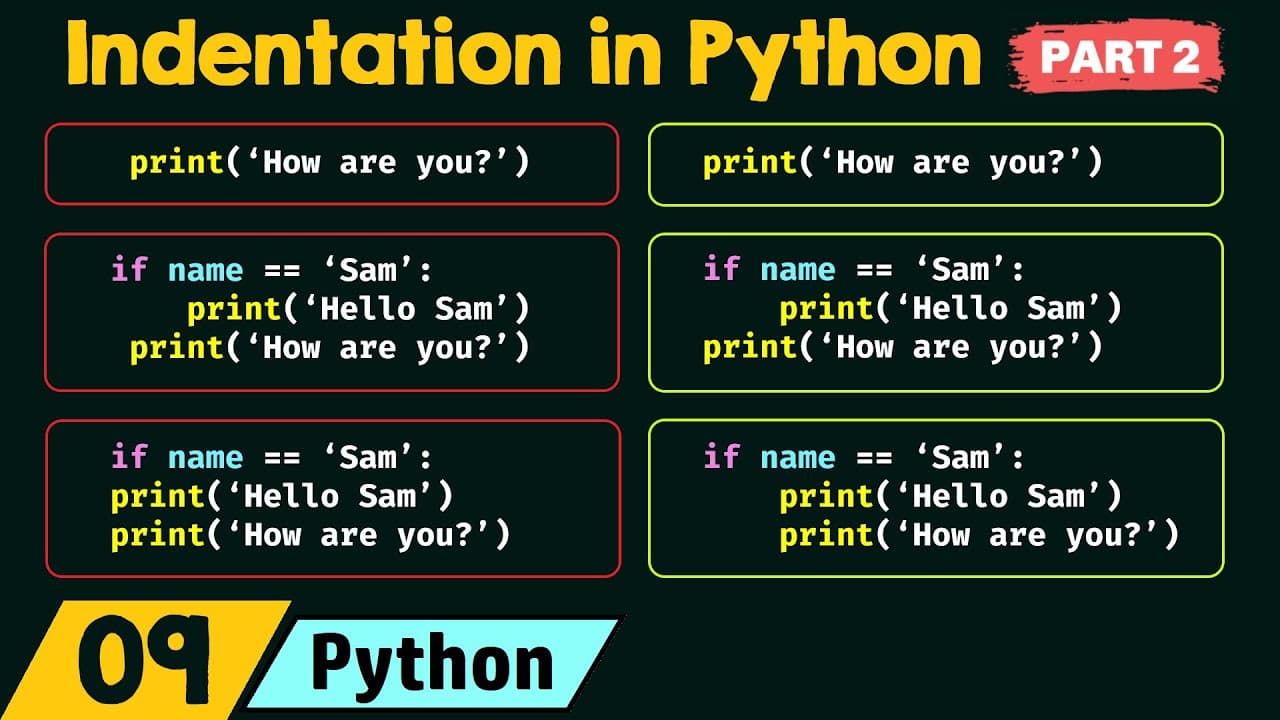
Avoid common Python indentation errors by indenting statements that belong to an if block, keeping statements at the same block level uniformly spaced, and leaving independent top-level statements unindented. An if statement must have at least one indented statement, and the examples use either one or four spaces consistently. Read on to see how indentation controls code blocks, conditional execution, and readability.
Transcript
foreign we saw part 1 of indentation in Python where we have discussed what is indentation the working of indentation and the rules of indentation now we will discuss some more topics on indentation in Python let's see all those topics one by one the first topic is common indentation errors and the second topic is advantages and disadvantages of in... Read More
Key Insights
- Indentation is the mechanism Python uses to represent a block of code. A statement or group of statements must be indented when it is intended to form part of another construct, such as an if statement.
- An if statement must be followed by at least one indented statement. If the statements beneath the condition are left at the top level, they are not treated as part of the if block, and the shown structure is not valid code.
- A top-level statement must not begin with unnecessary indentation. If a print statement is the first and only line of a program and does not belong to another piece of code, adding a leading space is incorrect.
- Statements in the same block must use uniform indentation. Giving one print statement one leading space and another four leading spaces fails to represent them consistently as members of the same if block.
- Indentation determines whether a statement belongs to a condition. A print statement that should run independently of an if statement must be unindented, while a print statement controlled by the condition must remain indented beneath it.
- The number of spaces used for indentation can vary in the examples, but consistency must be maintained. One space or four spaces can represent indentation, provided the chosen spacing remains uniform throughout the relevant code.
- Indentation improves readability and makes code blocks identifiable. Python also avoids the curly braces used to represent blocks in C, C++, and Java, which reduces the lines needed solely for block notation.
- Careful indentation becomes more demanding in large programs. Code editors such as Visual Studio Code can add indentation automatically, while writing in Notepad can make consistent spacing more tedious and difficult to maintain.
Install to Summarize YouTube Videos and Get Transcripts
Explore YouTube Video Summarizer or Get YouTube Transcript Extractor
Questions & Answers
Q: How do you avoid common Python indentation errors?
Indent every statement that belongs to an if block, and use the same number of spaces for statements at the same level. Do not indent a top-level statement that belongs to no other code, and unindent any statement that should execute independently of the condition.
Q: How do you indent statements inside a Python if block?
Place every statement that should execute when the condition is satisfied beneath the if statement at the same indentation level. In the example, both “hello Sam” and “how are you” must be indented because both should print when the name equals Sam.
Q: Why must statements after a Python if condition be indented?
Python uses indentation to represent a block of code belonging to another statement. The presentation says an if statement must have at least one indented statement; otherwise, the shown structure is not valid code.
Q: Why is indentation on the first line of a Python program incorrect?
A first-line statement should not be indented when it does not belong to another piece of code. Adding a leading space to the only print statement incorrectly represents it as part of an enclosing block.
Q: Why must indentation be uniform within a Python block?
Uniform spacing identifies statements as members of the same block. If one print statement has one leading space and another has four, they are not indented consistently even when both are intended to belong to the same if statement.
Q: How can indentation change which Python statements run conditionally?
A statement indented beneath an if condition belongs to that conditional block. If “hello Sam” should print only when the name equals Sam, it remains indented, while an independent “how are you” statement must be unindented.
Q: How many spaces can be used for Python indentation?
The presentation says one, two, three, or four spaces can represent indentation. The essential rule is uniformity: once a spacing level is chosen, statements in the same block must use it consistently throughout the program.
Q: What are the advantages and disadvantages of indentation in Python?
Indentation improves readability, identifies blocks of code, and avoids the curly braces used for blocks in C, C++, and Java. It requires careful, uniform spacing and can become tedious in large programs, although Visual Studio Code can add indentation automatically while Notepad makes it harder to maintain.
Summary & Key Takeaways
-
Python indentation represents blocks of code, not merely visual formatting. Statements intended to run when an if condition is satisfied must be indented beneath that if statement. At least one indented statement must follow an if statement, while statements that should execute independently must return to the top-level indentation position.
-
Common mistakes include failing to indent statements inside an if block, indenting the first or only top-level statement, using different numbers of spaces for statements in the same block, and accidentally indenting an unrelated statement. Correct indentation must accurately express which statements belong to each conditional block in the program.
-
Indentation improves readability, identifies code blocks, and avoids the curly braces used for blocks in languages such as C, C++, and Java. However, consistent indentation requires care, particularly in large programs. A code editor such as Visual Studio Code can automate indentation and make uniform formatting less tedious than writing code in Notepad.
Read in Other Languages (beta)
Share This Summary 📚
Summarize YouTube Videos and Get Video Transcripts with 1-Click
Try YouTube Summary with ChatGPT & Claude or YouTube Transcript Generator
Explore More Summaries from Neso Academy 📚
Summarize YouTube Videos and Get Video Transcripts with 1-Click
Try YouTube Summary with ChatGPT & Claude or YouTube Transcript Generator