How to Set Up Omnisphere with Seaboard RISE 25
TL;DR
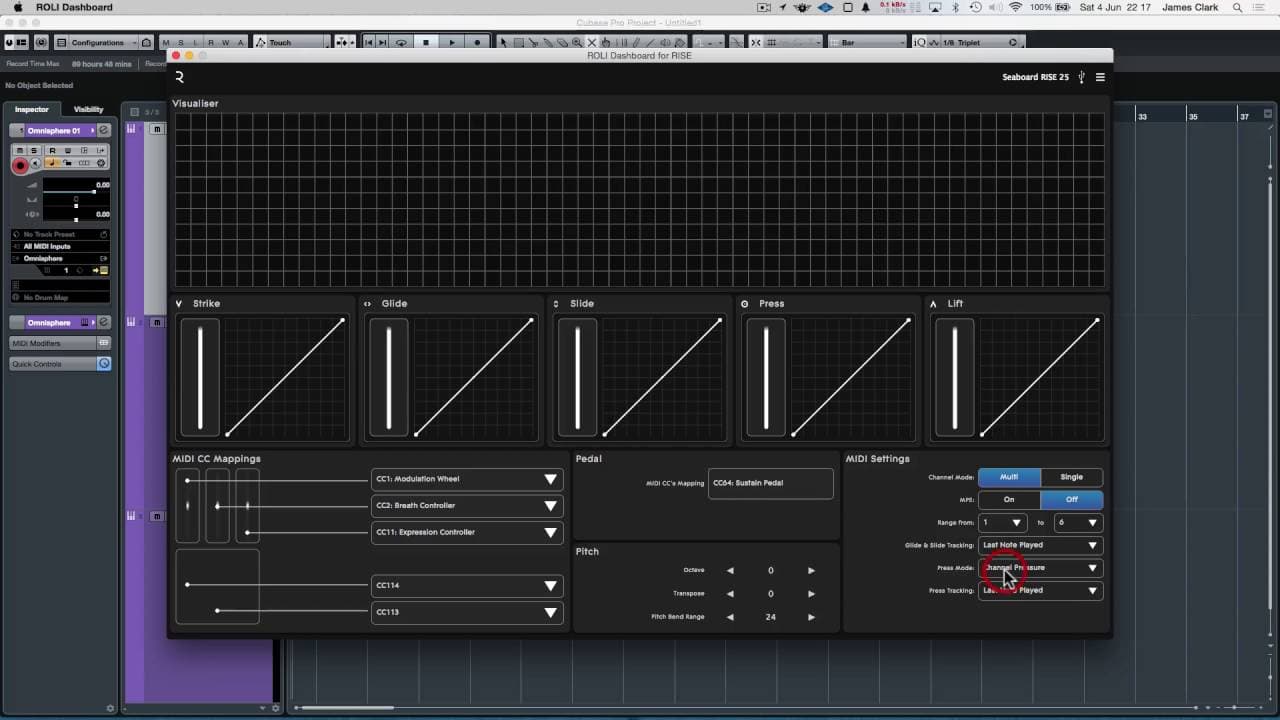
To set up Omnisphere with Seaboard RISE 25, connect the keyboard via USB and configure the Rolly Dashboard settings for strike, glide, slide, press, and lift. Adjust the pitch bend range according to the synthesizer used and utilize Omnisphere’s cloning feature for multi-timbral setups, allowing for independent sound manipulation on multiple notes.
Transcript
hello so we've got in front of us the Rolly dashboard for rise and I've got a rise 25 a seaboard 25 plugged in to this computer via USB rather than via the MIDI over Bluetooth we've got the strike glide slide press and lift all set up so the strikers velocity response gliders pitch Bend slide as the pushing up and down the keys from front to back o... Read More
Key Insights
- 😑 The Rolly Dashboard for Rise offers various controls, including strike, glide, slide, press, and lift, to enhance the playing experience.
- 👻 Customizing Omnisphere settings allows for better integration with the Rolly, optimizing its functionality and sound quality.
- 👻 The Rolly Dashboard for Rise is compatible with Omnisphere's multi-timbral capabilities, allowing for polyphonic playing and manipulation of individual sounds.
- 🧡 The pitch bend range should be adjusted based on the synthesizer module or native instrument being used for optimal performance.
- 👂 Effects, such as reverb, can be applied in Omnisphere to enhance the sound of the Rolly.
- 👂 The Rolly Dashboard for Rise is particularly well-suited for creating ethereal and synth-like sounds.
- 🥳 Cloning parts in Omnisphere makes it easy to create multi-timbral setups and play multiple sounds simultaneously with the Rolly.
Install to Summarize YouTube Videos and Get Transcripts
Explore YouTube Video Summarizer or Get YouTube Transcript Extractor
Questions & Answers
Q: What are the different controls available on the Rolly Dashboard for Rise?
The Rolly Dashboard for Rise features controls such as strike, glide, slide, press, and lift. Each control has a specific functionality related to velocity response, pitch bend, aftertouch response, and key release.
Q: How can you optimize the pitch bend range for synthesizer modules and native instruments like Omnisphere?
For most synthesizers, a pitch bend range of 24 is recommended. However, when using native instruments like Omnisphere, it is advised to set the pitch bend range to 12, as most contact modules do not support more than 12 pitch bend.
Q: How can you enhance the sound of the Rolly in Omnisphere?
By adjusting the settings in Omnisphere, you can improve the sound of the Rolly. This includes modifying the release, attack, filter cutoff, and applying effects like reverb to add depth and texture to the sound.
Q: Can the Rolly Dashboard for Rise be used for polyphonic playing?
Yes, by setting the Rolly to polyphonic mode and using the clone part functionality in Omnisphere, you can create a multi-timbral setup. This allows you to play chords and manipulate individual sounds using the Rolly's controls.
Summary & Key Takeaways
-
The content features a demonstration of the Rolly Dashboard for Rise and its connection to a computer via USB.
-
The different controls of the Rolly, such as strike, glide, slide, press, and lift are explained.
-
The content explores the settings and customization options of Omnisphere to optimize the Rolly's integration.
Read in Other Languages (beta)
Share This Summary 📚
Summarize YouTube Videos and Get Video Transcripts with 1-Click
Try YouTube Summary with ChatGPT & Claude or YouTube Transcript Generator
Explore More Summaries from Dory Video 📚






Summarize YouTube Videos and Get Video Transcripts with 1-Click
Try YouTube Summary with ChatGPT & Claude or YouTube Transcript Generator