How Do Bitwise NOT and XOR Work in Python?
TL;DR
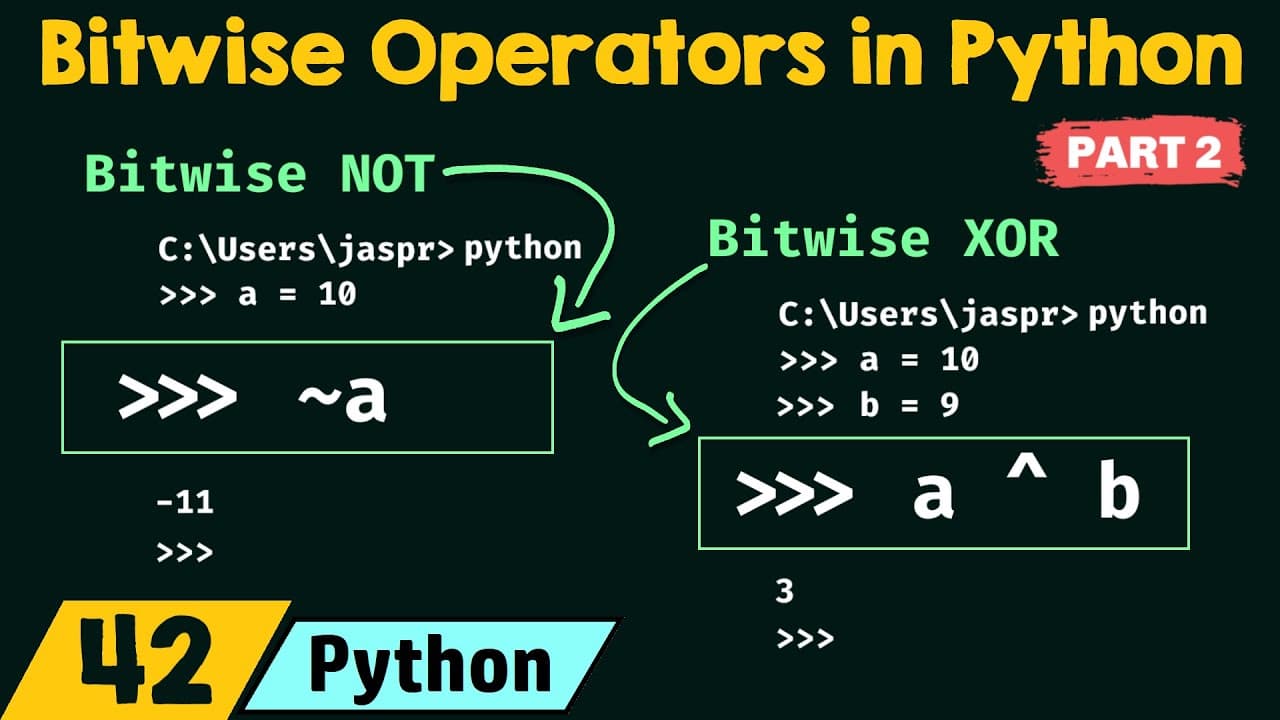
Python’s bitwise NOT operator flips every bit, including the sign bit, so applying it to 10 produces -11 rather than 5. The bitwise XOR operator compares corresponding bits and returns 1 only when one of the pair is 1, which makes 10 XOR 9 equal to 3.
Transcript
foreign let's continue our discussion on bitwise operators in Python this is part two of bitwise operators in the last presentation that is in part one of bitwise operators we have seen two different types of operators bitwise and and bitwise or we have understood them very well and now we are ready to see the next two operators in this presentatio... Read More
Key Insights
- The bitwise NOT operator is represented by the tilde symbol and returns the one’s complement of a number. One’s complement is formed by flipping every bit, which changes each 0 to 1 and each 1 to 0.
- The sign bit is essential when evaluating bitwise NOT because it is flipped along with the magnitude bits. Ignoring that bit makes the calculation for the bitwise NOT of 10 appear to equal 5 instead of Python’s actual result, -11.
- The bitwise NOT of 10 is -11 in Python. The presentation derives this by complementing the binary representation together with its sign bit, then combining the positional weights, including the negative positional weight assigned to the leading bit.
- The bitwise XOR operator is represented by the circumflex symbol. It returns 1 when one of the two corresponding bits is 1 and returns 0 when both bits are 0 or both bits are 1.
- The XOR operation differs from bitwise OR when both compared bits are 1. Bitwise OR returns 1 if at least one bit is 1, while XOR requires only one of the compared bits to be 1.
- The XOR of 10 and 9 is 3. Their binary representations are aligned and compared bit by bit, producing a result whose active positional weights combine to give the decimal value 3.
- The sign bits do not affect the demonstrated XOR calculation because both input values are positive. Their sign bits are both 0, and XOR applied to those sign bits returns 0, leaving the result positive.
- The bin function displays the binary form of a bitwise result. Passing the result of 10 XOR 9 to bin produces 0b11, while entering the XOR expression directly in the Python interpreter produces its decimal value, 3.
Install to Summarize YouTube Videos and Get Transcripts
Explore YouTube Video Summarizer or Get YouTube Transcript Extractor
Questions & Answers
Q: How does the bitwise NOT operator work in Python?
The bitwise NOT operator is written with the tilde symbol and returns the one’s complement of its operand. It flips every bit in the number’s binary representation, changing each 0 into 1 and each 1 into 0. The sign bit must also be included, because flipping it can cause a positive input to produce a negative result.
Q: Why does bitwise NOT of 10 equal -11 instead of 5?
A result of 5 comes from flipping only the visible magnitude bits of 10 and ignoring the sign bit. The presentation explains that the sign bit must also be complemented. Once that leading bit changes from 0 to 1, the resulting bit pattern represents a negative value, and its positional weights combine to produce -11.
Q: What is one’s complement in a bitwise operation?
One’s complement is the result of reversing every bit in a binary representation. Every 0 becomes 1, and every 1 becomes 0. Bitwise NOT performs this operation on its operand. When the calculation includes a sign bit, that bit is reversed too, which can change the sign and final decimal interpretation of the result.
Q: How does the sign bit affect bitwise NOT?
The sign bit indicates whether the represented decimal value is positive or negative in the presentation’s calculation. A sign bit of 0 indicates a positive value, while a sign bit of 1 indicates a negative value. Because bitwise NOT flips this bit along with the others, omitting it can produce an incorrect positive answer.
Q: How does the bitwise XOR operator work in Python?
The bitwise XOR operator is written with the circumflex symbol and compares corresponding bits from two operands. It returns 1 when one of the two bits is 1. It returns 0 when both bits are 0 or both bits are 1. Python then presents the resulting binary pattern as a decimal value by default.
Q: What is the result of applying XOR to 10 and 9?
Applying XOR to 10 and 9 produces 3. The binary representation of 10 is compared with the binary representation of 9 one position at a time. Positions containing one active bit produce 1, while positions where the bits match produce 0. The resulting binary value has the decimal equivalent 3.
Q: What is the difference between bitwise XOR and bitwise OR?
Bitwise OR returns 1 when at least one of the compared bits is 1, including the case where both bits are 1. Bitwise XOR is more restrictive because it returns 1 only when one of the compared bits is 1. When both bits are 1, XOR returns 0 instead of 1.
Q: How can Python display an XOR result in binary?
Python returns a decimal value when an XOR expression is entered directly in the interpreter. To display the binary representation, pass the XOR expression to the bin function. In the demonstrated example, applying XOR to 10 and 9 gives decimal 3, while passing that same expression to bin produces the binary display 0b11.
Summary & Key Takeaways
-
The bitwise NOT operator, written with the tilde symbol, returns the one’s complement of a number. One’s complement means flipping every bit, so each 0 becomes 1 and each 1 becomes 0. The calculation must include the sign bit because flipping it can change a positive value into a negative value.
-
Applying bitwise NOT to 10 demonstrates why the sign bit matters. Flipping only the magnitude bits appears to produce 5, but that calculation is incomplete. Once the leading sign bit is included and flipped, the result represents a negative value. Python therefore evaluates the bitwise NOT of 10 as -11.
-
The bitwise XOR operator, written with the circumflex symbol, compares corresponding bits from two values. It produces 1 when one of the compared bits is 1, but produces 0 when both bits match. For 10 and 9, the bit-by-bit XOR result is binary 11, which Python returns as decimal 3.
Read in Other Languages (beta)
Share This Summary 📚
Summarize YouTube Videos and Get Video Transcripts with 1-Click
Try YouTube Summary with ChatGPT & Claude or YouTube Transcript Generator
Explore More Summaries from Neso Academy 📚





Summarize YouTube Videos and Get Video Transcripts with 1-Click
Try YouTube Summary with ChatGPT & Claude or YouTube Transcript Generator