Updates for the AccelStepper library - TB6600 and Arduino
TL;DR
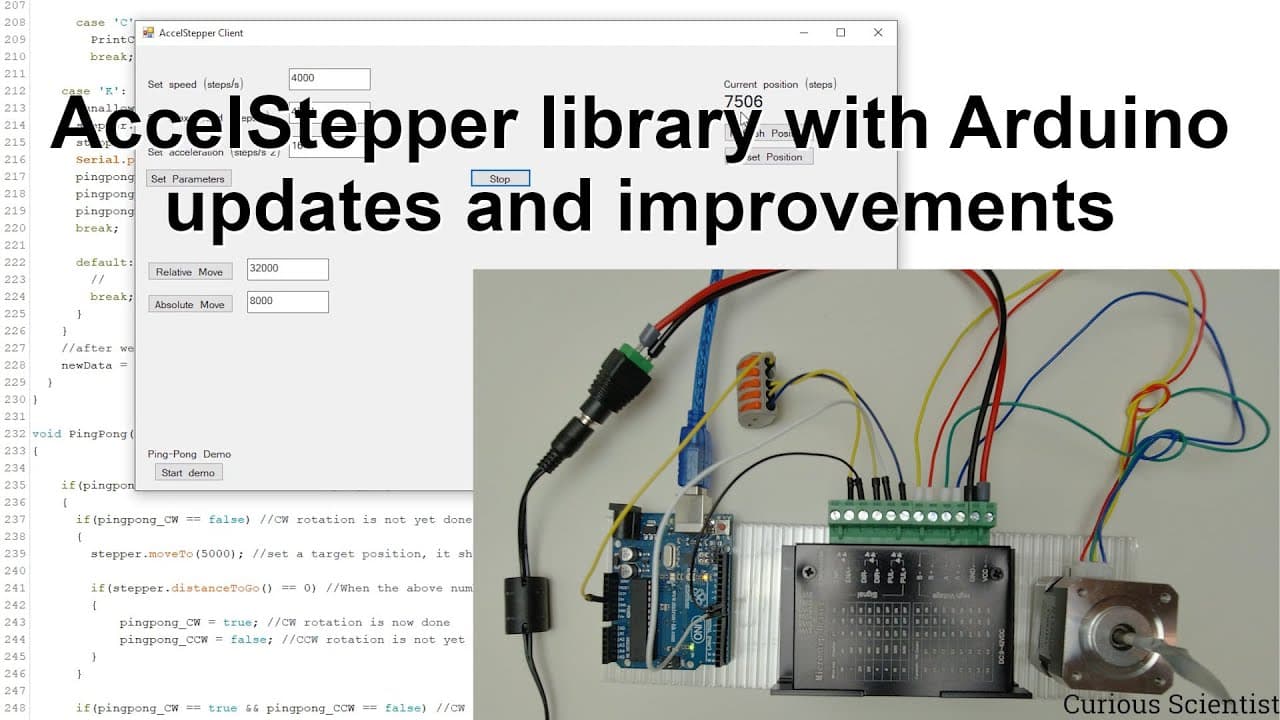
This video demonstrates controlling a stepper motor using Arduino and an access stepper library.
Transcript
welcome everyone to another accesstepper library video so in this video i'm going to show you some extra features that i was working on for this kind of library so what we will do here is basically we will utilize this very nice library and do some stuff with the stepper motor and with an arduino and the circuit that i will use to control the stepp... Read More
Key Insights
- 🧑🦼 The Access Stepper library streamlines the process of controlling stepper motors using Arduino, requiring only minimal hardware setups.
- 👻 Serial communication enables real-time data exchange, allowing users to send commands directly from their computers to the Arduino for instantaneous motor control.
- 🧑🦼 Variables like acceleration and speed are crucial for smooth motor operation and prevent sudden jumps that could damage the hardware.
- 👏 The tutorial provides hands-on practices, including modifying motor parameters during runtime to adapt to different use cases.
- 🫵 The video encourages viewer interaction, inviting suggestions for future updates to the software to enhance its functionality.
- 🦻 A comprehensive wiring explanation aids beginners in understanding the connections required for the Arduino and stepper motor controller.
- 👶 The software interface developed by the creator simplifies user interaction, making it accessible even for those new to programming.
Install to Summarize YouTube Videos and Get Transcripts
Explore YouTube Video Summarizer or Get YouTube Transcript Extractor
Questions & Answers
Q: What hardware is required to control the stepper motor in this project?
To control the stepper motor, you'll need an Arduino board, a TB6600 stepper motor driver, a NEMA 17 stepper motor, and a suitable power supply. Additionally, connecting wires and a computer for serial communication are essential. This setup allows for precise control over the motor's movements.
Q: How does the Access Stepper library improve motor control?
The Access Stepper library simplifies the coding process for controlling stepper motors. It abstracts complex functions, allowing users to focus on essential commands like setting speed, acceleration, and position. This makes it easier to implement both relative and absolute movements without extensive programming knowledge.
Q: What is the difference between absolute and relative movement in this context?
Absolute movement refers to instructing the stepper motor to move to a specific position, regardless of its current location. In contrast, relative movement commands the motor to move a certain number of steps from its current position. This distinction is crucial for tasks that require precision and repeatability.
Q: How does the demonstration in the video showcase the capabilities of the setup?
The demonstration features a ping-pong motion where the stepper motor oscillates between two defined positions. This visual representation allows viewers to see how the motor can be controlled dynamically and respond to speed and acceleration changes, emphasizing the real-time capabilities of the setup.
Summary & Key Takeaways
-
The video showcases the integration of the Access Stepper library and Arduino to control a stepper motor using the TB6600 controller.
-
Viewers learn how to set up serial communication for real-time control, including acceleration, speed, and motor position variables through commands sent from a computer.
-
The tutorial features a ping-pong demonstration where the stepper motor oscillates between two positions, illustrating both relative and absolute movement functionalities.
Read in Other Languages (beta)
Share This Summary 📚
Summarize YouTube Videos and Get Video Transcripts with 1-Click
Try YouTube Summary with ChatGPT & Claude or YouTube Transcript Generator
Explore More Summaries from Curious Scientist 📚




Summarize YouTube Videos and Get Video Transcripts with 1-Click
Try YouTube Summary with ChatGPT & Claude or YouTube Transcript Generator