What Are NotebookLM's New Features in 2023?
TL;DR
NotebookLM has introduced major updates, including integration with Nano Banana Pro for creating infographics and slide decks, enhancing the visual representation of information. The tool now supports deep research through Gemini, allowing users to import comprehensive sources automatically. These updates, along with quality of life improvements, make NotebookLM a more powerful tool for organizing and visualizing knowledge.
Transcript
Notebook LM was already one of my favorite AI tools that I recommend to everyone, but with the most recent update, they added some new features that make it even more powerful. I'll cover the two big obvious ones they added, which are amazing, but also some of the smaller, less obvious features they incorporated, plus a few pro tips that aren't new... Read More
Key Insights
- NotebookLM integrates Nano Banana Pro to create infographics and slide decks, enhancing information visualization.
- Deep research integration with Gemini allows automatic import of comprehensive sources, improving research capabilities.
- NotebookLM reduces AI hallucinations by grounding answers in user-provided sources, increasing trustworthiness.
- Users can customize infographics and slide decks with different styles and levels of detail for tailored presentations.
- The tool offers pro tips for identifying source contradictions, gaps, and alternative viewpoints to ensure comprehensive research.
- New features include a video overview upgrade with customizable visual styles, enhancing presentation quality.
- Chat history is now automatically saved, preventing accidental loss of conversations and improving user experience.
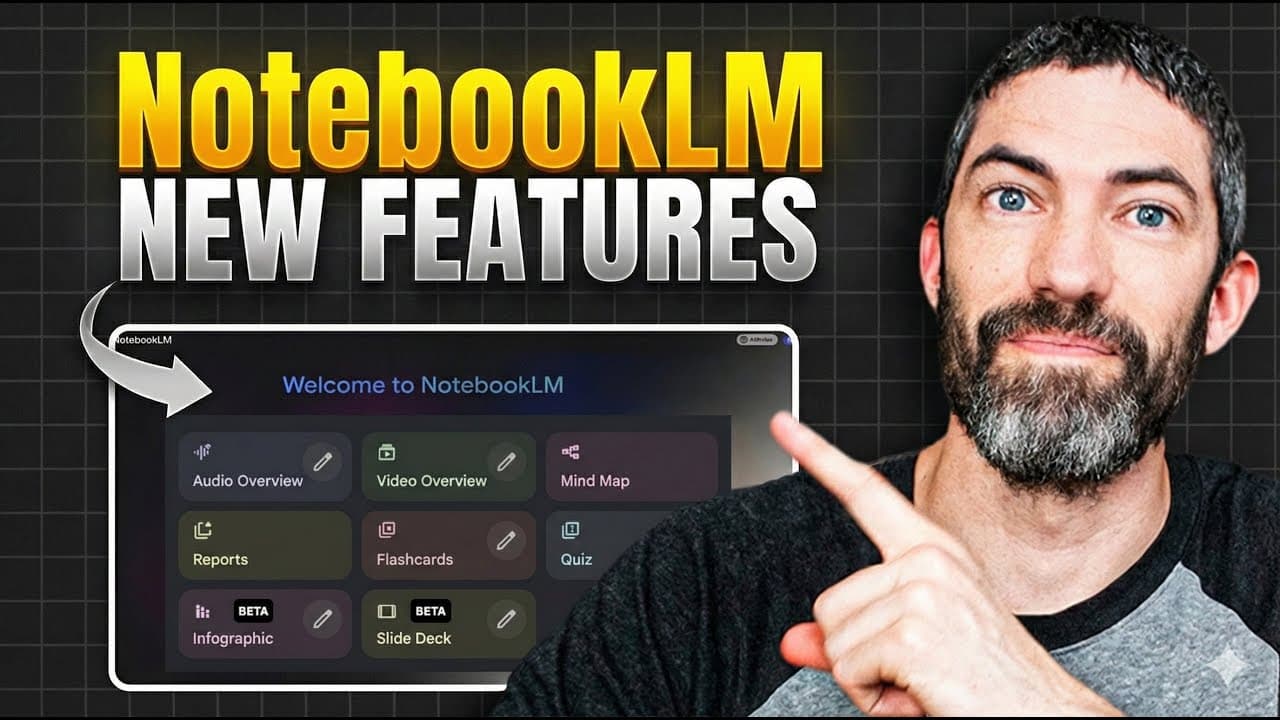
- NotebookLM's studio panel offers various formats for content creation, including audio and video overviews, mind maps, and quizzes.
Install to Summarize YouTube Videos and Get Transcripts
Explore YouTube Video Summarizer or Get YouTube Transcript Extractor
Questions & Answers
Q: How does NotebookLM integrate with Nano Banana Pro?
NotebookLM integrates Nano Banana Pro to create infographics and slide decks, allowing users to visualize information effectively. This integration provides customizable options for style and detail level, enhancing the presentation of information. Users can select sources, orientation, and detail level to tailor the output to their needs, making it a powerful tool for content visualization.
Q: What is the deep research feature in NotebookLM?
The deep research feature in NotebookLM, integrated with Gemini, autonomously researches a topic and analyzes findings to fill in knowledge gaps. It generates a comprehensive research report and imports sources directly into NotebookLM, enabling users to access a wide array of information for thorough research. This feature enhances the tool's research capabilities significantly.
Q: How does NotebookLM reduce AI hallucinations?
NotebookLM reduces AI hallucinations by grounding answers in user-provided sources. When users ask questions, the tool references specific sources within the notebook, ensuring that the information is accurate and reliable. This approach minimizes the risk of generating incorrect or misleading information, making NotebookLM a trustworthy tool for learning and research.
Q: What customization options are available for infographics and slide decks?
Users can customize infographics and slide decks in NotebookLM by selecting the orientation, detail level, and style. Options include landscape, portrait, or square orientation, and concise, standard, or detailed information levels. Users can also describe the desired style, color, or focus, allowing for tailored presentations that meet specific needs and preferences.
Q: What are some pro tips for using NotebookLM effectively?
Effective use of NotebookLM involves identifying contradictions, gaps, and alternative viewpoints in sources. Users can ask specific questions to pinpoint disagreements or missing information, ensuring a comprehensive understanding of the topic. This approach helps refine sources and build a balanced view, making NotebookLM a powerful tool for thorough research and learning.
Q: What improvements were made to the video overview feature?
The video overview feature in NotebookLM has been upgraded with customizable visual styles powered by Nano Banana Pro. Users can choose from various visual styles or create custom ones, enhancing the presentation quality. This feature provides structured or brief overviews, allowing users to grasp core ideas quickly and effectively through visually appealing presentations.
Q: How does the chat history feature enhance user experience?
The chat history feature in NotebookLM now automatically saves conversations, preventing accidental loss of information. This improvement ensures that users can revisit previous discussions without worrying about losing important details. Additionally, users can delete chat history if needed, providing flexibility and enhancing the overall user experience.
Q: What formats are available in the NotebookLM studio panel?
The NotebookLM studio panel offers various formats for content creation, including audio and video overviews, mind maps, reports, flashcards, quizzes, infographics, and slide decks. These formats help users view, understand, and retain information effectively, making NotebookLM a versatile tool for learning and content creation across different mediums.
Summary & Key Takeaways
-
NotebookLM has integrated Nano Banana Pro to create infographics and slide decks, allowing users to visualize information effectively. The tool now supports deep research through Gemini, enabling automatic import of comprehensive sources. These updates, along with quality of life improvements, make NotebookLM more powerful for organizing and visualizing knowledge.
-
Users can customize infographics and slide decks with different styles and levels of detail, enhancing presentations. NotebookLM reduces AI hallucinations by grounding answers in user-provided sources, increasing trustworthiness. New features include a video overview upgrade with customizable visual styles and automatic chat history saving.
-
Pro tips help users identify contradictions, gaps, and alternative viewpoints in their sources, ensuring comprehensive research. The studio panel offers various formats for content creation, including audio and video overviews, mind maps, and quizzes, making NotebookLM a versatile tool for learning and content creation.
Read in Other Languages (beta)
Share This Summary 📚
Summarize YouTube Videos and Get Video Transcripts with 1-Click
Try YouTube Summary with ChatGPT & Claude or YouTube Transcript Generator
Explore More Summaries from Futurepedia 📚

Summarize YouTube Videos and Get Video Transcripts with 1-Click
Try YouTube Summary with ChatGPT & Claude or YouTube Transcript Generator