How to Water Cool a Raspberry Pi 3 for Better Performance
TL;DR
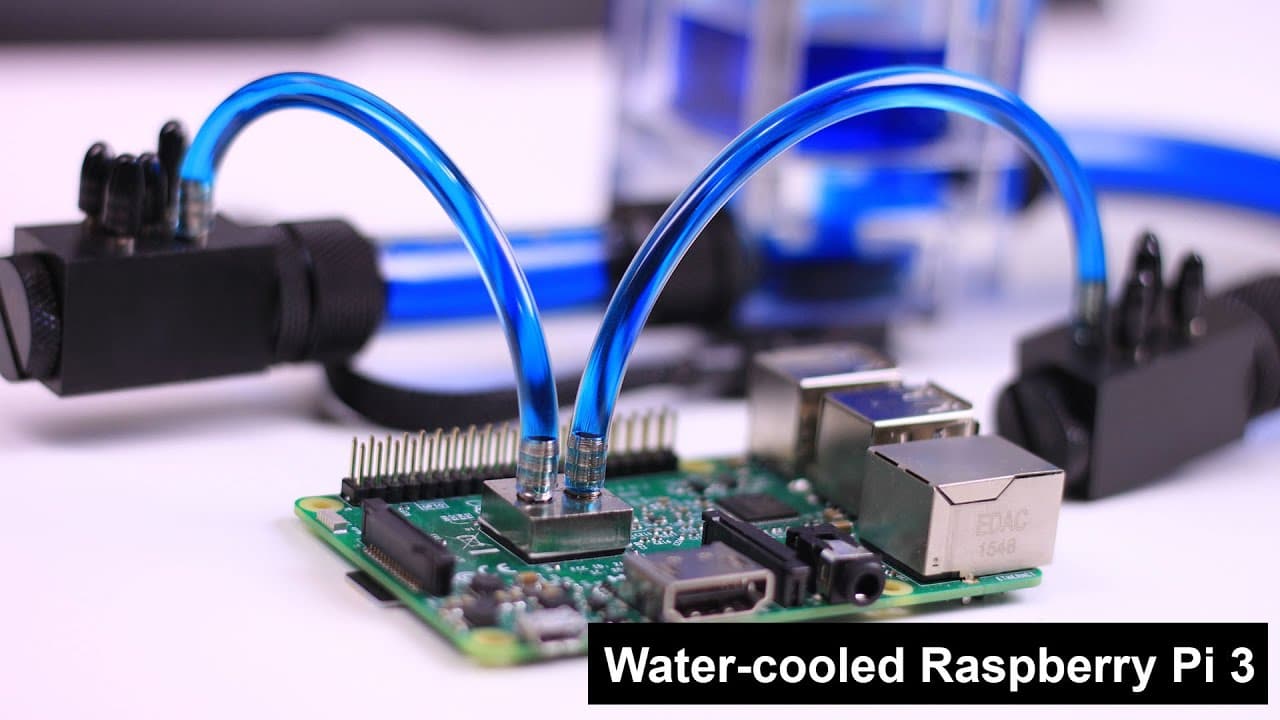
Water cooling a Raspberry Pi 3 can significantly lower temperatures, especially during overclocking. By using a closed-loop system that includes a pump, reservoir, and radiator, you can maintain optimal performance, with temperatures dropping from 61°C with a stock heat sink to around 58°C under load with water cooling. This method is ideal for enthusiasts looking to push their devices beyond standard limits.
Transcript
hey guys what's going on it's Don here from Nova Spirit Tech and today I got a really special episode for you guys we're going to be water cooling a Raspberry Pi now some say it's very pointless to water cooler Raspberry Pi and I say then why' you click on this video so let's get started so I got to give a shout out to mody mods.com now they're the... Read More
Key Insights
- 💦 Water cooling can effectively manage higher temperatures for Raspberry Pi, especially crucial during overclocking.
- ❓ The setup includes several components, which must be chosen carefully for proper functionality and efficiency.
- 😒 The use of a reservoir simplifies filling the loop and reduces the chance of air bubbles in the system.
- 😘 A well-implemented cooling system can lead to significantly lower operating temperatures compared to traditional heat sinks.
- 🫷 Enthusiast communities appreciate projects that push devices beyond manufacturer specifications, embracing risk and innovation.
- 🖐️ Customer support plays a crucial role in guiding users through complex configurations and component selections.
- 🤗 The experimentation with voltage and cooling methods represents the ethos of the maker and hacker communities, focused on hands-on learning.
Install to Summarize YouTube Videos and Get Transcripts
Explore YouTube Video Summarizer or Get YouTube Transcript Extractor
Questions & Answers
Q: Why would someone choose to water cool a Raspberry Pi?
Water cooling can significantly reduce CPU temperatures, especially when overclocking. Traditional cooling methods may not effectively manage higher temperatures, and water cooling offers better thermal performance, making it an appealing choice for enthusiasts looking to maximize their Raspberry Pi's potential.
Q: What components are essential for this water cooling setup?
Essential components include a low-noise pump, a reservoir for easier filling, a radiator to dissipate heat, tubing to connect parts, and cooling blocks for effective heat transfer. Each component plays a vital role in ensuring efficient cooling performance.
Q: How does the water cooling system function?
The system circulates cool water from the reservoir through the CPU cooler, absorbing heat, and then directs the heated water into the radiator. The radiator cools the water using fins and airflow before returning the cooled water to the CPU, completing the cycle.
Q: What temperature differences were observed between stock and water cooling setups?
The stock setup recorded temperatures of 61°C at idle, reaching 82°C under maximal overclocking at 1.4GHz. In contrast, the water-cooled setup maintained temperatures around 60°C even under overclocking, significantly improving thermal performance.
Q: What was the host's approach to selecting components from ModMyMods?
The host praised ModMyMods for their excellent customer support, with CEO Joe providing assistance in selecting parts. This direct guidance simplified the process of obtaining the right components, ensuring a successful build for the water cooling project.
Q: Were there any additional cooling components considered for this setup?
The host mentioned considering additional components like cooling for the USB controller but ultimately decided against it, as it did not reach high enough temperatures to warrant extra cooling, focusing instead on CPU performance.
Q: What future experiments is the host planning regarding the Raspberry Pi?
The host aims to explore voltage manipulation options using a specific capacitor to understand how it could affect CPU performance further. Exciting developments are expected in future videos, emphasizing continued experimentation and tinkering.
Q: How does the mindset of tech enthusiasts contribute to projects like this?
Tech enthusiasts thrive on experimentation and pushing the limits of devices. While some may view projects like water cooling a Raspberry Pi as unnecessary, enthusiasts see them as opportunities to innovate, learn, and overcome technical challenges in creative ways.
Summary & Key Takeaways
-
The host reviews the components needed for a Raspberry Pi water cooling setup, emphasizing the importance of selecting compatible parts for effective performance.
-
A detailed explanation of how water cooling works is provided, including the cooling cycle and temperature comparisons between stock setup and water cooling.
-
Audience interaction is encouraged, with the host addressing potential criticisms of the project while highlighting the fun and experimental nature of tinkering with technology.
Read in Other Languages (beta)
Share This Summary 📚
Summarize YouTube Videos and Get Video Transcripts with 1-Click
Try YouTube Summary with ChatGPT & Claude or YouTube Transcript Generator
Explore More Summaries from Novaspirit Tech 📚






Summarize YouTube Videos and Get Video Transcripts with 1-Click
Try YouTube Summary with ChatGPT & Claude or YouTube Transcript Generator